Track Shipment and Receipt Details for Drop Ship Orders in Order Management
Enhance visibility into drop shipment orders by tracking shipment and receipt details directly within Oracle E-Business Suite Release 12.2.14 Order Management. Prior to this release, only Oracle Purchasing provided details such as Advance Shipment Notice (ASN) and receipt information for drop shipments , requiring navigation between systems to monitor order status, which was inefficient and prone to oversight. This feature introduces new fields—Supplier Shipment Number, Receipt Number, Waybill/Airbill, and Bill of Lading—displayed in the Drop Ship tab of the Additional Line Information window in the Sales Orders form and on the Dropship Details page in the Order Management HTML UI, providing a unified view of shipment and receipt data.
This functionality delivers significant business value by streamlining drop shipment tracking, reducing the need for cross-module navigation, and improving supply chain transparency. It addresses needs in industries reliant on drop shipping, such as retail and third-party logistics, where real-time visibility into supplier shipments and customer receipts is critical for operational efficiency and stakeholder satisfaction. Use cases include monitoring supplier shipment progress or verifying receipt details without switching to Oracle Purchasing. Implementation considerations involve ensuring provide training to access and interpret the new fields in Order Management interfaces and integrating this data into reporting for comprehensive order oversight.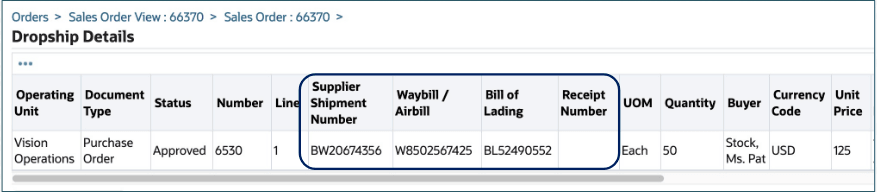
Dropship Details
Steps to enable and configure
You don't need to do anything to enable this feature.
Tips and considerations
- Ensure supplier and receipt data are accurately updated in the system to maintain the reliability of information displayed in Order Management.
- Provide training on accessing the Drop Ship tab in the Sales Orders form and the Dropship Details page in the HTML UI to leverage this enhanced visibility effectively.
- Integrate these new fields into custom reports or dashboards for a holistic view of drop shipment status across operations.
Key resources
- Oracle Order Management User's Guide
- Chapter: Actions on Orders
- Topic: Viewing Order and Return Information
- Sub-Topic: To view additional line information
- Topic: Viewing Order and Return Information
- Chapter: Actions on Orders