Acknowledge All Processing Messages for Multiple Order Lines Together
Streamline order processing by acknowledging all processing messages for multiple order lines simultaneously in Oracle E-Business Suite Release 12.2.14. In earlier releases, each processing message—resulting from holds, scheduling, or reservation issues— required individual acknowledgement for every line in separate windows within the Sales Orders and Quick Sales Orders forms, leading to significant time delays for orders with numerous lines. This enhancement allows batch acknowledgment of all messages for multiple lines at once through the Process Messages window, mirroring the functionality already available in the Order Management HTML UI.
This feature offers substantial business value by reducing administrative overhead, accelerating order processing workflows, and enhancing operational efficiency. It addresses needs in industries with high order volumes, such as retail and distribution, where processing delays due to individual message handling can impact operational efficiency. Use cases include quickly clearing multiple hold messages for an order with several lines to expedite booking or shipping. Implementation considerations involve providing training on the batch acknowledgment process in forms to ensure efficient adoption and ensuring that system performance supports bulk message processing without delays.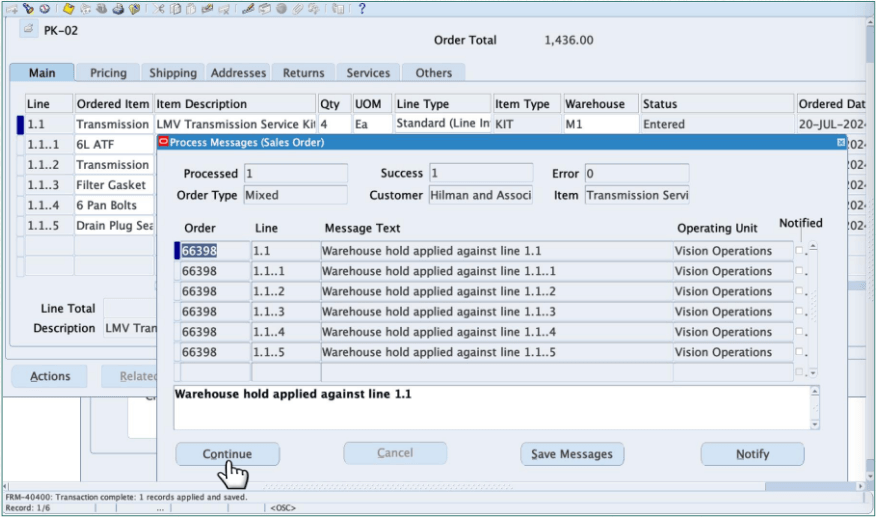
Process Messages
Steps to enable and configure
You don't need to do anything to enable this feature.
Tips and considerations
- Provide training for accessing and using the batch acknowledgment feature in the Process Messages window to maximize efficiency gains.
- Monitor system performance during bulk message acknowledgment for large orders to ensure no processing delays occur.
- Document standard procedures for message acknowledgment to maintain consistency across teams handling order exceptions.
Key resources
- Oracle Order Management User's Guide
- Chapter: Integration with Other Applications
- Topic: Manual Screening and Overriding or Completing Export Compliance Screening
- Sub-topic: Process Messages Window
- Topic: Manual Screening and Overriding or Completing Export Compliance Screening
- Chapter: Integration with Other Applications