Generate 7600B Reports for IGT Orders
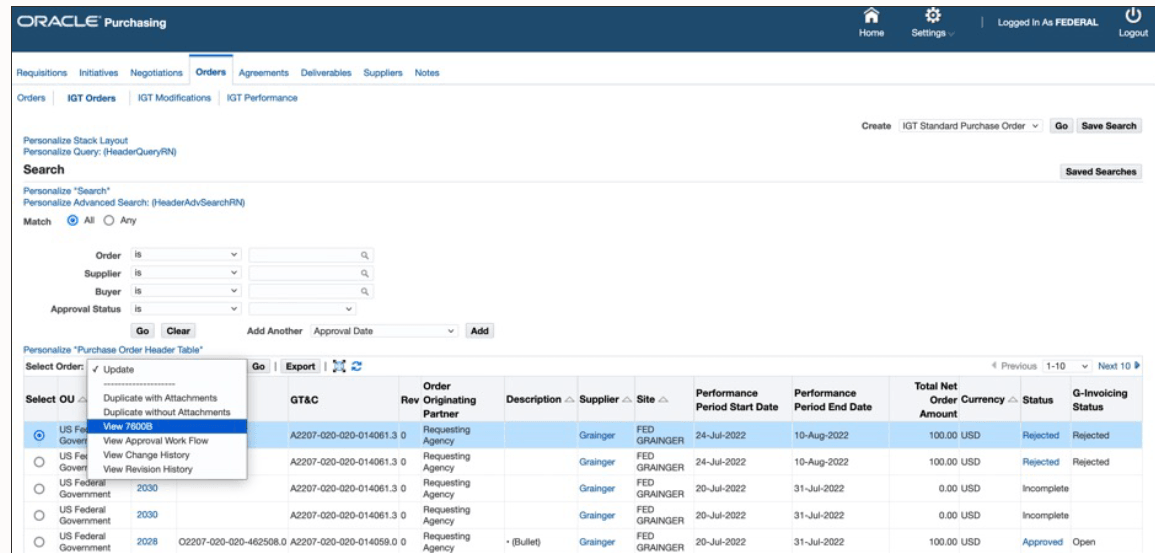
Generate 7600B report output for IGT orders directly from the IGT Orders page. Users can select an order and choose the 7600B action to produce an order report that reflects the order details needed for review, documentation, or partner communication.
The feature makes reporting available in the same context where buyers manage the IGT order. That reduces navigation and helps ensure the report is generated from the current order record, including GT&C, partner, order amount, performance period, status, and related order attributes.
Agencies can use the report to support internal review, audit packages, or communication with stakeholders who need a familiar 7600B representation of the G-Invoicing order. The report should be tested for common order types and modification scenarios so users trust the output in production.
Contracting officers or buyers can now print the 7600B document for IGT orders. The 7600B document is a printed version of the agreement between two federal program agencies for a reimbursable intragovernmental order. The 7600B document is generated and sent to the approver in a notification every time the order is submitted for approval. The approver can print it and have it signed by the program and funding officials, and then scan and attach the signed document to the approved IGT order.
The 7600B document is supported for the following G-Invoicing features in EBS:
- Buyer-initiated orders (BIOs) created in Oracle CLM or Oracle Purchasing
- Seller-facilitated orders (SFOs) updated in Oracle CLM or Oracle Purchasing
- BIOs or SFOs created in G-Invoicing and pulled into Oracle CLM or Oracle Purchasing (when EBS is used as the financial system)
IGT Order Approvers can now view and download a PDF copy of the 7600B agreement directly from the notification they receive. This provides quick access to the document, improving visibility and simplifying the review and approval process.
Contracting Officers and Buyers can also access the 7600B PDF copy from the notification, enabling them to easily review, download, and retain the agreement documentation as needed.
View 7600B action generates the PDF if order is modified from the last generation of PDF, else retrieves the PDF from the FND attachments and shown to user.
View 7600B Action
Steps to enable and configure
You can generate the 7600B document by running the PO IGT Generate PDF concurrent program. If an order has more than ten order lines, then this concurrent program generates the 7600B document when you choose View 7600B in the IGT Order or Modification summary page.
Tips and considerations
- Validate 7600B output for key order types and partner scenarios before relying on it for production communication.
- Confirm that attachments and order values are current before generating report output.
Key resources
- Oracle E-Business Suite G-Invoicing Process Guide
- Using G-Invoicing: Requesting Agency
- The 7600B Document
- G-Invoicing Setup and Administration: Requesting Agency
- Setting Up G-Invoicing
- Administering G-Invoicing
- Using G-Invoicing: Requesting Agency
- The 7600B Document
- Using G-Invoicing: Requesting Agency
- Oracle Contract Lifecycle Management for Public Sector Implementation Guide
- Implementation Guide
- Setting Up G-Invoicing
- G-Invoicing Overview
- Setting Up G-Invoicing
- Administering G-Invoicing
- Implementation Guide
- Oracle Contract Lifecycle Management for Public Sector Purchasing User Guide
- G-Invoicing
- The 7600B Document
- G-Invoicing
Transfer of Information
R12.2.13 TOI: Implement and Use Contract Lifecycle Management for Public Sector - G-Invoicing