Manage 7600EZ Invoices for IGT Orders
The Oracle E-Business Suite G-Invoicing solution supports 7600 Easy (EZ) Invoicing that lets you process recurring and unplanned expenditures for which an order is not required.
The 7600 EZ Invoicing provides you the flexibility to process large-volume and low-value purchases between trading partners. The requesting agency can accept or reject a transaction. An approval is not necessary for transferring funds.
The feature provides a buy-side work area for a streamlined G-Invoicing invoice process. Instead of handling 7600EZ activity outside Purchasing, users can view the transaction alongside other IGT performance records with G-Invoicing status, processing status, reference performance, operating unit, supplier, and GT&C context.
Users can search for 7600EZ invoice performance transactions, review invoice and reference information, accept or reject the invoice, and support downstream Payables processing when the transaction is accepted.
This feature is useful where agencies use 7600EZ to simplify invoicing for eligible orders. Buyers and finance users should review funding, points of contact, supplier, accounting details, comments, and rejection reasons carefully because the accept or reject decision can affect partner communication and Payables invoice generation.
The IGT Performance page now includes 7600EZ Reject or 7600EZ Accept options.
Reject or Accept Options
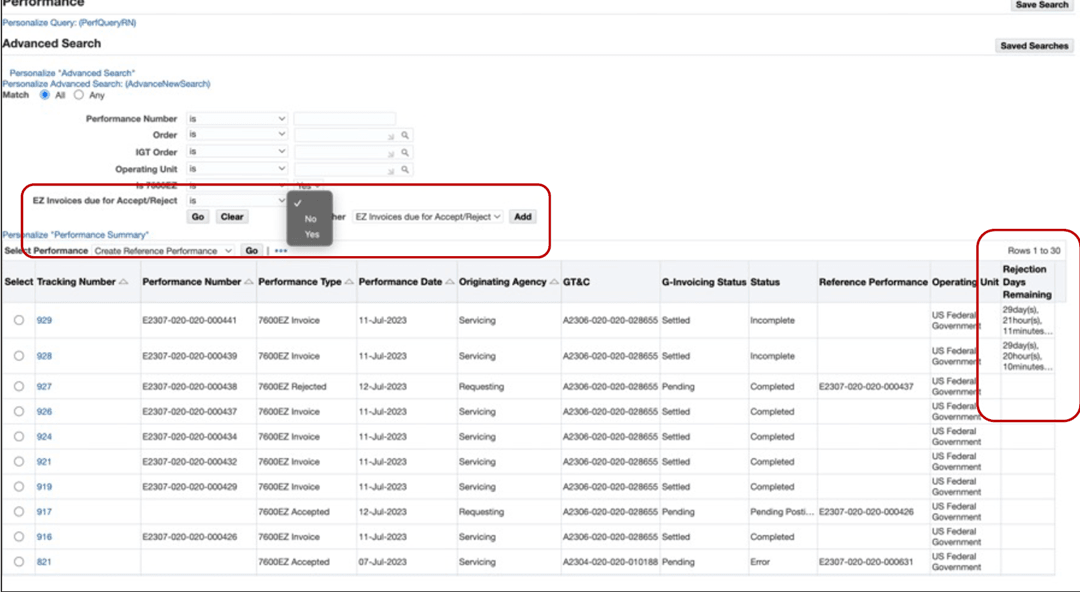
When the EZ invoicing is completed, the requesting agency can either accept or reject the 7600 EZ invoice. When the EZ invoice is accepted, the invoice status changes to informational and there is no accounting impact for such accepted transaction.
The requesting agency can reject an EZ invoice within the 30 days of the invoice creation. The invoice rejection results in the funds returned to the requesting agency. If the reject is performed outside of the 30-day rejection period, then the status is updated to informational and there will not be any impact on accounting.
Number of Days to Rejection: The Performance summary page includes the number of days to rejection option. The rejection days are the length of time within when a requesting agency can reject an EZ invoice and initiate funds reversal for the rejected invoice.
Steps to enable and configure
- Intragovernmental 7600EZ Invoice Interface Program: Run this concurrent program to pull the EZ invoice from federal G-Invoicing that is in Settled or Pending status.
- PO_IGT_EZ_PERF_CUSTOM.SET_DEFAULT_EZ_INFO.SET_DEFAULT_EZ_INFO: This new custom hook lets you identify all the EZ invoice transactions and default(optional). Agencies can use the custom hook to populate data for an EZ invoice transaction.
- Intragovernmental 7600EZ Validation Program: This concurrent program uses the PO_IGT_EZ_PERF_CUSTOM.SET_DEFAULT_EZ_INFO.SET_DEFAULT_EZ_INFO custom hook. When validations are successful, the EZ Invoice status is updated to complete.
- Confirm 7600EZ processing setup and performance integration for the operating unit.
- Review 7600EZ invoice performance transactions, accept or reject the invoice, and validate downstream Payables results.
Tips and considerations
- Use saved searches to separate 7600EZ invoices due for action from accepted, rejected, completed, or errored transactions.
- Add comments when rejecting a 7600EZ invoice so the servicing agency can understand the issue.
Key resources
- Oracle E-Business Suite G-Invoicing Process Guide
- Using G-Invoicing: Requesting Agency
- Support for EZ Invoicing
- Intragovernmental 7600EZ Invoice Interface Program
- Pulling an EZ Invoice
- Accepting or Rejecting an EZ Invoice
- Reverse an EZ Invoice
- Accounting Transactions During EZ Invoice Processing
- Support for EZ Invoicing
- Using G-Invoicing: Requesting Agency
- Oracle Contract Lifecycle Management for Public Sector Implementation Guide
- Setting Up G-Invoicing
- G-Invoicing Overview
- Setting Up G-Invoicing
- Administering G-Invoicing
- Setting Up G-Invoicing
- Oracle Contract Lifecycle Management for Public Sector Purchasing User Guide
- Support for EZ Invoicing
- Intragovernmental 7600EZ Invoice Interface Program
- Pulling an EZ Invoice
- Accepting or Rejecting an EZ Invoice
- Reverse an EZ Invoice
- Accounting Transactions During EZ Invoice Processing
- Intragovernmental 7600EZ Invoice Interface Program
- Support for EZ Invoicing
Transfer of Information
R12.2.13 TOI: Implement and Use Contract Lifecycle Management for Public Sector - G-Invoicing