Price, Receive, and Cost Goods in Complex Services Orders
Use complex services orders to manage goods that need normal pricing, receiving, and costing behavior alongside services-based progress activity. This enhancement broadens complex services purchasing so buyers can represent material or goods components in the same order structure used for contract services, milestones, pay items, and work confirmations.
The feature is useful for project, maintenance, construction, repair, and field-service scenarios where the supplier provides both labor or services and physical goods. A buyer can price goods at the schedule or line level, the receiving organization can record receipt activity, and costing can reflect the received goods instead of forcing those items into a separate purchasing document.
Operationally, the feature helps keep the commercial agreement, receiving record, and cost recognition aligned. Users can see goods-related quantities and prices in the complex purchase order context while still using Services Procurement controls for complex payment and work confirmation flows.
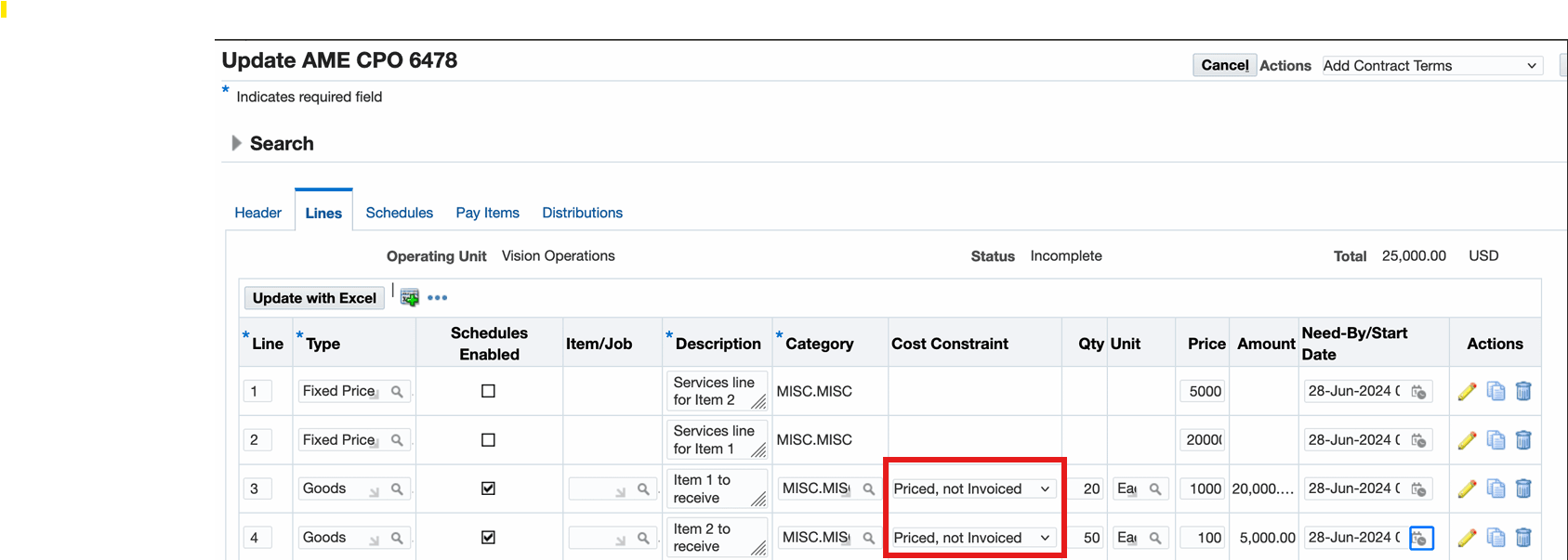
Now, you can set up a goods line with proper pricing and select a new cost constraint Priced, not Invoiced, which identifies that the goods line is only for receiving and costing, while the related services line is for payment disbursal. When the cost constraint option "Priced, not Invoiced" is selected, for a schedule the status is automatically set as Closed For Invoice. The value for Invoice Close Tolerance (%) defaults to 100 and the Accrue at Receipt value defaults to Yes. This enables you to track inventory, maintain accurate cost, and use existing complex payment options for goods. For example, as a buyer, when you create a purchase order for a turbine, the supplier buys raw materials, obtains the approved designs, delivers the parts, and provides an installation service. You model the purchase order to have one goods line for the turbine with the unit price, a related service line for the lumpsum amount with various milestones, and a service line for the installation amount. With this feature, you can receive and cost the goods line, without affecting the purchase order totals. Additionally, for a complex PO, in the Lines tab, when you click the Update action for a line, on the Update Line page, you can select a Cost Constraint.
Priced, not Invoiced Constraint
Steps to enable and configure
- Review the document style used for complex services orders and confirm that it supports the complex payment options, schedules, and goods-line behavior required by the process.
- Set up the receiving, costing, inventory, and purchasing controls that apply to the goods being ordered.
- Create or update the complex services order using the appropriate line, schedule, destination, and receiving attributes for the goods component.
Tips and considerations
- Use clear line descriptions so users can distinguish goods that require receipt and costing from service pay items that are confirmed through work confirmations.
- Validate a full transaction cycle in a test environment, including order approval, goods receipt, costing, work confirmation, and invoicing.
Key resources
Oracle Purchasing User's Guide
- Topic: Entering Complex Work Purchase Order Lines
Oracle Services Procurement Process Guide
- Topic: Understanding the Complex Work Features