Use Additional Obligation Funds from Budget for Requisitions with Insufficient Backing Funds
To address pricing changes, as a requester, you may want to increase order line amount even if the associated requisition does not have sufficient backing funds available. To meet such requirements, the purchasing administrator can now enable the Allow Obligation to be Over Commitment CLM Control option. When a requisition is placed on an award with more than the full requisition amount, the additional obligation (funds) required will be consumed from the budget based on the availability of funds.
Prior to Release 12.2.14, award amounts were increased by creating a new award line without a requisition.
The main benefit is tighter alignment between procurement actions and federal funds control requirements.
Allowing additional funds to be obligated from the budget during Award creation when the associated requisition has insufficient funds improves productivity and reduces processing delays. This enhancement enables users to complete award actions without interruption, minimizing turnaround time and reducing the need for manual funding adjustments.
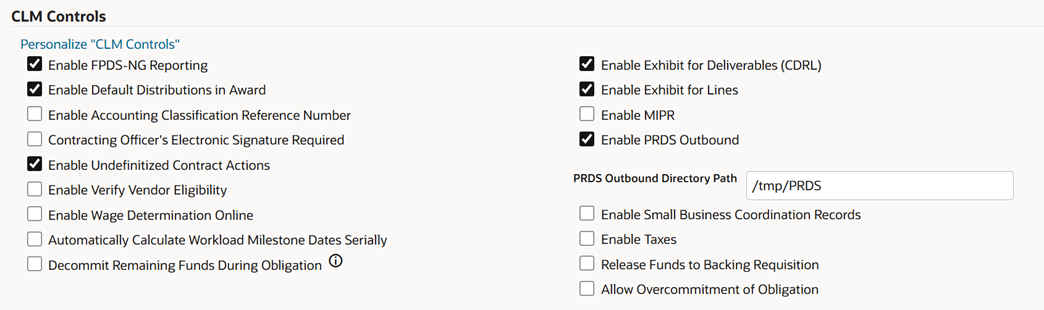
Allow Overcommitment of Obligation Option
Steps to enable and configure
- Configure the Allow Overcommitment of Obligation option on the CLM Controls page. You can select this option only if the Decommit Remaining Funds During Obligation option is selected. Select this option if you want to increase order line amount even if an associated requisition does not have sufficient backing funds available. The Allow Overcommit of Obligation check box is hidden by default. If required, display the check box using personalization. See Personalizing the CLM Interface in the Oracle Contract Lifecycle Management for Public Sector Implementation Guide.
- Review the federal funds, accounting, and budgetary control setup used for CLM purchasing documents.
- Configure or validate document attributes, accounting values, funds checking, encumbrance date defaults, ACRN handling, and object class values as applicable.
- Test the feature with representative requisition, award, modification, or IGT order funding scenarios.
Tips and considerations
Validate the feature with realistic funded and partially funded scenarios, including approval and modification flows.
Key resources
Oracle Contract Lifecycle Management for Public Sector Implementation Guide
- CLM Controls
Oracle Contract Lifecycle Management for Public Sector Purchasing User Guide
- Funding an Award from Requisitions
Transfer of Information
R12.2.14 TOI: Implement and Use Procurement - Contract Lifecycle Management for Public Sector