Check Funds on Post Award Request Notifications During Approval
The Program Office may request modifications to an award after it is created and approved. Post-award requests (PAR) are used to implement those modifications. Before submitting the modification request, it is vital to verify and confirm that the funds are available in the event that the PAR requires further funding.
An approver or a fund manager can now use the Check Funds action on a post-award request (PAR) notification before approving the notification. If funds are available, a commitment is made and tracked to secure or reserve funds. After this process, the contracting office receives the PAR as a source for the award modification.
Similarly, an approver or a fund manager can check funds when a modification notification for approval is received. Using the Edit Document link on the notification page, the approver can navigate to the Update CLM Award Modification page and select the Check Funds action.
Funds check during post award request approval provides flexibility and improves productivity of users or approvers as they know the funds availability before approving the PAR.
Check Funds Option
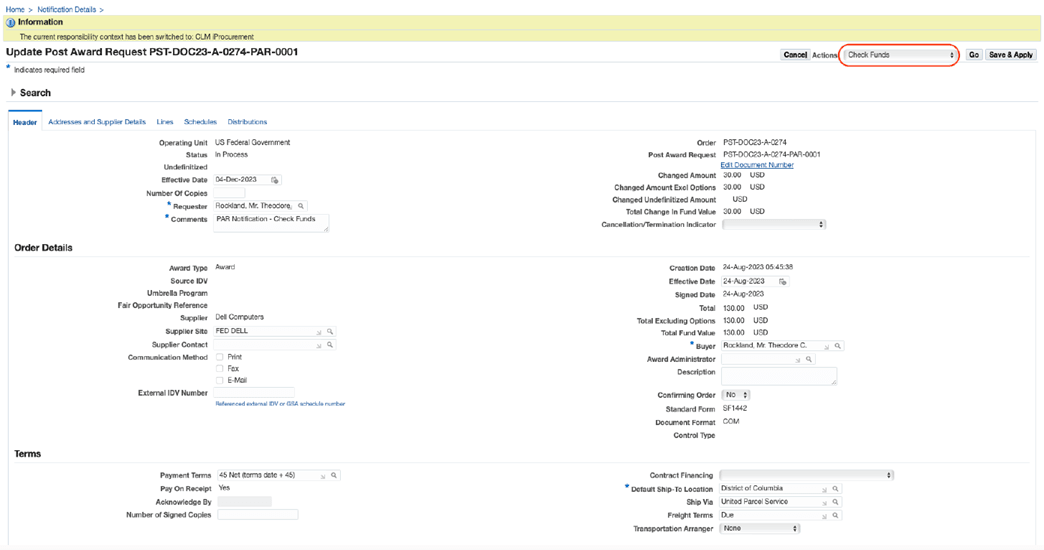
Check Funds option is available to review the Budgetary Control Results report for funding details.
Steps to enable and configure
- Review the federal funds, accounting, and budgetary control setup used for CLM purchasing documents.
- Configure or validate document attributes, accounting values, funds checking, encumbrance date defaults, ACRN handling, and object class values as applicable.
- Test the feature with representative requisition, award, modification, or IGT order funding scenarios.
Tips and considerations
Validate the feature with realistic funded and partially funded scenarios, including approval and modification flows.
Key resources
Oracle Contract Lifecycle Management for Public Sector Purchasing User Guide
Transfer of Information
R12.2.14 TOI: Implement and Use Procurement - Contract Lifecycle Management for Public Sector