Track Modifications Using Predefined System Milestones
A workload assignment consists of several tasks that are also called milestones, which the buyer must accomplish in each time frame. Milestones can be system defined or custom defined. You can now use predefined system milestones for modification related activities. When creating a workload assignment, you can choose the new predefined milestones, so that when an award is modified either to increase funds or to exercise an option line, the create modification milestone is completed automatically.
The new predefined milestones are:
- Create Modification with no Change in Fund
- Approve Modification with no Change in Fund
- Create Modification for Fund Change
- Approve Modification for Fund Change
When the modification is approved, the approve modification milestone is also completed automatically.
The automatic closure of the "Create Modification" and "Approve Modification" milestones when a modification is created and approved for a funds change or other update improves user productivity by eliminating the need for manual task completion. These milestones are automatically marked as complete when the corresponding events occur, helping ensure accurate milestone tracking and reducing administrative effort.
This enhancement improves buyer workload management by making requisition assignments, milestones, status tracking, date management, and reassignment activities easier to manage from the CLM purchasing workbench.
The main benefit is clearer buyer workload visibility and more controlled follow-up on assigned procurement work.
New Predefined System Milestones
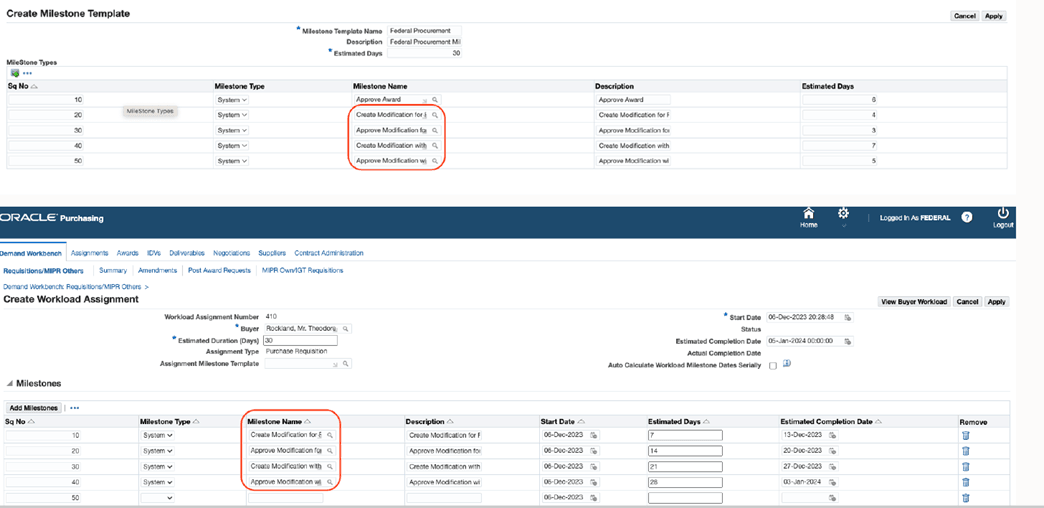
If you select System milestone type, then the new predefined milestones are available on the following pages in the Milestone Name field:
- Create Milestone Template
- Update Milestone Template
- Create Workload Assignment
- Update Workload Assignment
Steps to enable and configure
- Review the CLM Public Sector workload assignment and milestone setup used by the buying organization.
- Configure assignment, buyer, milestone template, saved search, and notification options for the operating units that use the process.
- Test reassignment, milestone sequencing, date calculation, and action history with representative requisition lines.
Tips and considerations
- Review buyer workload saved searches and milestone templates so users see the new fields and dates in their normal work queues.
- Test both active and closed document scenarios so buyers know when a document can be changed, closed, reopened, or resubmitted.
Key resources
Oracle Contract Lifecycle Management for Public Sector Implementation Guide
- Workload Assignment Setup Steps
Oracle Contract Lifecycle Management for Public Sector Purchasing User Guide
- Using Workload Assignments from the Requisitions Page
Transfer of Information
R12.2.14 TOI: Implement and Use Procurement - Contract Lifecycle Management for Public Sector