Calculate Estimated Start and Completion Dates for Workload Assignment Milestones Automatically
When the Program Office initiates requisitions, the contracting officer assigns the requisitions to contracting specialists using a workload assignment process comprising a series of milestones that must be achieved. This methodology aids in the determination of the Procurement Action Lead Time (PALT) upon completion of the assignment. As part of the workload assignment preparation, the estimated start and completion dates for each milestone are now automatically computed based on the preceding sequential milestones using the new Automatically Calculate Workload Milestone Dates Serially option.
The contracting officer can use this information to prioritize milestones based on the estimated completion date in the workload assignment.
The system now automatically calculates the expected start and completion dates for each milestone based on its sequence number and the completion date of the preceding milestone. This automation reduces the need for manual date entry and adjustments, helping users manage milestone schedules more efficiently and focus on prioritizing their work.
Automatically Calculate Workload Milestone Dates Serially Option
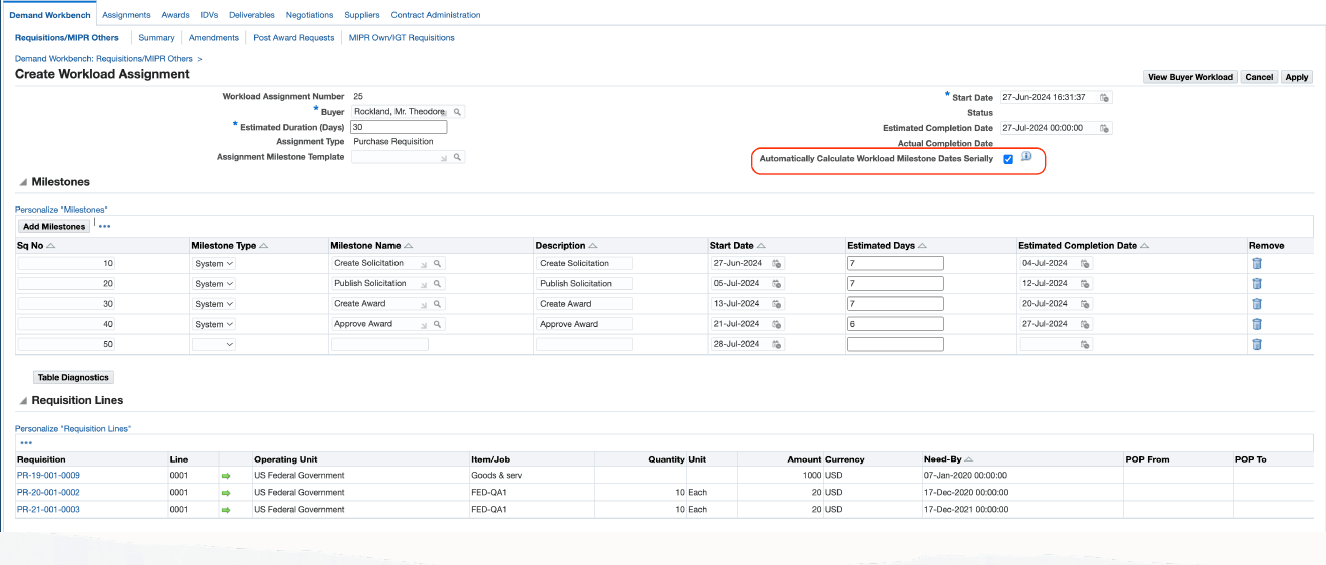
Process Flow
When the program office creates and approves a requisition, the contracting officer creates a workload assignment and assigns it to a contracting specialist. The workload assignment includes a list of milestones that must be completed, covering all activities from pre-award tasks through post-award activities. As part of the workload assignment preparation process, a milestone template can be selected to automatically default all required milestones. Each milestone in the template is assigned a sequence number. The estimated start and completion dates for each milestone are automatically calculated based on the completion of the preceding sequential milestones. Use the Sequence Number (Sq No) column on the Milestone Template page to define the order of milestones within the template, ensuring that the same sequence numbers are automatically populated when creating the workload assignment.
Steps to enable and configure
- Review the CLM Public Sector workload assignment and milestone setup used by the buying organization.
- Configure assignment, buyer, milestone template, saved search, and notification options for the operating units that use the process.
- Configure the Automatically Calculate Workload Milestone Dates Serially option on the CLM Controls page to automatically compute the estimated start and completion dates for each milestone based on the preceding sequential milestones. The contracting officer can update the default value. However, if the option is selected during the creation of the workload assignment, then the option cannot be changed when the workload assignment is updated.
Tips and considerations
Review buyer workload saved searches and milestone templates so users see the new fields and dates in their normal work queues.
Key resources
- Oracle Contract Lifecycle Management for Public Sector Implementation Guide
- Oracle Contract Lifecycle Management for Public Sector Purchasing User Guide
Transfer of Information
R12.2.14 TOI: Implement and Use Procurement - Contract Lifecycle Management for Public Sector