Process Administrative (Admin) Modifications in Seller-Facilitated Orders (SFO)
Administrative modifications allow buyers to correct or maintain non-substantive order details for seller-facilitated orders (SFOs) without treating the change as a full business modification to core order obligations. Certain modifications to intragovernmental orders (IGTs) such as changing the comments section, the point of contact information, the internal order number, do not affect the order's terms and conditions or outcomes. Such changes are called Admin Modifications, and do not require the trading partner’s approval. The requesting agency can perform admin modifications on SFOs and then push the modifications to the federal G-Invoicing application.
This feature gives agencies a practical maintenance path for SFO records after they are represented in Oracle Purchasing. Buyers can select the Create Admin Modification action on the IGT Orders page and update allowable administrative details while preserving the distinction between administrative corrections and changes that affect scope, amount, period, or funding.
The feature helps keep SFO data accurate without overusing formal modifications for minor administrative corrections. Agencies should define which changes qualify as administrative and train buyers to choose the correct modification action so partner communication and audit history remain clear.
Process Flow
The requesting agency can perform admin modifications on seller-facilitated orders in the open status in Oracle CLM and Purchasing. The IGT Orders page on the Demand Workbench includes an option, Create Admin Modification, which is enabled for the SFOs in open status.
IGT Orders
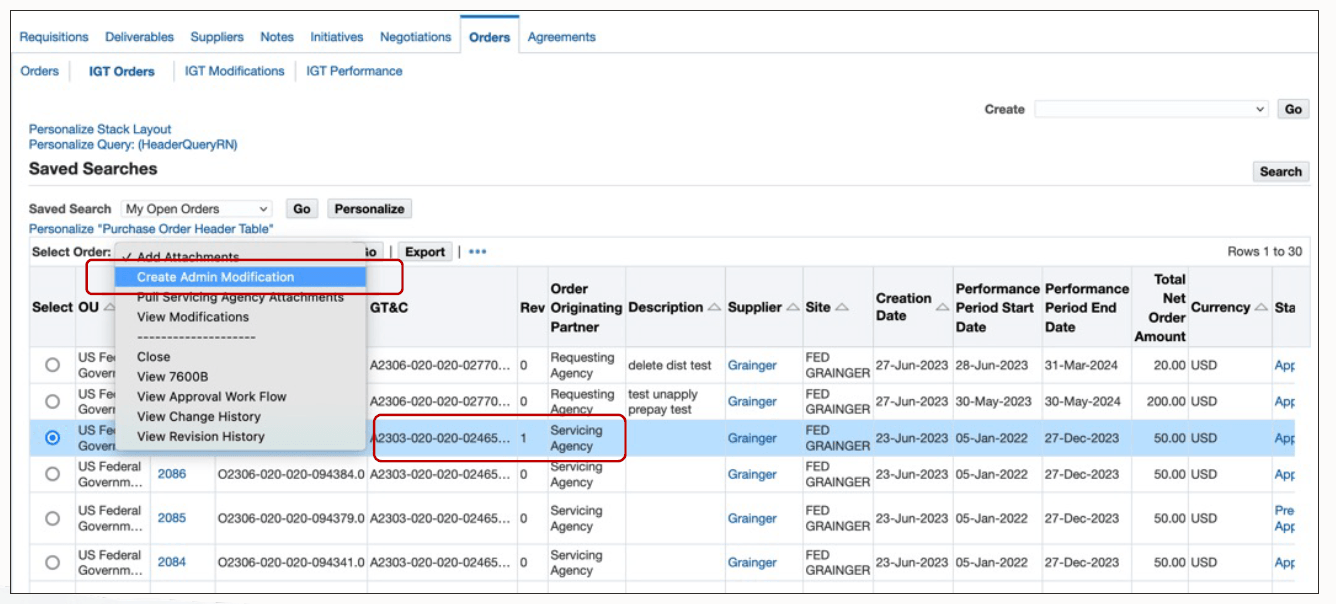
After you submit an admin modification, the change is pushed to G-Invoicing. The initial status in EBS is Pre-Approved, and the G-Invoicing status is Pending Posting. Your administrator runs the Intragovernmental Orders Interface Program to push the admin modification to the federal G-Invoicing application. The EBS status is updated to Approved and Merged. The G-Invoicing status changes to Open.
Steps to enable and configure
You don't need to do anything to enable this feature.
Tips and considerations
- Use administrative modifications for non-financial or administrative corrections only when agency policy allows.
- Select the correct modification action so administrative changes are not treated as substantive order revisions.
Key resources
-
Oracle Contract Lifecycle Management for Public Sector Purchasing User Guide
Topic: IGT ModificationsTransfer of Information
R12.2.13 TOI: Implement and Use Contract Lifecycle Management for Public Sector - G-Invoicing