Pull Open In-flight Orders from G-Invoicing and Create as New IGT Orders
Pull open in-flight orders from G-Invoicing and create them as new IGT orders in Oracle Purchasing. This supports transition scenarios where an order already exists in G-Invoicing and must be brought into the Oracle buy-side process for continued management, modification, performance, or settlement.
In-Flight Orders (IFO) or In-Process orders are existing intragovernmental orders that were created in the legacy systems before agencies moved to the Department of the Treasury G-Invoicing application. The agencies must close the in-process orders and create replacement orders in the intragovernmental order format. The requesting agency can bulk upload in-flight orders to federal G-Invoicing by using the .CSV file and then both agencies approve the uploaded file. The requesting agency imports these orders into Oracle Purchasing or Oracle Contract Lifecycle Management for Public Sector and uses them for additional processing such as order modification, performance accounting, and order closure.
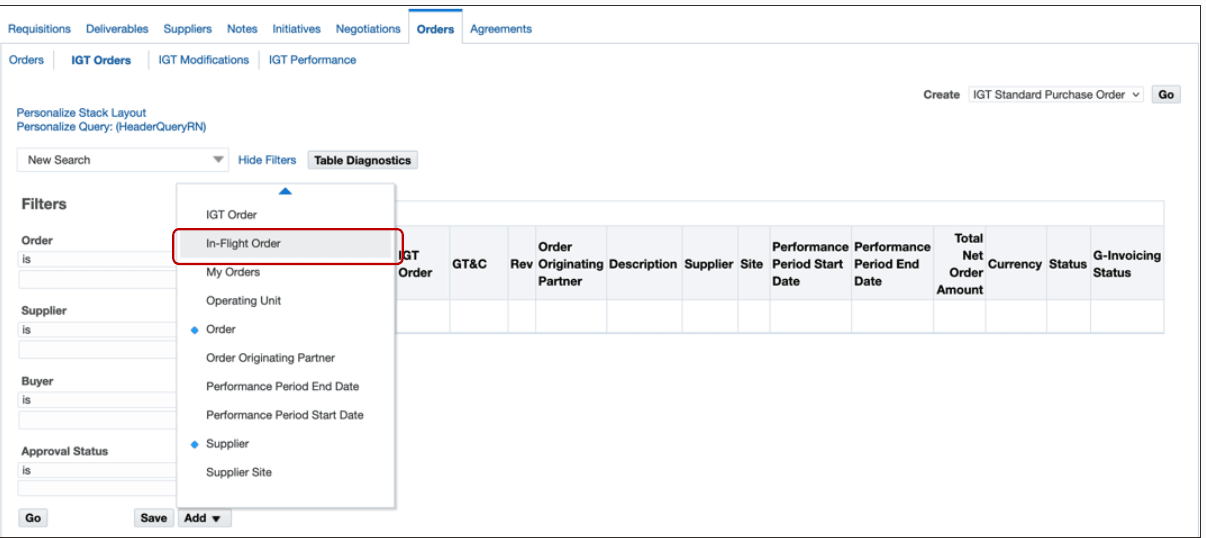
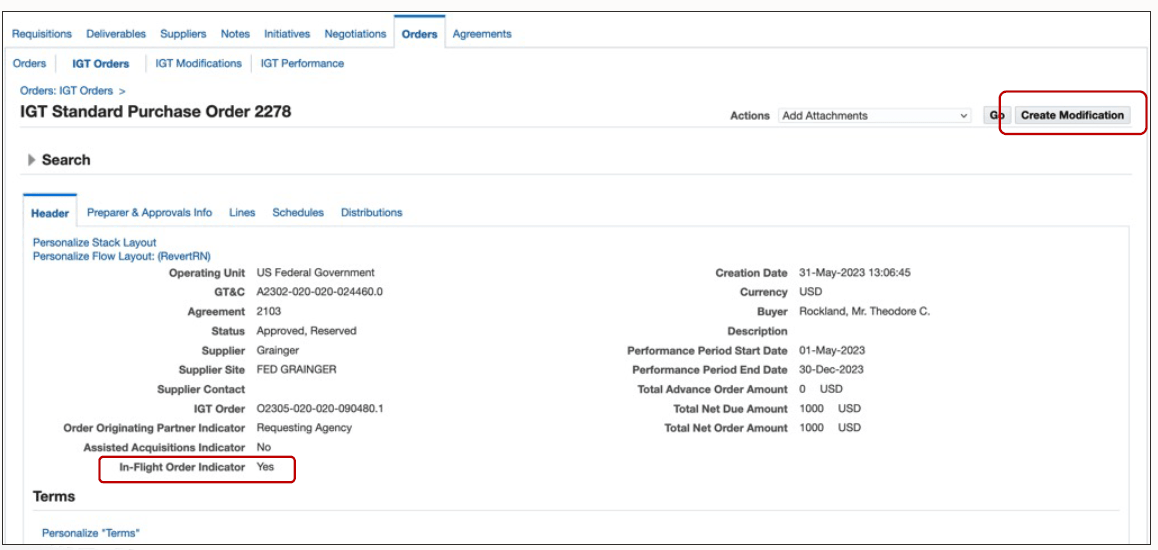
Users can filter for in-flight orders, review the returned data, and create a corresponding IGT Standard Purchase Order. The resulting Oracle record can show an In-Flight Order Indicator so users understand that the order originated from an existing G-Invoicing transaction rather than a locally authored order.
The feature helps agencies avoid manually recreating partner-side order data. It is most valuable during implementation, cutover, or cleanup when open G-Invoicing orders need to be represented in Oracle Purchasing with accurate GT&C, partner, amount, and performance-period information.
Search for in-flight orders.
In-Flight Order Search
The IGT Purchase Order page includes an option, In-Flight Order Indicator, which identifies if an order is an in-flight order.
Steps to enable and configure
- Confirm G-Invoicing request processing and operating unit setup.
- Pull the approved IGT orders (IFOs) by running the Intragovernmental Orders Interface Program with parameter
- Get Orders List. Note: IFO flag will be stamped on intragovernmental orders only when the concurrent program is run with parameter Get Orders List.
- Search for in-flight orders, review the returned order data, and create the corresponding IGT order in Oracle Purchasing.
Tips and considerations
- Validate GT&C, partner, amount, performance period, and funding values before creating an Oracle order from an in-flight order.
- Use the In-Flight Order Indicator to distinguish converted in-flight orders from locally authored orders.
Key resources
- Oracle E-Business Suite G-Invoicing Process Guide
- Oracle Contract Lifecycle Management for Public Sector Implementation Guide
- Oracle Contract Lifecycle Management for Public Sector Purchasing User Guide
Transfer of Information
R12.2.13 TOI: Implement and Use Contract Lifecycle Management for Public Sector - G-Invoicing
R12.2.14 TOI: Implement and Use Procurement - G-Invoicing