Search Parties by PO Number in Contact Center HTML UI
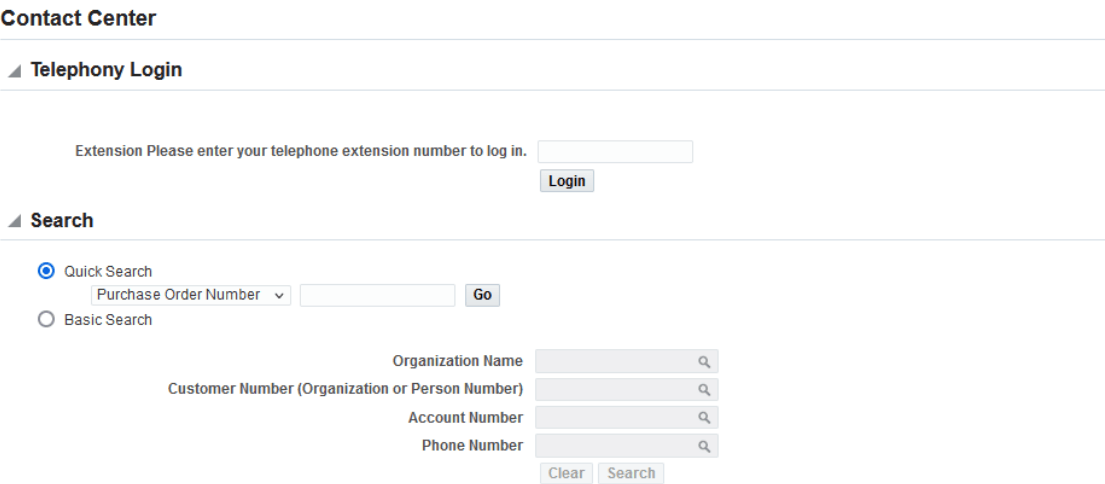
Support agents can now use the Purchase Order Number search attribute in the Contact Center window and Contact Center HTML UI. This attribute is added to the following interfaces:
- Contact Center window, Search By field
- Contact Center HTML page, Quick Search option
When you search using the purchase order number, the Contact Center page opens with the customer details.
This feature improves search efficiency by enabling support agents to quickly locate customer details using the Purchase Order Number directly from the Contact Center search interfaces. It reduces the time spent navigating through multiple search criteria, helping agents respond faster to customer inquiries and improving overall service productivity.
When you search using the purchase order number, the Contact Center page opens with the customer details.
Contact Center - Purchase Order Number Search
Steps to enable and configure
You don't need to do anything to enable this feature.
Tips and considerations
Not Applicable
Key resources
Oracle TeleService Implementation and User Guide
- Chapter: User Interfaces in Contact Center and Service Request Module
- Topic: About the Contact Center
- Chapter: HTML Contact Center
- Topic About HTML Contact Center
Transfer of Information
R12.2.12 TOI: Implement and Use TeleService - HTML Service and HTML Contact Center Enhancements