View Current Location Party Name and Address for Instance in Customer Support HTML UIs
Service agents can now view the current location party name associated with an installed base instance directly within the service request. Use this enhancement to know the party name associated with the current location if the item instance is at a site other than an owner party site. By providing immediate visibility into the customer or site location tied to the instance, this feature improves service request tracking, enhances operational accuracy, and helps agents manage location-specific support activities more efficiently without navigating to additional screens.
Prior to this release, the current location party name of an instance was not readily displayed, often requiring additional navigation or custom queries to obtain this information.
This feature provides visibility into the current location party name associated with an installed base instance directly within the service request. It helps service agents quickly identify the customer or location linked to an instance, improving service request tracking and enabling more accurate management of location-specific support activities.
Feature Description
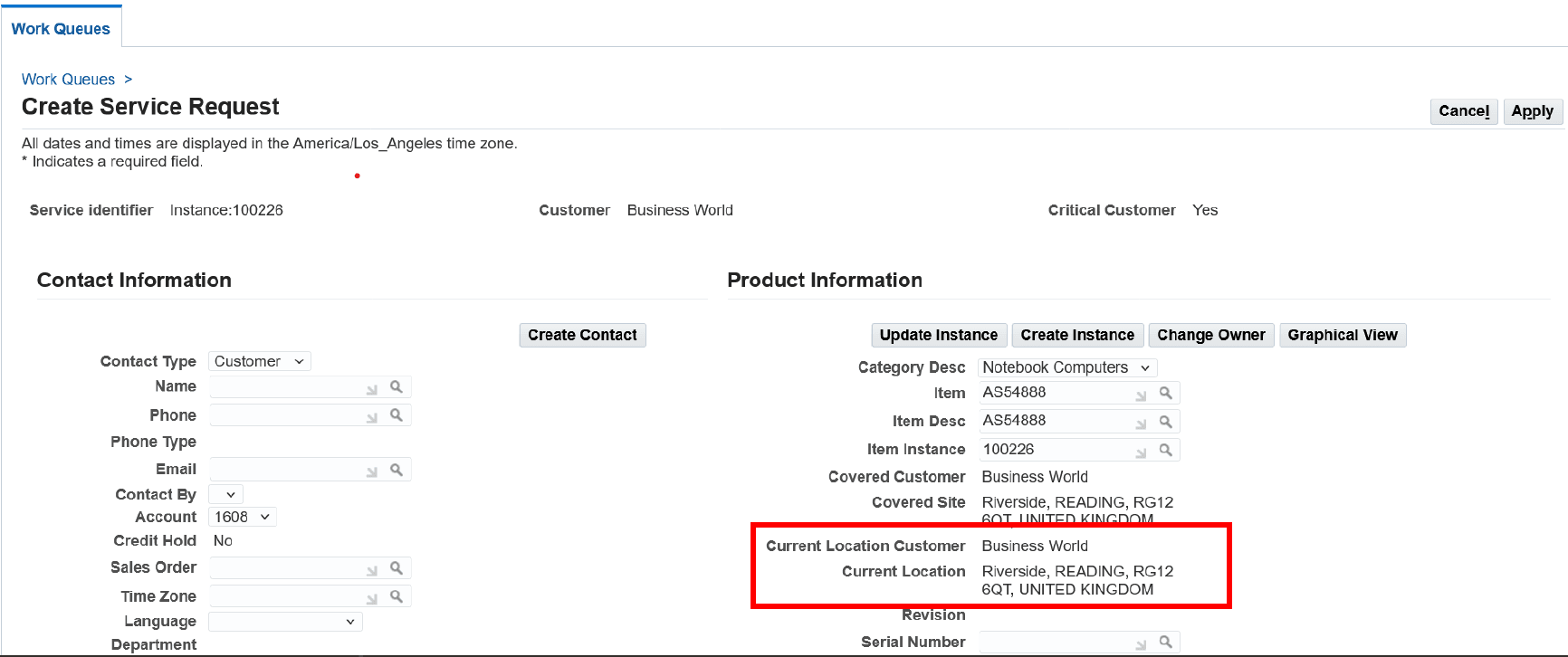
On the Create and Update Service Request pages, the Current Location Customer and Current Location fields are read-only and the installed base address defaults to the Current Location field.
Create Request Page
Steps to enable and configure
You don't need to do anything to enable this feature.
Tips and considerations
Ensure that instance records are regularly updated to maintain accurate location party information for seamless integration with service request workflows.
Key resources
Oracle TeleService Implementation and User Guide
- Chapter: Customer Support User Procedures
- Topic: Creating a Service Request
Transfer of Information
R12.2.12 TOI: Implement and Use TeleService - HTML Service and HTML Contact Center Enhancements