View Task Details in Infotile in Contact Center HTML UI
Support agents can gain quick access to critical task information with the ability to view task details directly in an infotile within the Contact Center HTML user interface.
Prior to this release, viewing detailed task information often required additional clicks or navigation, slowing down response times and reducing efficiency. improve agent productivity and response speed, ultimately enhancing service delivery.
This feature enhances visibility by presenting key task data in a concise, easily accessible format, allowing service agents to make informed decisions without navigating through multiple screens.
Feature Description
The new Tasks infotile displays the summary and detailed information of party tasks. You can use this infotile to view, create and update party tasks for the selected customer.
Tasks Infotile
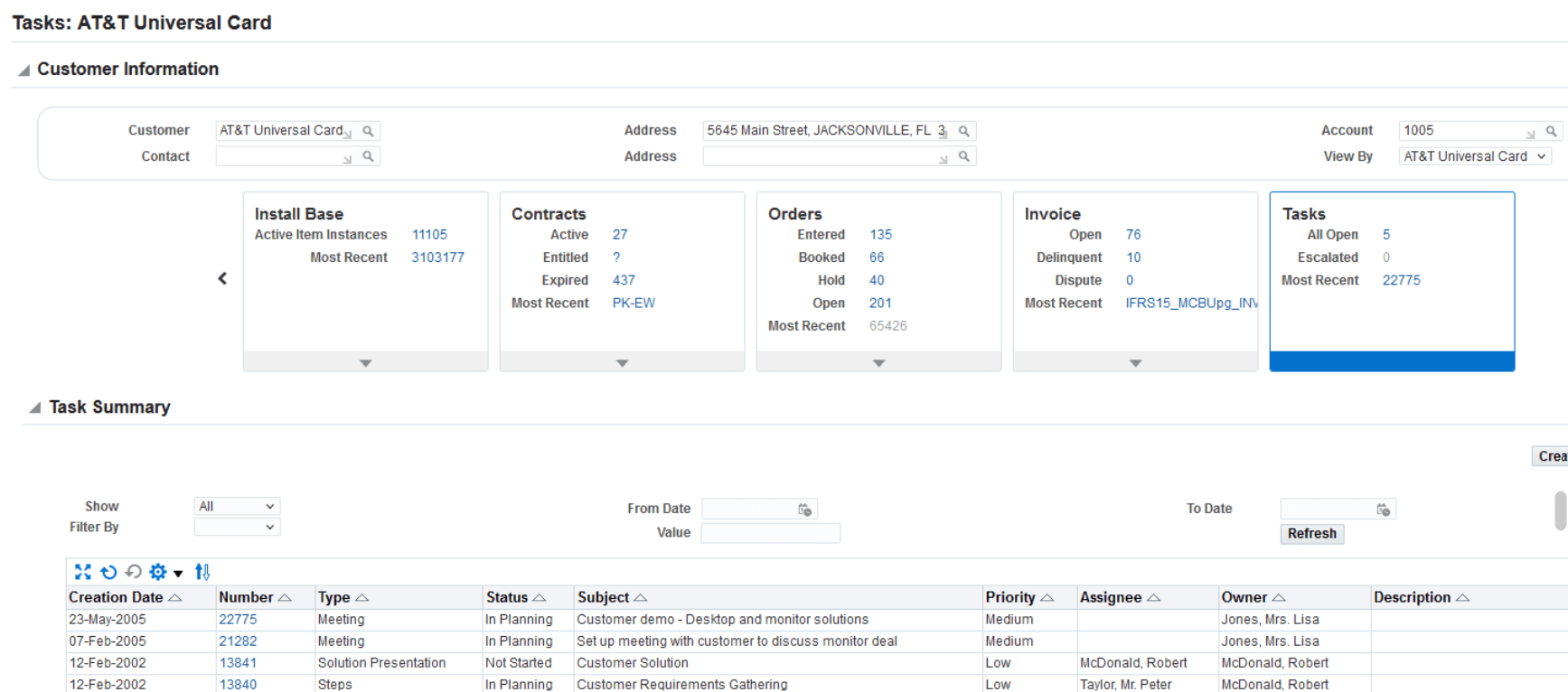
Additionally, the Tasks Summary region contains the following components:
- The Show options are All (default), Assigned, Closed, and Open.
- Number link to update the task information on the Task Details page. The Summary region displays the updated details.
- Create Task button to create a task. After you save the task, it appears as the most recent task in the infotile and the Task Summary region displays the task.
Steps to enable and configure
You don't need to do anything to enable this feature.
Tips and considerations
Not Applicable
Key resources
Oracle TeleService Implementation and User Guide
- Chapter: HTML Contact Center
- Topic: Customer Overview
Transfer of Information
R12.2.12 TOI: Implement and Use TeleService - HTML Service and HTML Contact Center Enhancements