Use Multiple Task Templates by Service Request Type
Organizations can optimize service request processing by enabling the selection of multiple task templates for a single service request type. This feature allows organizations to associate various task templates with a specific service request type, providing flexibility to automatically generate diverse sets of tasks tailored to specific service scenarios.
Before this enhancement, Oracle TeleService restricted users to mapping only one task template per service request type in the configuration setup, limiting the automation of varied task creation.
This feature increases flexibility in task management by automating the creation of multiple relevant tasks based on a single service request type, helping improve operational efficiency. It supports customizable service workflows for complex service requests that involve multiple departments or business processes, while emphasizing the importance of designing task templates that align with specific service request types to maximize automation effectiveness.
Feature Description
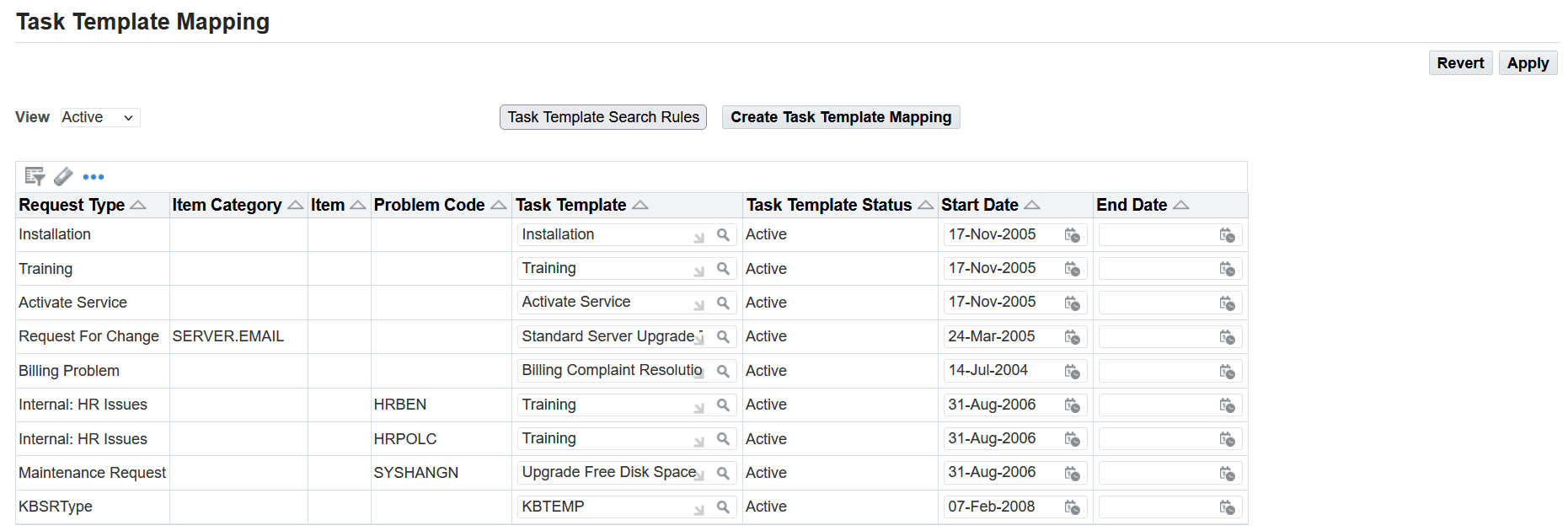
Service administrators can associate multiple task templates with a service request type using the Task Template Mapping page. You can associate multiple task templates with a single service request type.
Task Template Mapping Page
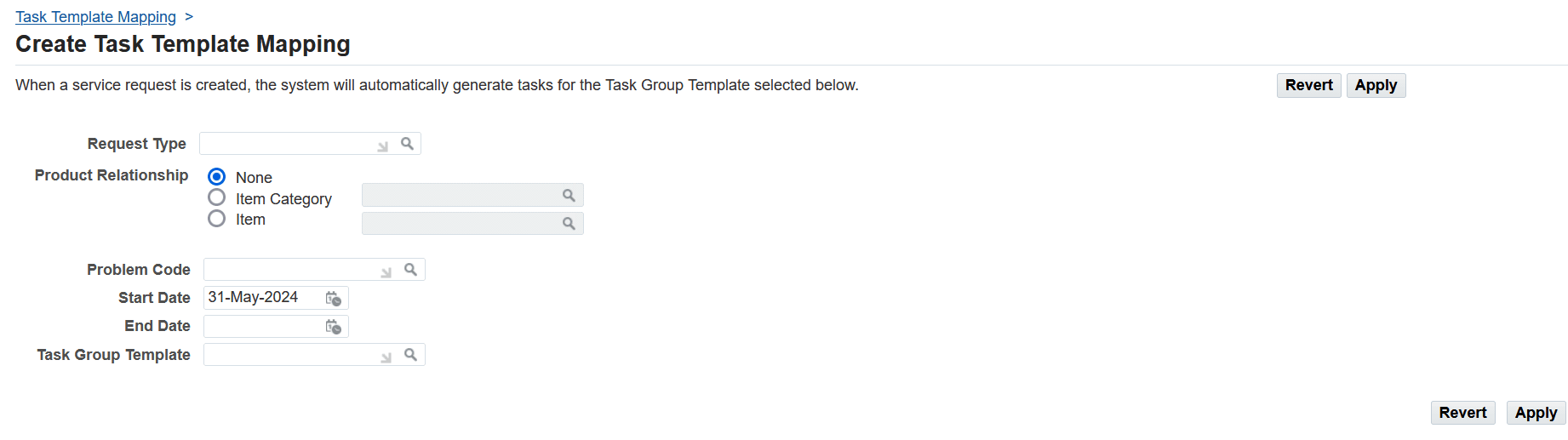
Create Task Template Mapping Page
When a support engineer selects the related service request type during service request creation, the Automatic Task Generation process creates tasks from all the associated templates. The generated tasks appear in the Task tab of the Service Request window and the Resolution and Wrap Up tab of the Service Request HTML page.
Steps to enable and configure
Create task group templates before you can map them.
- Under the Service responsibility, navigate to Setup, then Mapping, and select Task Template Mapping. The Task Template Mapping page appears.
- Click Create Task Template Mapping.
- The Create Task Template Mapping page appears.
- Select the object or combination of objects you want to map:
- For service request types, use the Request Type list of values (the flashlight icon) to make your selection.
- To map to an inventory item or an item category, select either the Item or the Item Category option and use the list of values to make your selection.
- For problem codes, use the Problem Code list of values.
- To limit the availability of this mapping use the Start Date and End Date fields.
- Select the task template group using the Task Group Template list of values. Note that on the Task Template Mapping page, you can associate multiple task templates with a single service request type.
- Click Apply to save your mapping. The new mapping appears in the Task Template Mapping page.
Note that based on the service request type and task template association, the Automatic Task Generation process creates tasks from the associated templates.
Tips and considerations
- Design task templates to cover different aspects of a service request type to fully leverage the flexibility of associating multiple templates.
- Review and update the Service Request Type-Task Template mapping configuration to ensure alignment with operational needs.
- Train staff on managing multiple task templates to avoid confusion or overlap in automated task generation.
Key resources
Oracle TeleService Implementation and User Guide
- Chapter: Generating Tasks Automatically
- Topic: Automatic Task Generation Overview
- Topic: Implementing Task Generation Setup Process Overview
- Topic: Specifying Conditions for Task Generation
- Topic: Updating a Task Template Group Mapping
- Chapter: User Interfaces in Contact Center and Service Request Module
- Topic: About the Service Request Window
Transfer of Information
R12.2.14 TOI: Implement and Use TeleService