Deployment Server & Enterprise Server Multi-Foundation Architecture
Multi-foundation Architecture
A JD Edwards EnterpriseOne architecture that allows for contrasting tools release foundations to reside on different path codes.
Before you upgrade to a new tools release foundation, it is good practice to test and validate the functionality prior to upgrading the production path code. You can keep the production path code running on the existing tools release foundation and apply the new tools release foundation to all other path codes. This architecture enables you to perform tests on the new tools release foundation without impacting the production (PD) path code. When you complete the validation, you upgrade the PD path code to the new tools release foundation.
The following are common server configurations:
Deployment Server with multiple physical Enterprise Servers
Deployment Server with one physical server with multiple ports
Deployment Server with one physical server with one port
Deployment Server with Multiple Physical Enterprise Servers
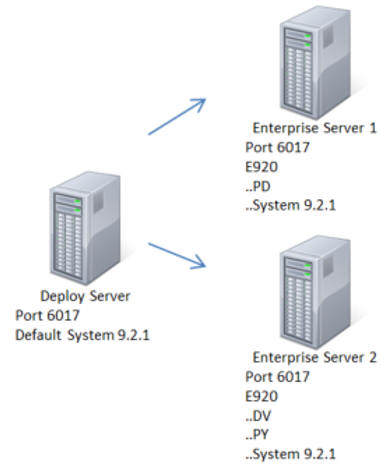
In the above graphic, the PD path code resides on Enterprise Server 1 with a Tools Release 9.2.1 foundation. The prototype (PY) and development (DV) path codes share Enterprise Server 2 with a Tools Release 9.2.1 foundation. This architecture illustrates multi-foundation with different path codes on different Enterprise Servers while having multiple tools release foundations.
Deployment Server with One Physical Enterprise Server with Multiple Ports
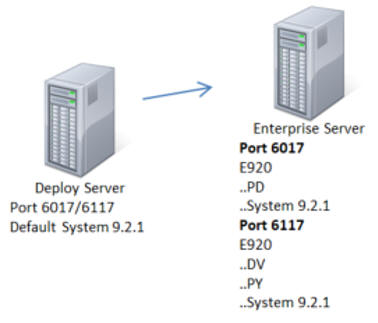
In the above graphic, the PD path code uses port 6017 with Tools Release 9.2.1 foundation. The PY and DV path codes use port 6117 with the Tools Release 9.2.1 foundation. This architecture illustrates multi-foundation. The path codes are on the same Enterprise Server, but they are on different ports. Each port can have a different tools release foundation.
Deployment Server with One Physical Enterprise Server with One Port
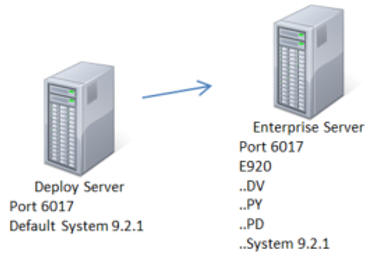
In the above graphic, the PD, PY and DV path codes use port 6017 and Tools Release 9.2.1foundation. This architecture is not multi-foundation because the path codes use the same tools release foundation on the same server and port.
Tools Release Upgrade Example
Initial State
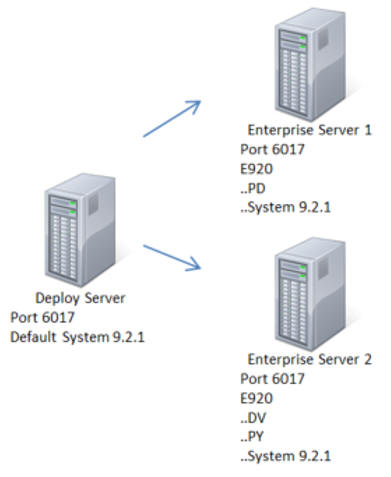
The Deployment Server and both Enterprise Servers are using the Tools Release 9.2.1 foundation.
Upgrade State
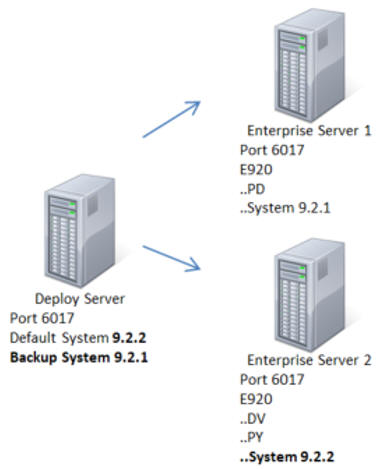
To upgrade a tools release foundation:
- Manually back-up the current tools release foundation on the Deployment Server.
- Apply the new tools release foundation to the Deployment Server as the default system.
- Apply the new tools release foundation to Enterprise Server 2.
- Run validations on Enterprise Server 2.
- After system validations are performed apply the new foundation to Enterprise Server 1.
Final State
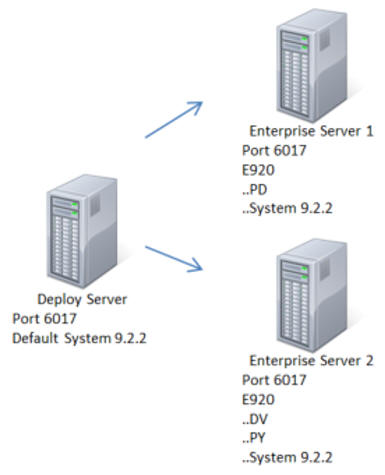
The Deployment Server and both Enterprise Servers are now running on Tools Release 9.2.2 foundation.