Process Metrics
The Process Metrics tab displays details such as Filter Criteria, Variables, Series Definition, Context Analytic, and so on for the related tables and business views of the selected enterprise process template. The Process Metrics is used to analyze and measure the overall performance of the process.
Click the Process Metrics icon. For the Receipts process model, you can review the settings in the read-only mode for these process metrics:
- Full Receipts
- Cost Deviation
- Landed Cost
- Reversals
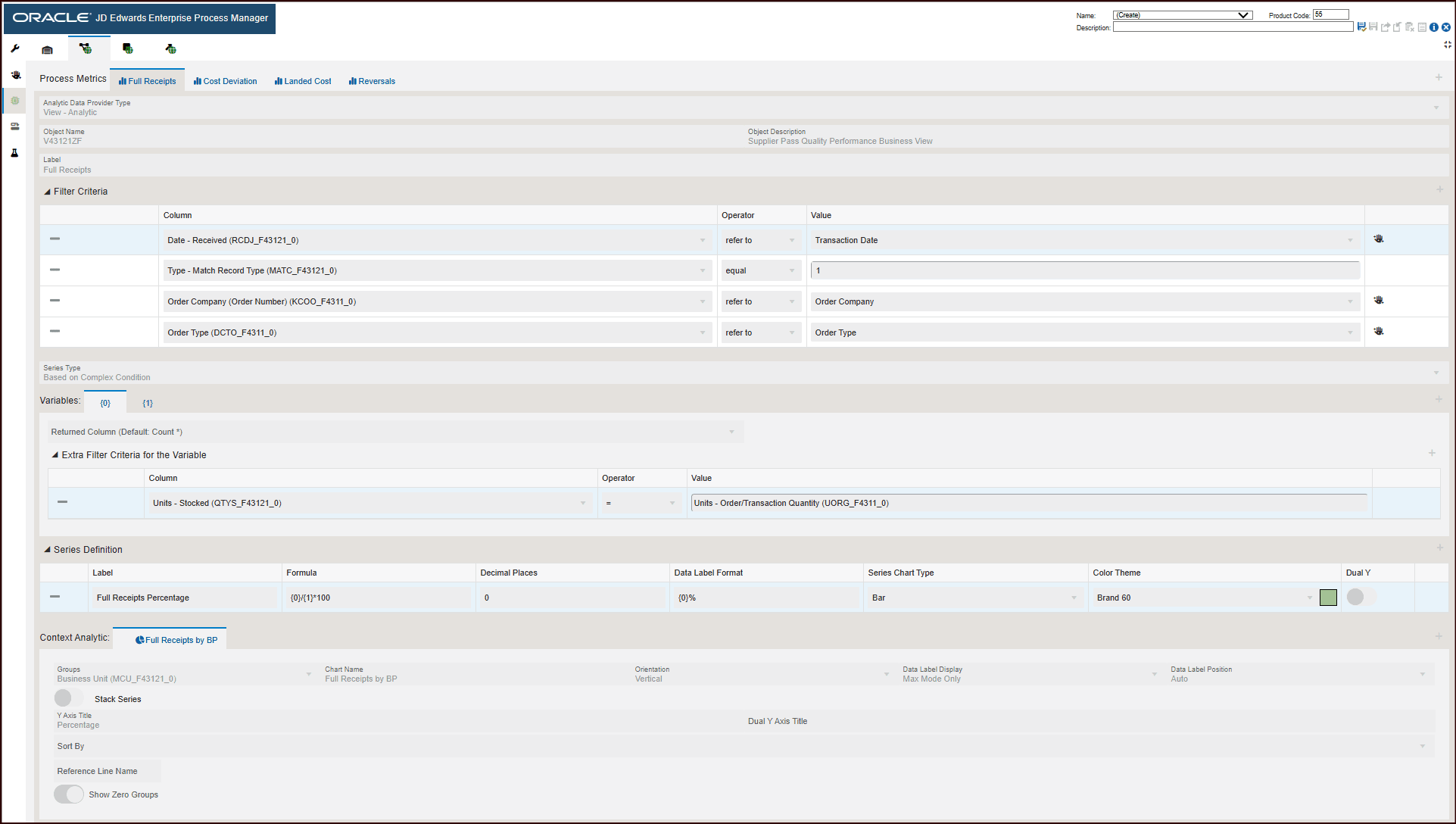
For the Full Receipts process metrics displays the following information:
- Object type: View - Analytic
- Object Name: V43121ZF
- Object Description: Supplier Pass Quality Performance Business View
- The Filter Criteria displays the list of columns that are considered for filtering and the value each column is referring to. These filter options are displayed when you click the Show Filter Options icon to analyze the enterprise process. For more information, See "Using the Show Filter Options".
- The Series Type selected is Based on Complex Condition. This criteria returns standard aggregated values from View to display the values on charts in preview mode.
- The Variables section defines the filter criteria for the variable.
- The Series Definition section defines the formula to calculate the Full
Receipts Percentage.
The system calculates the full receipts percentage using the formula {0}/{1}*100.
- The system uses the data in Context Analytic section to generate charts. For every row in this section, a unique chart is generated.
Charts
Based on the details in the Context Analytic section, the data is grouped in the Process Metrics tab. For Full Receipts metrics, the Full Receipts by BP chart is generated.
This table lists and describes the charts that are available on the Process Metrics tab for full receipts:
|
Component Title |
Description |
|---|---|
|
Full Receipts by BP |
Use this chart to view the percentage of full receipts. The grouping is based on Branch Plant. The chart depicts the percentage by business unit vertically. |
Click the Cost Deviation tab. The process metrics displays the following information:
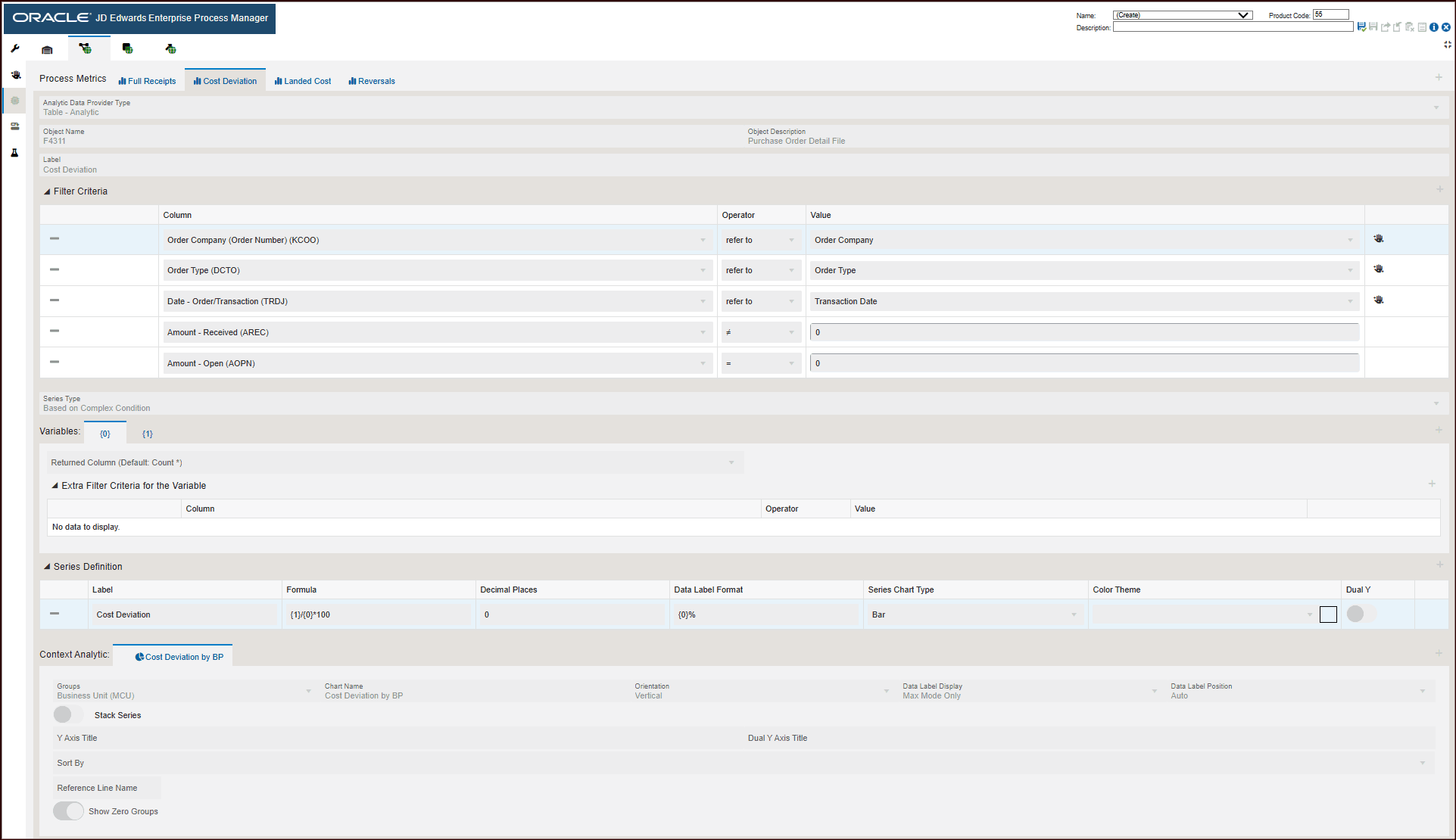
- Object type: Table - Analytic
- Object Name: F4311
- Object Description: Purchase Order Detail File
- The Filter Criteria displays the list of columns that are considered for filtering and the value each column is referring to.
- The Series Type selected is Based on Complex Condition. The system performs mathematical calculations based on the variables defined under Variables and uses the formula provided in the Series Definition section and displays these values in the charts.
- The Variables section defines each of the Variable ID and the status approval values for them.
- The Series Definition section defines the formula to calculate the
Variance and Average Cost Variance.
The system calculates the voucher variance using the specified formula.
- The system uses the data in Context Analytic section to generate charts. For
every row in this section, a unique chart is generated.
Charts
For the cost deviation metrics, the Cost Deviation is grouped by Business Unit column and is represented in the Cost Deviation by BP chart. This table lists and describes the charts that are available on the Process Metrics tab for cost deviation:Component Title
Description
Cost Deviation by BP
Use this chart to view the cost deviation by branch plant. The grouping is based on Business Unit.
The chart depicts the cost deviation count vertically.
Click the Landed Cost tab. The process metrics displays the following information:
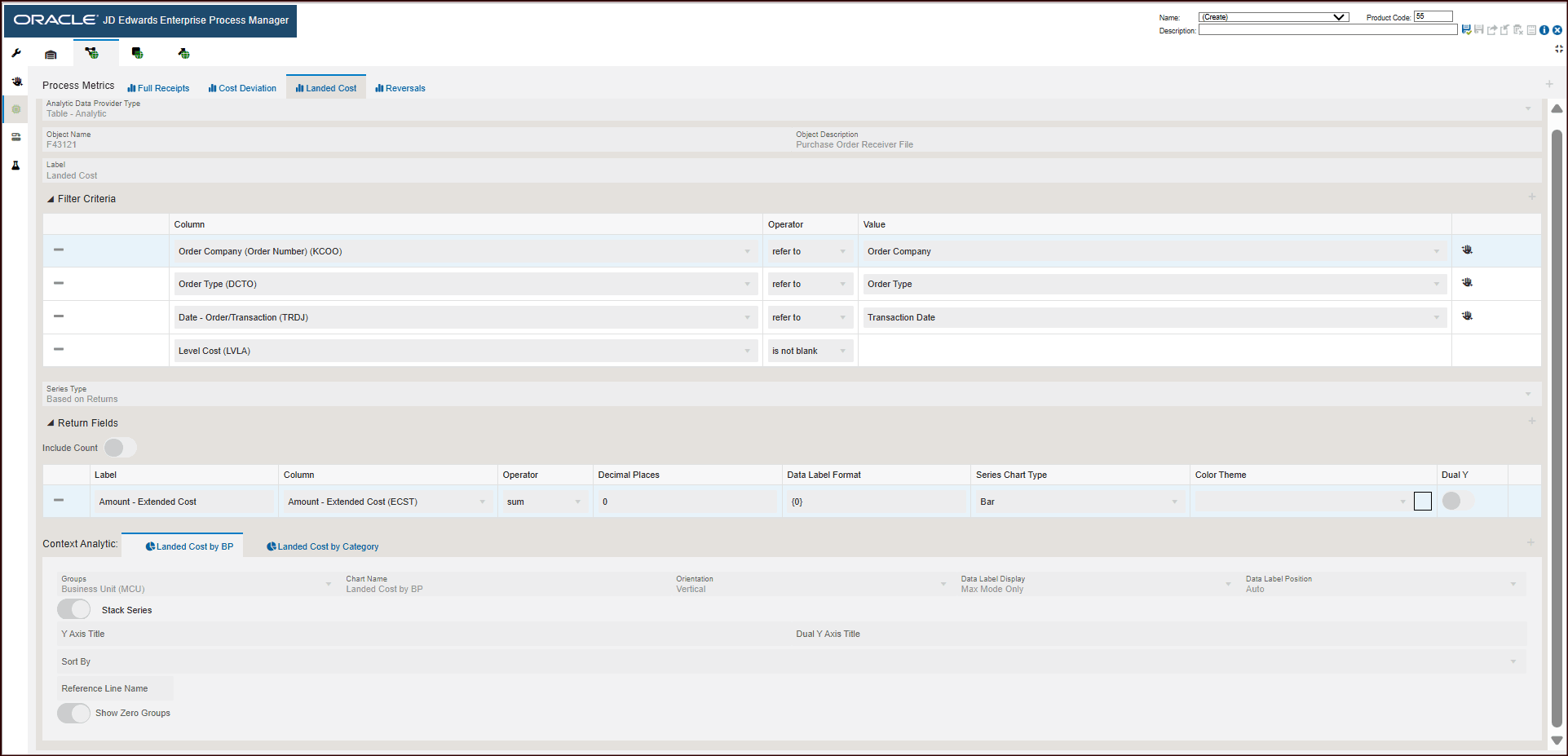
- Object type: Table - Analytic
- Object Name: F43121
- Object Description: Purchase Order Receiver File
- The Filter Criteria displays the list of columns that are considered for filtering and the value each column is referring to.
- The Series Type selected is Based on Returns. The system performs calculations based on the filter criteria and return fields specified and displays these values in the charts.
- The system uses the data in Context Analytic section to generate charts. For
every row in this section, a unique chart is generated.
Charts
For the Landed Cost metrics, Landed Cost is grouped by Branch Plant and Category and are represented in the Landed Cost by BP and Landed Cost by Category charts. This table lists and describes the charts that are available on the Process Metrics tab for landed cost:Component Title
Description
Landed Cost by BP
Use this chart to view the landed cost by branch plant.
The chart depicts the landed cost by Branch Plant vertically.
Landed Cost by Category
Use this chart to view the landed cost by category.
The chart depicts the landed cost by Category vertically.
Click the Reversals tab. The process metrics displays the following information:
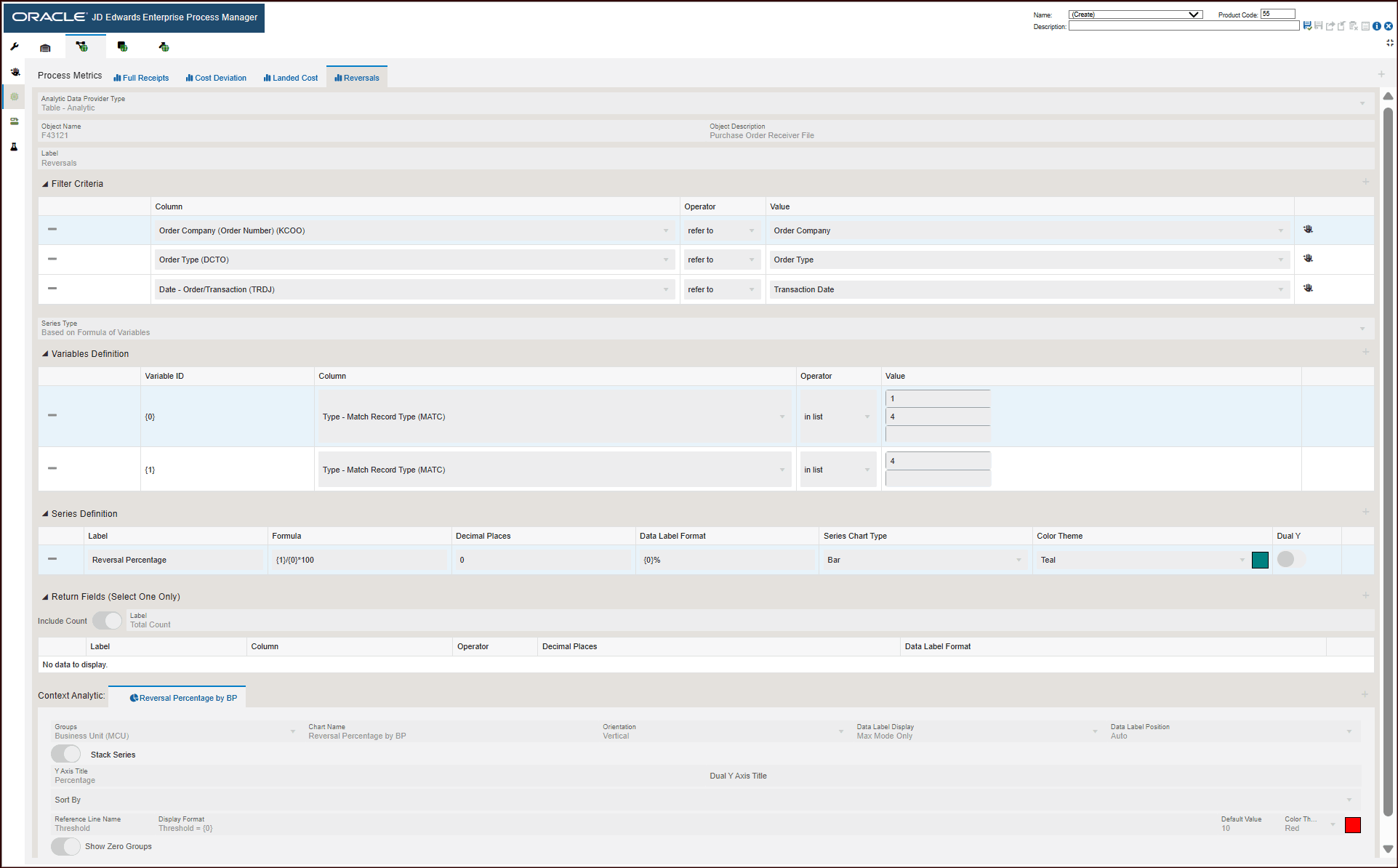
- Object type: Table - Analytic
- Object Name: F43121
- Object Description: Purchase Order Receiver File
- The Filter Criteria displays the list of columns that are considered for filtering and the value each column is referring to.
- The Series Type selected is Based on Formula of Variables. The system performs mathematical calculations based on the variables defined under Variables Definition and displays these values in the charts.
- The Variables Definition section defines each of the Variable ID and the status approval values for them.
- The Series Definition section defines the formula to calculate the Reversal Percentage.
- The system uses the data in Context Analytic section to generate charts. For
every row in this section, a unique chart is generated.
Charts
For the Voucher Match metrics, the Reversal Percentage is grouped by Business Unit and is represented in the Reversal Percentage by BP chart. This table lists and describes the charts that are available on the Process Metrics tab for Reversals:Component Title
Description
Reversal Percentage by BP
Use this chart to view the reversals percentage by branch plant. The grouping is based on Business Unit.
The chart depicts the reversal percentage by branch plant vertically.