Attach Generated Code to the Component Event
The code can be copied from the Generated Code window and pasted into the PeopleCode Event. Open Application Designer and navigate to the PeopleCode Event. In this example, the Event is added to the FieldChange event of a WorkRecord field:
This example illustrates the Application Designer Example for Rules Engine User Interface Integration Example.
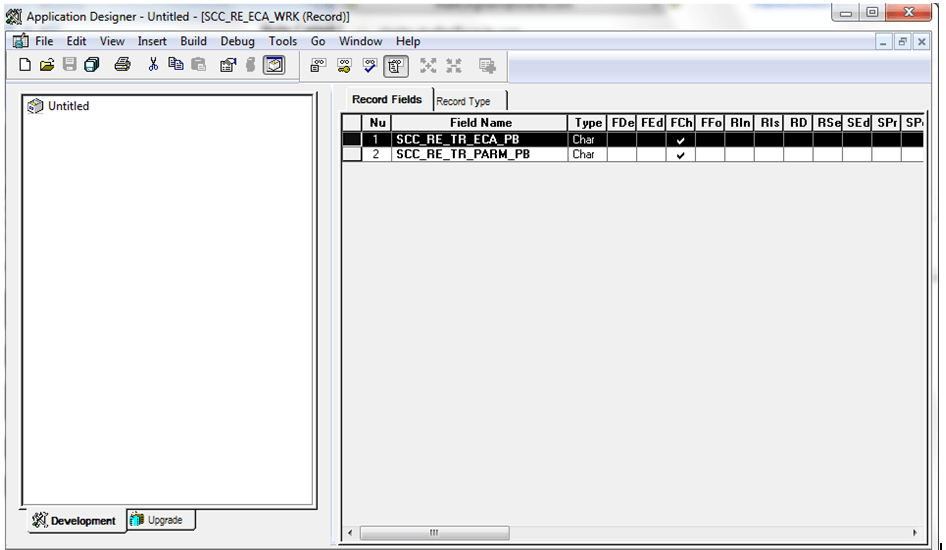
Open the FieldChange event and paste the Generated Code for the ECA Trigger into the appropriate event. Adjust the code to retrieve the correct row from which to select the Entity. This is the adjusted PeopleCode on the FieldChange Event of field SCC_RE_TR_ECA_PB which is the field for the ECA Calc button:
import SCC_RULES_ENGINE:Util:RuleFactory;
 import SCC_RULES_ENGINE:Util:RuleInterface;
 import SCC_COMMON:ENTITY:COMPONENT:EntityComponentAdapterAbstract;
 import SCC_COMMON:ENTITY:IEntity;
 Local SCC_RULES_ENGINE:Util:RuleFactory &sccRuleFactory = create SCC_RULES_ENGINE:Util:RuleFactory();
 Local SCC_RULES_ENGINE:Util:RuleInterface &SCC_RTRIG_20140218092909 = &sccRuleFactory.getRule("SCC_RULE_ID_20140218093117", True);
 Local SCC_COMMON:ENTITY:COMPONENT:EntityComponentAdapterAbstract &objECA;
 Local array of SCC_COMMON:ENTITY:IEntity &arrIEntity;
 Local SCC_COMMON:ENTITY:IEntity &objIEntity;
 Local Row &row;
 Local number &i;
 /* Make sure you are using the proper Entity Component Adapter implementation for your Component */
 /* Remove the comment markers below to implement the ECA */
 &objECA = CreateObject("SCC_COMMON:ENTITY:COMPONENT:ECAErrorGrid");
 /*  If the current row is not the row where the entity exists, replace logic below to get the correct row in the component */
 &row = GetRow();
 /* Bind the row of data in the comonent to an entity */
 /* Be sure to correctly bind the component to the entities used by the rule */
 &arrIEntity = CreateArrayRept(&objIEntity, 0);
 &arrIEntity.Push(&objECA.BindToUIFromRowWithEntityID(&row, "SCC_ENTITY_20140214090313"));
 &SCC_RTRIG_20140218092909.Context = &arrIEntity;
 &SCC_RTRIG_20140218092909.Invoke();
Based on the level 1 row in this example, the Entity can be selected from the current row. References to Variable and Calculated_GPA have been removed from code. As we are using the Rule to update the GPA Entity Property, there is no need to declare or assign a value to the &Calculated_GPA variable in this PeopleCode.
This is the adjusted PeopleCode on the FieldChange Event of field SCC_RE_TR_PARM_PB which is the field for the Parm Calc button:
import SCC_RULES_ENGINE:Util:RuleFactory;
 import SCC_RULES_ENGINE:Util:RuleInterface;
 import SCC_COMMON:ENTITY:COMPONENT:EntityComponentAdapterAbstract;
 Local SCC_RULES_ENGINE:Util:RuleFactory &sccRuleFactory = create SCC_RULES_ENGINE:Util:RuleFactory();
 Local SCC_RULES_ENGINE:Util:RuleInterface &SCC_RTRIG_20140218095510 = &sccRuleFactory.getRule("SCC_RULE_ID_20140218095142", True);
 Local SCC_COMMON:ENTITY:COMPONENT:EntityComponentAdapterAbstract &objECA;
 Local Row &row;
 Local number &i;
 /* Make sure you are using the proper Entity Component Adapter implementation for your Component */
 /* Remove the comment markers below to implement the ECA */
 /* &objECA=CreateObject("SCC_COMMON:ENTITY:COMPONENT:ECAErrorGrid"); */
 /*  If the current row is not the row where the entity exists, replace logic below to get the correct row in the component */
 &row = GetRow();
 /* Bind the row of data in the comonent to an entity */
 /* Be sure to correctly bind the component to the entities used by the rule */
 /* &SCC_RTRIG_20140218095510.Context = CreateArrayRept(&objECA.BindToUIFromRowWithEntityID(&row, "SCC_ENTITY_20140214090313"), 1); */
 /* Input Variable Declaration */
 Local string &Emplid;
 Local string &Institution;
 Local string &Career;
 Local string &Term;
 Local number &Sequence_Number;
 Local string &GPA_Type;
 /* Output Variable Declaration */
 Local number &GPA; /* Maps to Rule Output GPA*/
 /* Assign values from the component to the rule variables */
 /* Replace ? with the appropriate values */
 /* Required variables must have values passed into the rule */
 /* Optional variables do not need values assigned, leave the line commented out */
 &Emplid = &row.STDNT_SPCL_GPA.EMPLID.Value; /* Maps to Rule Input Emplid (Required) */
 &Institution = &row.STDNT_SPCL_GPA.INSTITUTION.Value; /* Maps to Rule Input Institution (Required) */
 &Career = &row.STDNT_SPCL_GPA.ACAD_CAREER.Value; /* Maps to Rule Input Career (Required) */
 &Term = &row.STDNT_SPCL_GPA.STRM.Value; /* Maps to Rule Input Term (Required) */
 &Sequence_Number = &row.STDNT_SPCL_GPA.SEQ_NUM.Value; /* Maps to Rule Input Sequence Number (Required) */
 &GPA_Type = &row.STDNT_SPCL_GPA.GPA_TYPE.Value; /* Maps to Rule Input GPA Type (Required) */
 ObjectSetProperty(&SCC_RTRIG_20140218095510, "V0001", &Emplid);
 ObjectSetProperty(&SCC_RTRIG_20140218095510, "V0003", &Institution);
 ObjectSetProperty(&SCC_RTRIG_20140218095510, "V0005", &Career);
 ObjectSetProperty(&SCC_RTRIG_20140218095510, "V0007", &Term);
 &SCC_RTRIG_20140218095510.Invoke();
 /* Assign values from the rule back to the component */
 /* Replace ? with appropriate values */
 &GPA = ObjectGetProperty(&SCC_RTRIG_20140218095510, "V0013");
 &row.STDNT_SPCL_GPA.LS_GPA.Value = &GPA;
The PeopleCode has been adjusted to provide a FieldValue for each Variable to be provided to the Trigger. For example, &Emplid =&row.STDNT_SPCL_GPA.EMPLID.Value. In this example, the &GPA value retrieved is updated on the component by updating &row. STDNT_SPCL_GPA.LS_GPA.Value.
When the Events PeopleCode has been adjusted, the user interface integration can be tested from the Component page.