Generate Boilerplate Code
With a Trigger created, the boilerplate code can be generated and connected it to a Component Event. In this example, the code calls the Rule to calculate the GPA by clicking a button on the Student Special GPA page. The example shows two new buttons added: ECA Calc, representing the Method A approach to the Trigger, and Parm Calc, representing the Method B approach to the Trigger. You would likely only use one approach in the customization of your system and would, therefore, only have one button.
This example illustrates the Student Special GPA page after Customization for Rule Engine User Interface Example.
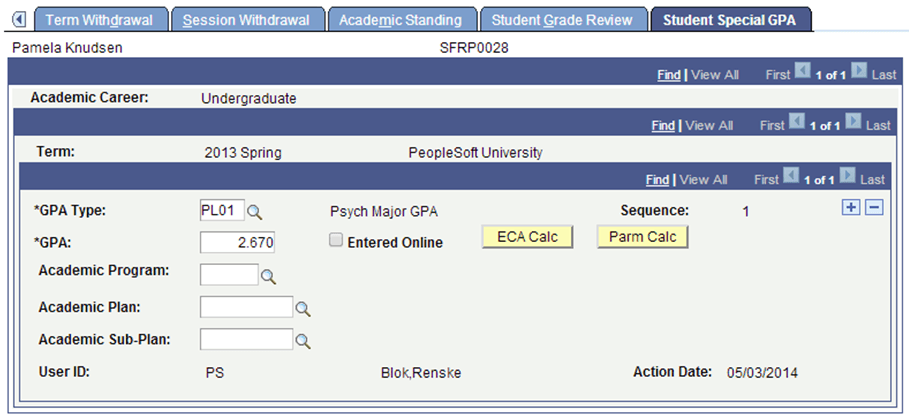
The act of clicking a button is the FieldChange Event to which the PeopleCode should be added to call the Trigger.
Use the Define Rule Triggers page (Set up SACR > System Administration > Rules Engine > Setup > Define Rule Triggers) to generate boilerplate code and attach that code to the Component Event. The setup created here also acts as an administrative reference to Events and associated Rules. You must minimally specify a PeopleCode Event, a Record, and a Field. The following PeopleCode Events can be selected:
-
FieldChange
-
FieldEdit
-
SavePostChange
-
SavePreChange
You may also add a Component for reference. Once you have the setup, click the Generate Code button to generate the boilerplate PeopleCode. The Generate Code option uses information from the Trigger to create a Code example which can be used to call the Trigger from the Component.
Generating Code for the ECA Calc
This example shows a Trigger based on Method A, which contains an Entity and assumes that an Entity is passed to the Trigger. The calculated GPA is updated directly on the Entity.
Access the Define Rule Triggers page ().
This example illustrates the Define Rule Triggers page for Parm Calc for Rules Engine User Interface Integration Example.
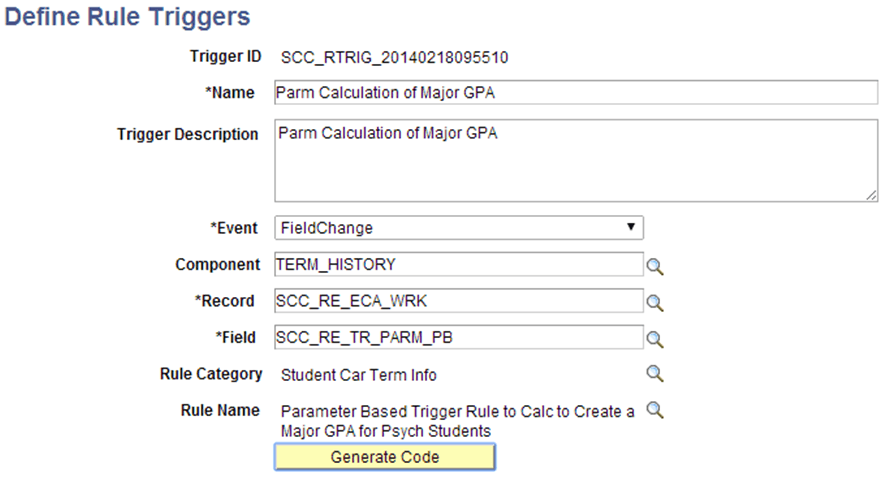
Here is the example generated code:
* ---------------------  About This Example Code  -------------------------- */
/* The following Example Code has been created as a starting point from       */
/* which to create Rule –UI Integration.  In the code you will find that the  */
/* rule refers to the Trigger Rule provided on the component as well as its   */
/* Arguments.  The code below will need to be adjusted before it can be used  */
/* to call the (Trigger) Rule.  For more information please refer to the      */
/* PeopleBooks documentation available for Rules Engine Functionality.        */
/*                                                                            */
/* ----------------  Understanding this Example Code  ----------------------- */
/* There are two ways to bring information from a Page or Component into a    */
/* Rule:                                                                      */
/*                                                                            */
/* Method 1: Providing Arguments from Rowset                                  */
/* Provide Local Strings with Values obtained from the appropriate Component  */
/* Rowset.  This method may be appropriate when calling a Rule or Function    */
/* without an Entity which requires a set of input Arguments (Variables) or   */
/* for a Rule with a Base Entity which requires a set of parameters which can */
/* be easily obtained and passed into the Rule.                               */
/*                                                                            */
/* Method 2: Providing Entity using EntityComponentAdapter                    */
/* Use the Entity Component Adapter to obtain Entity values from the          */
/* Component.  This method should be used when calling a Function with a Base */
/* Entity which needs to work with that Entity information from the UI.       */
/* -------------------------------------------------------------------------- */

import SCC_RULES_ENGINE:Util:RuleFactory;
import SCC_RULES_ENGINE:Util:RuleInterface;
import SCC_COMMON:ENTITY:COMPONENT:EntityComponentAdapterAbstract;
import SCC_COMMON:ENTITY:IEntity;

Local RuleFactory &sccRuleFactory = create RuleFactory();
Local RuleInterface &SCC_RTRIG_20140218092909= &sccRuleFactory.getRule("SCC_RULE_ID_20140218093117", true);

Local EntityComponentAdapterAbstract  &objECA;
Local array of SCC_COMMON:ENTITY:IEntity &arrIEntity;
Local SCC_COMMON:ENTITY:IEntity &objIEntity;
Local row &row;
Local number &i;

/* Make sure you are using the proper Entity Component Adapter implementation for your Component */
/* Remove the comment markers below to implement the ECA */

/* &objECA=CreateObject("SCC_COMMON:ENTITY:COMPONENT:ECAErrorGrid"); */

/*  If the current row is not the row where the entity exists, replace logic below to get the correct row in the component */

&row = getrow();

/* Bind the row of data in the comonent to an entity */
/* Be sure to correctly bind the component to the entities used by the rule */

/* &arrIEntity = CreateArrayRept(&objIEntity, 0); */
/* &arrIEntity.Push(&objECA.BindToUIFromRowWithEntityID(&row, "SCC_ENTITY_20140214090313")); */
/* &SCC_RTRIG_20140218092909.Context = &arrIEntity; */
/* Execute the Rule */

&SCC_RTRIG_20140218092909.Invoke();
Generate Code for the Parm Calc
This example shows a Trigger based on Method B, which only contains Input Variables. The calculated GPA is passed back to the Component Event which takes care of updating the GPA value.
Access the Define Rule Triggers page ().
This example illustrates the Define Rule Triggers page for Parm Calc for Rules Engine User Interface Integration Example.
Here is the example generated code:
/* ---------------------  About This Example Code  -------------------------- */
/* The following Example Code has been created as a starting point from       */
/* which to create Rule –UI Integration.  In the code you will find that the  */
/* rule refers to the Trigger Rule provided on the component as well as its   */
/* Arguments.  The code below will need to be adjusted before it can be used  */
/* to call the (Trigger) Rule.  For more information please refer to the      */
/* PeopleBooks documentation available for Rules Engine Functionality.        */
/*                                                                            */
/* ----------------  Understanding this Example Code  ----------------------- */
/* There are two ways to bring information from a Page or Component into a    */
/* Rule:                                                                      */
/*                                                                            */
/* Method 1: Providing Arguments from Rowset                                  */
/* Provide Local Strings with Values obtained from the appropriate Component  */
/* Rowset.  This method may be appropriate when calling a Rule or Function    */
/* without an Entity which requires a set of input Arguments (Variables) or   */
/* for a Rule with a Base Entity which requires a set of parameters which can */
/* be easily obtained and passed into the Rule.                               */
/*                                                                            */
/* Method 2: Providing Entity using EntityComponentAdapter                    */
/* Use the Entity Component Adapter to obtain Entity values from the          */
/* Component.  This method should be used when calling a Function with a Base */
/* Entity which needs to work with that Entity information from the UI.       */
/* -------------------------------------------------------------------------- */

import SCC_RULES_ENGINE:Util:RuleFactory;
import SCC_RULES_ENGINE:Util:RuleInterface;
import SCC_COMMON:ENTITY:COMPONENT:EntityComponentAdapterAbstract;
import SCC_COMMON:ENTITY:IEntity;

Local RuleFactory &sccRuleFactory = create RuleFactory();
Local RuleInterface &SCC_RTRIG_20140218095510= &sccRuleFactory.getRule("SCC_RULE_ID_20140218095142", true);

Local EntityComponentAdapterAbstract  &objECA;
Local array of SCC_COMMON:ENTITY:IEntity &arrIEntity;
Local SCC_COMMON:ENTITY:IEntity &objIEntity;
Local row &row;
Local number &i;

/* Make sure you are using the proper Entity Component Adapter implementation for your Component */
/* Remove the comment markers below to implement the ECA */

/* &objECA=CreateObject("SCC_COMMON:ENTITY:COMPONENT:ECAErrorGrid"); */

/* Input Variable Declaration */

Local String &Emplid;
Local String &Institution;
Local String &Career;
Local String &Term;
/* Output Variable Declaration */

Local Number &GPA; /* Maps to Rule Output GPA*/

<*

/* Assign values from the component to the rule variables */
/* Replace ? with the appropriate values */
/* Required variables must have values passed into the rule */
/* If optional variables do not need values assigned, leave the line commented out */

&Emplid = ?;  /* Maps to Rule Input Emplid (Required) */
&Institution = ?;  /* Maps to Rule Input Institution (Required) */
&Career = ?;  /* Maps to Rule Input Career (Required) */
&Term = ?;  /* Maps to Rule Input Term (Required) */

*>

ObjectSetProperty(&SCC_RTRIG_20140218095510, "V0001" , &Emplid);
ObjectSetProperty(&SCC_RTRIG_20140218095510, "V0003" , &Institution);
ObjectSetProperty(&SCC_RTRIG_20140218095510, "V0005" , &Career);
ObjectSetProperty(&SCC_RTRIG_20140218095510, "V0007" , &Term);/* Execute the Rule */

&SCC_RTRIG_20140218095510.Invoke();

/* Assign values from the rule back to the component */
/* Replace ? with appropriate values */

&GPA = ObjectGetProperty(&SCC_RTRIG_20140218095510,"V0013");
Understanding the Generated Code
The generated code contains a reference to the EntityComponentAdapterAbstract because the Trigger uses a Base Entity. The Entity information must be passed from the Component to the Trigger Rule. The Entity Component Adapter provides the following functionality:
-
The EntityComponentAdapterAbstract (ECA) is code that maps the data in the component to the Base Entity attached to the Rule.
-
If the Base Entity has child Entities, the ECA also maps the Entity children.
-
Rather than pulling data from the database, the ECA uses data in the component which may include unsaved changes. This means that the Rule can interact directly with data from the component.
-
Changes made to the Entities in the Rule are made to the component data also.
The ECAErrorGrid handles any Errors which may be generated by the EntityComponentAdapter. This code is required whenever an ECA is used and provides the necessary Error Handling for the Entity Component Adapter. Two error methods exist:
-
ECAErrorGrid – This code takes care of the error messages coming back from the ECA.
-
ECAErrorPoPup – Opens a popup page which displays the errors coming back from the ECA.
The IEntity array needs to be instantiated as an Array object before you can map the data from a Component to the base Entity of a rule. Errors are generated if the Entity is directly pulled into the code without a push to the array first. In this example, the data is being retrieved and mapped using the BindToUIFromRowWithEntityID method.
BindtoUIfromRowWithEntity selects the correct Entity based on the Base Entity ID associated with the Trigger Rule on the Trigger Component. This generated code has already placed the BaseEntityID in the BindtoUIfromRowWithEntity construct.
Other methods are available through which to retrieve the Entity. They can be added but are not included in the Generated Code:
-
BindToUI: This grabs the Entity Based on the record on level 0. This would be the first non–Work, non–View encountered in the Component.
Note:
For any Component which uses, for example, a record such as INSTALLATION on level 0, this does not work well. Binding at level 0 also implies you may be creating a relatively large Entity Tree. Performance is a consideration.
-
BindToUIfromRow: This picks the first Entity on that rowset level for example level 1. It assumes that the Component structure and the Entity structure are going to be similar or the same. It “walks” the Component and tries to match what is in the Component with what is in the Entity.
Note:
This returns the first Entity found based on the RowSet indicated. Problems may occur when the there are multiple RowSets in the Component on that level.
-
BindToUIfromRecord: This picks the Entity from the user interface based on the record indicated. This record is assumed to be the Production Record from which the Entity is mapped.
Note:
Multiple Entities could be mapped to the same Production Record. In this case, the first Entity is returned which may not be the right one.
For more extensive and technical information regarding these Entity Methods, see Setting Up Entity Registry.