Create a Trigger to Call the Functional Rule
Note:
This example describes the creation of a Functional Rule and a separate Trigger Rule. However, the separation of business logic and user interface integration, although beneficial, is not strictly necessary. You may create one Rule that performs both functions.
The Trigger is the connection between the user interface and the Functional Rule. The Trigger calls the Functional Rule and passes the information from the user interface to the Functional Rule. Using a Trigger Rule allows you to separate the functional business logic (in this case the GPA calculation) from the logic which dictates when and how that Functional Rule is called. Over time, the Functional Rule may change due to changes in the business case whereas the Trigger Rule controls the interaction with the user interface and the how and when of calling the Functional Rule.
In this example, the Trigger must pass the specified input values (EmplID, Academic Career, Institution, Term, and Subject area) from the user interface to the Functional Rule to successfully select Grade Points and Units from the Student Enrollment Entity and calculate the GPA. A Component Event using PeopleCode (in this example, clicking a button) calls the Trigger which then calls the Functional Rule. This is discussed further in Generate Boilerplate Code.
There are two approaches to creating a Trigger in this example:
-
Method A: Pass the needed Variables to the Functional Rule by retrieving and passing the Entity to the Rule.
Considerations for Using Method A
-
The Rule Usage is Function or Trigger and has a Base Entity. A Function or Trigger does not have criteria. This means that for this Function to work with the Base Entity attached, it needs Entity information obtained by the calling Rule or the Component Event PeopleCode which calls the Trigger or Function.
-
There is a need to act upon multiple sections of a flexible Entity Structure (for example Entities for Program Enrollment) or Entity Tree.
-
You do not want to lock-down the Input Variables for the Trigger or Function as the data needed may change over time.
-
The execution of the Rule depends on the data in the component, which may not be the same as the data saved in the database. Any changes in the Rule update the component from which the data is retrieved and does not save the data to the database directly.
-
-
Method B: Pass the needed Variables to the Functional Rule using Variables taking their values from the user interface.
Considerations for Using Method B
-
The Rule Usage is Trigger so the component needs to pass input Variables to a called Rule.
-
The Trigger Rule should not have a base entity defined.
-
The Input Variables are not expected to change over time.
-
Any data needed by the rules and not passed in using input Variables must be retrieved in a rule called from the trigger rule as the base entity defined by the criteria of a rule.
-
If the Rule changes values in the component, the data must be returned to the component as output Variables.
-
Creating a Trigger Using Method A: Passing an Entity using an Entity
In Method A, the Trigger is defined to work with the Student Special GPA Entity as a Base Entity. The production record for this Base Entity, STDNT_SPCL_GPA, is available on the user interface from which the Trigger is called. The needed information from the Entity can be passed directly to the Trigger. Although the Trigger has no Criteria, the correct Entity is provided to the Trigger.
This example illustrates the Define Rule page for Creating Method A Trigger for Rules Engine User Interface Integration Example.
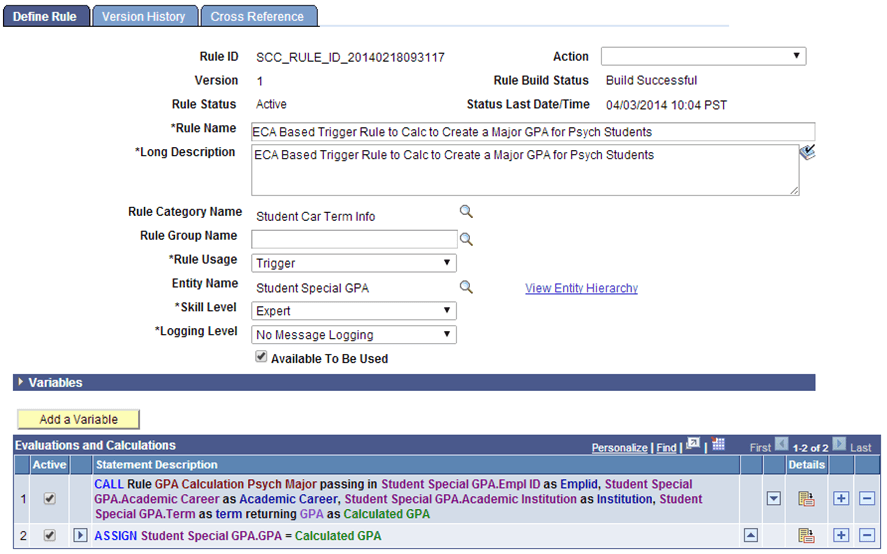
This Trigger updates the Student Special GPA Entity with the calculated GPA. This update is displayed on the Special GPA page. This is the Define Call Statement to the GPA Calculation Rule:
This example illustrates the Define Call Statement page for Creating Method A Trigger for Rules Engine User Interface Integration Example
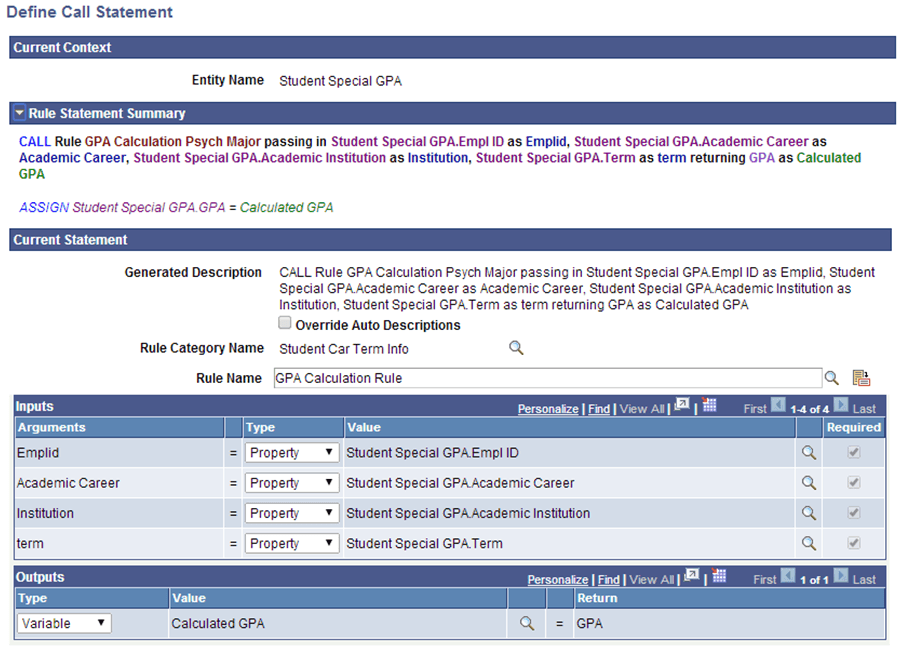
From the call to the Functional GPA rule, it is apparent that the input values needed are passed in using Entity Properties from Student Special GPA Entity.
Creating a Trigger Using Method B: Passing Parameters
In Method B, the Trigger is defined to receive all input values as Variables from the user interface. There is no Base Entity as it is not needed to provide the called GPA Functional Rule with the values it needs.
This example illustrates the Define Rule page for Creating Method B Trigger for Rules Engine User Interface Integration Example
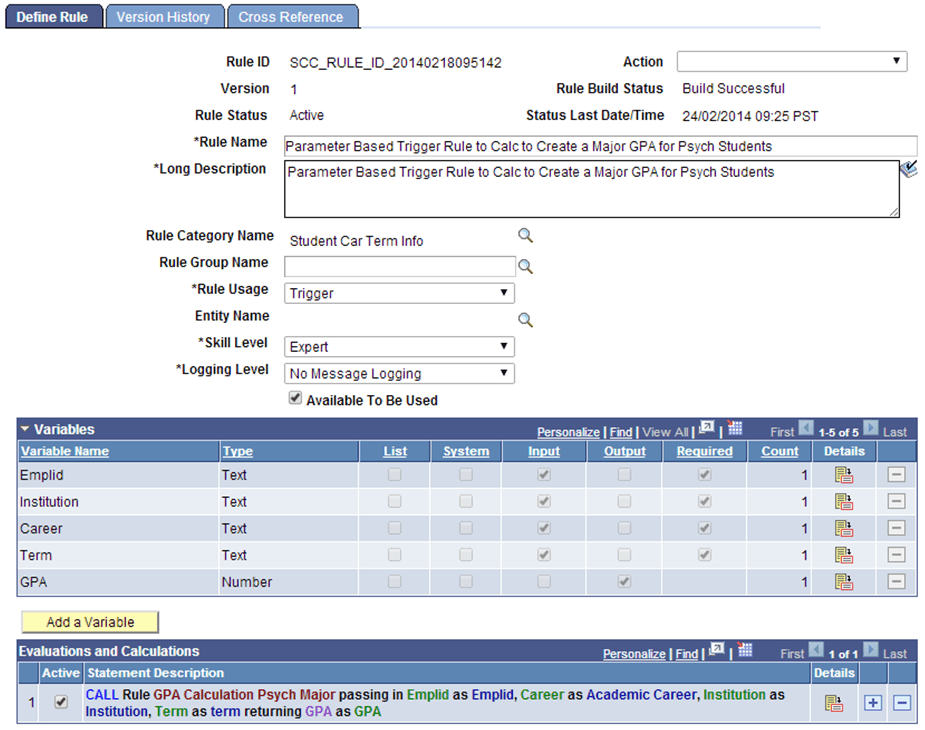
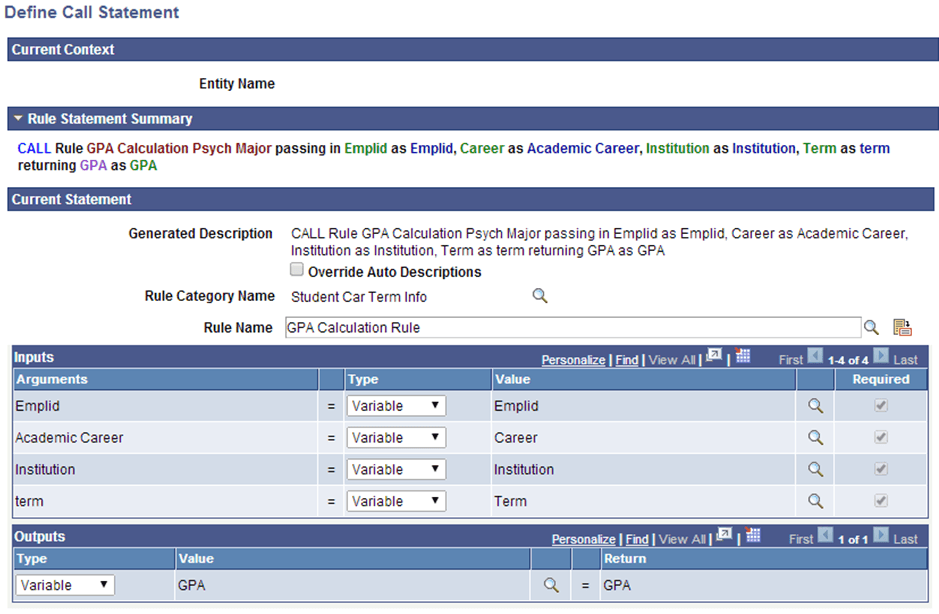
The calculated GPA is passed into a GPA output Variable. The calling PeopleCode event takes this value and updates the GPA on the Special GPA page. This is the Define Call Statement to the GPA Calculation Rule:
This example illustrates the Define Call Statement page for Creating Method B Trigger for Rules Engine User Interface Integration Example.