Authenticate User (SCC_USERREG_AUTHENTICATE) Service Operation
This service operation uses the delivered User Manager adapter to validate a username (user ID) and password combination with the installed user management system. The service operation is delivered with the ability to authenticate a user using the PeopleTools user management system.
A call to the SCC_USERREG_AUTHENTICATE service operation verifies whether the supplied username and password combination is correct using the configured user management system. If the username and password combination is correct, then the user is signed into the PeopleSoft system. All users accessing the SCC_USERREG_AUTHENTICATE operation have an Anonymous status until they have been successfully authenticated. Anonymous users only have minimal system access.
Use SCC_USERREG_AUTHENTICATE to allow a user to access your system through a front door, such as a login page.
The Authenticate User (SCC_USERREG_AUTHENTICATE) service operation:
-
Verifies whether the input parameters exist (user name and password).
-
Calls the user management adapter to validate the user name and password combination.
-
If an EMPLID is tied to the retrieved user profile, uses the EMPLID to retrieve constituent information on the authenticated person.
-
Prepares the response message. The service operation either signs in the user to the PeopleSoft system or returns an error. The service error returns an error in the following conditions:
-
Input parameters, username and password, are invalid.
-
User name and password combination cannot be authenticated using the user management system.
-
The Authenticate User service operation includes the following messages:
Input message: SCC_UR_AUTHENTICATE_REQ
The following diagram shows the input parameters that the SCC_USERREG_AUTHENTICATE service operation receives from a calling online transaction (mostly the user login page):
This example illustrates the fields and controls on the SCC_UR_AUTHENTICATE_REQ Message Parameters. You can find definitions for the fields and controls later on this page.
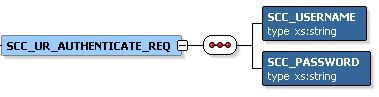
The following input parameters are mandatory for the login page to pass to the service operation:
-
Username
-
Password
The following is an example of the SCC_UR_AUTHENTICATE_REQ message that the SCC_USERREG_AUTHENTICATE service operation receives from a login page:
<?xml version="1.0"?>
<SCC_UR_AUTHENTICATE_REQ>
        <SCC_USERNAME>KANGA</SCC_USERNAME>
        <SCC_PASSWORD>Rooly23</SCC_PASSWORD>
</SCC_UR_AUTHENTICATE_REQ>
Output message: SCC_UR_AUTHENTICATE_RESP
The following diagram shows the output parameter that the SCC_USERREG_AUTHENTICATE service operation passes to the calling online transaction:
This example illustrates the fields and controls on the SCC_UR_AUTHENTICATE_RESP Message Parameters. You can find definitions for the fields and controls later on this page.

Constituent is an entity defined in the Entity Registry. Use the PeopleTools Schema page to access the SCC_ENTITY_CONSTITUENT schema ().
This example illustrates the fields and controls on the Example of the SCC_UR_ AUTHENTICATE_RESP message that the SCC_USERREG_AUTHENTICATE service operation transmits to the calling online transaction. You can find definitions for the fields and controls later on this page.
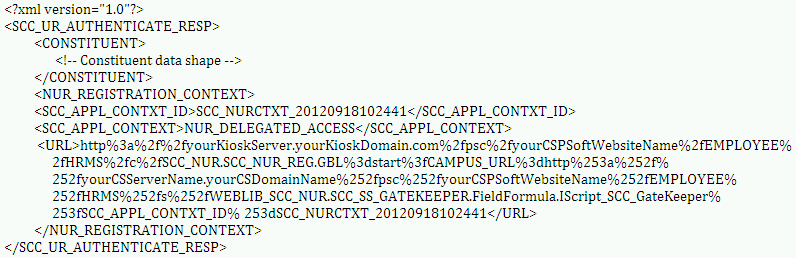
<?xml version="1.0"?>
<SCC_UR_CREATEACCT_RESP>
  <CONSTITUENT>
   <!-- Constituent data shape -->
  </CONSTITUENT>
<NUR_REGISTRATION_CONTEXT>
		<SCC_APPL_CONTXT_ID>SCC_NURCTXT_20120918102441</SCC_APPL_CONTXT_ID>
   <SCC_APPL_CONTEXT>NUR_DELEGATED_ACCESS</SCC_APPL_CONTEXT>
   <URL>http://yourServer.yourDomain.com/EMPLOYEE/SCC_DA_PROXY/SS_CC_DA_TERMS_CON</URL>
</NUR_REGISTRATION_CONTEXT>
</SCC_UR_CREATEACCT_RESP>
Fault message: SCC_FAULT_RESP
Refer to the SCC_FAULT_RESP message example in the SCC_USERREG_CREATEACCT service operation section.