Create User Account (SCC_USERREG_CREATEACCT) Service Operation
Use this service operation to enable an online user to create a user name (user ID) and password. This service operation creates a new PeopleTools user profile.
The service operation supports the PeopleTools user management system. The service operation also supports other user management systems through the adapter architecture. To allow your PeopleSoft system to interact with another user management system through SCC_USERREG, a new adapter must be created.
When calling the Create User Account service operation, the user is required to choose a user name and password, and optionally to enter some constituent information such as first name, last name, email address, and so on. This either creates or does not create a single user account in the user management system you configure. If the user name is valid and does not already exist in the user management system, the service operation creates a user account. The new user account can be used immediately (no need for the new user to manually login). The user account is created based on an existing user ID that serves as a template (the SCC_SS_TEMPLATE user ID). This account must contain the basic role and permission security to access and use your system. This is also referred as the generic role provisioning. The service operation copies the user default information contained in this template, to create the new account. Therefore, you must set up the SCC_SS_TEMPLATE user account to allow an online transaction to use New User Registration. A second user ID that needs to be created and which also serves as a template to create user profiles is SCC_GUEST.
See Developer Reference to Deploy New User Registration, “Step 1: Initial Setup for New User Registration.”
The Create User Account service operation:
-
Verifies whether the required input parameters have been passed in the user registration page (user name, password, and confirm password).
-
Retrieves any constituent information from the input parameters, if included in the registration page, and validates the information. The constituent information is stored in the CTM constituent staging tables using the CTM transaction NEW_USER_REGISTRATION.
-
Calls the user management adapter to:
-
Verify that the requested user name does not exist in the user management system.
-
Verify your Password Controls setup is respected. This is defined in
-
Create the new user account.
-
Authenticate the user and signs the user into the online transaction.
-
-
Prepares the response message. The service operation either creates a new user account which the user can immediately use or returns an error. The service error returns an error in the following conditions:
-
User name, password or confirm password input parameters are invalid.
-
Constituent information provided through the input parameters is invalid.
-
The PeopleSoft Password Controls rules are not respected.
-
An account for the same user name already exists in the user management system.
-
Note:
If you intend to use the Forgot User ID and Forgot Password utilities, you must require the user to enter an email address when they create an account. To do this, you must select the Email Address check box in the New User Registration Installation page. The email address the user provides is stored in the newly created user profile and serves to send user ID or reset password if the user later forgets his or her user ID or password. The New User Registration sample login page and New User Registration Tester page are integrated with the Forgot User ID and Forgot Password utilities. To take advantage of this integration, make sure you select the Email Address check box in the New User Registration Installation page.
See Defining Installation Options for New User Registration.
The Create User Account service operation includes the following three messages:
Input message: SCC_UR_CREATEACCT_REQ
The following diagram shows the input parameters that the SCC_USERREG_CREATEACCT service operation receives from a calling online transaction (mostly the user registration page):
This example illustrates the fields and controls on the SCC_UR_CREATEACCT_REQ Message Parameters. You can find definitions for the fields and controls later on this page.
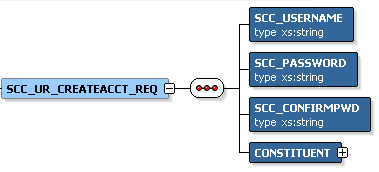
The following input parameters are mandatory by the registration page to pass to the service operation:
-
SCC_USERNAME
-
SCC_PASSWORD
-
SCC_CONFIRMPWD
-
CONSTITUENT
While the CONSTITUENT tag is required in the request message (as indicated in the request message schema: <xs:element maxOccurs="1" minOccurs="1" ref="CONSTITUENT"/>) the CONSTITUENT elements can be empty in the request. This is because it is possible, but optional to gather constituent information at registration time.
Constituent is an entity defined in the Entity Registry. Use the PeopleTools Schema page to access the SCC_ENTITY_CONSTITUENT message schema (). Any attributes contained in the schema can be used in the registration page.
See Setting Up Entity Registry.
The following is an example of the SCC_UR_CREATEACCT_REQ message that the SCC_USERREG_CREATEACCT service operation receives from a user registration page:
<?xml version="1.0"?>
<SCC_UR_CREATEACCT_REQ>
        <SCC_USERNAME>KANGA</SCC_USERNAME>
        <SCC_PASSWORD>Rooly23</SCC_PASSWORD>
        <SCC_CONFIRMPWD>Rooly23</SCC_CONFIRMPWD>
  <CONSTITUENT>
   <!-- Constituent data shape -->
  </CONSTITUENT>
</SCC_UR_CREATEACCT_REQ>
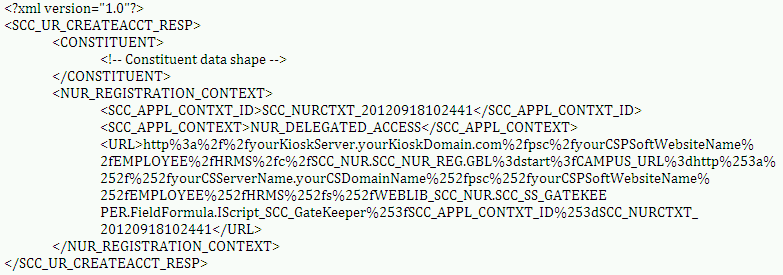
Output message: SCC_UR_CREATEACCT_RESP
The following diagram shows the output parameters that the SCC_USERREG_CREATEACCT service operation passes to the calling online transaction:
This example illustrates the fields and controls on the SCC_UR_CREATEACCT_RESP Message Parameters. You can find definitions for the fields and controls later on this page.

Constituent is an entity defined in the Entity Registry. Use the PeopleTools Schema page to access the SCC_ENTITY_CONSTITUENT schema ().
This example illustrates the fields and controls on the Example of the SCC_UR_CREATEACCT_RESP message that the SCC_USERREG_CREATEACCT service operation responds to the calling online transaction. You can find definitions for the fields and controls later on this page.
Fault message: SCC_FAULT_RESP
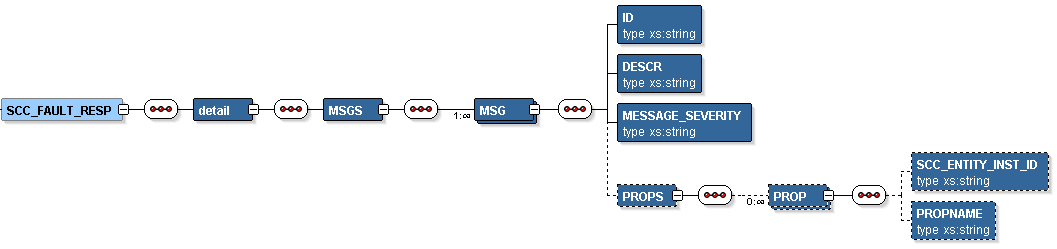
If the service operation encounters an error condition, it responds with the SCC_FAULT_RESP message.
The following diagram shows the output parameters that the SCC_FAULT_RESP service operation passes to the calling online transaction:
This example illustrates the fields and controls on the SCC_FAULT_RESP Message Parameters. You can find definitions for the fields and controls later on this page.