Configuring Shopping Cart
To register the application-specific shopping cart, access the Shopping Cart Configuration page (Set Up SACR, System Administration, Utilities, Shopping Carts, Shopping Cart).
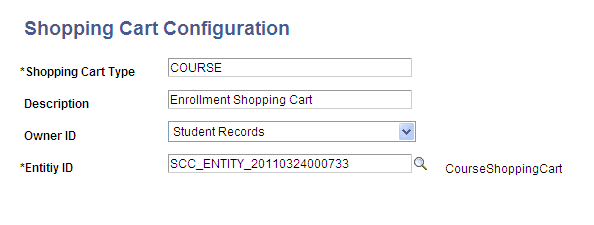
This example illustrates the fields and controls on the Shopping Cart Configuration page. You can find definitions for the fields and controls later on this page.
| Field or Control | Description |
|---|---|
|
Owner ID |
Because the Shopping Cart framework can be used by any Campus Solutions application, select the Campus Solutions application that owns the shopping cart you are creating. |
|
Entity ID |
Select the Entity ID of the parent entity that you created on the Entity Registry page. |
On the Shopping Cart Configuration page, you attach the entity ID of an application-specific shopping cart to an application-specific shopping cart type. The shopping cart type represents the type of the application-specific shopping cart, and the entity ID represents the application-specific entity defined on the Entity Registry page.
Purpose of this configuration:
Because the Shopping Cart framework is generic, the service operation must know which application-specific shopping cart sent the request so that it can proceed with first building the appropriate entities that are specified on the Shopping Cart Configuration page and then start processing the request.
Each shopping cart request must contain a <SCC_SHOP_CART_TYPE> tag. The value of the tag indicates the shopping cart type that you have defined on the Shopping Cart Configuration page. Any shopping cart service operation upon receiving a request first reads the shopping cart type from the request. Once the service operation identifies the cart type, it then identifies the appropriate entities attached to this cart type from the Shopping Cart Configuration page to perform the application-specific shopping cart processing.
Example for how the framework uses SCC_SHOP_CART_TYPE:
The enrollment shopping cart involves two entities: CourseShoppingCart and CourseShoppingCartItem. We have defined these entities on the Entity Registry page with CourseShoppingCart as the parent entity and CourseShoppingCartItem as the child entity. The shopping cart configuration for the enrollment shopping cart would therefore look as shown in the preceding screen shot titled Shopping Cart Configuration page.
Note that the shopping cart is Course in the screen shot for the enrollment shopping cart. Therefore, for example, when the enrollment shopping cart sends a request to add an item (academic class) to the enrollment shopping cart, the request must include the shopping cart type Course. The following is an example of a request XML code to add an item to the enrollment shopping cart:
This example illustrates the fields and controls on the Sample SCC_SC_ADDITEM_REQ.xml from the Enrollment shopping cart. You can find definitions for the fields and controls later on this page.
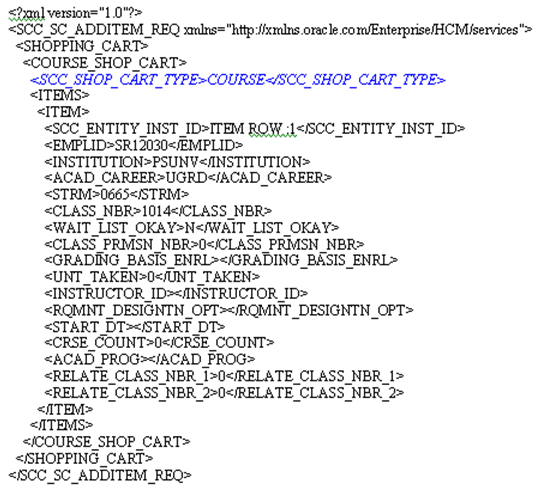
Note that in the code example, the SCC_SHOP_CART_TYPE tag contains the COURSE value. The SCC_SC_ADDITEM service operation reads the cart type value of Course from the request. The operation then queries the Shopping Cart Configuration page to identify the entity appropriate for this cart type (which is CourseShoppingCart for this example) and then proceeds with building the entity hierarchy for processing the enrollment shopping cart request.
Suppose if the <SCC_SHOP_CART_TYPE> had a value of StudentFinance. In such a case, the service operation builds the StudentFinanceShopCart entity and uses this entity for processing the Student Financials shopping cart request to add an item.
Therefore, depending on the <SCC_SHOP_CART_TYPE> value (for example, Course or StudentFinance) with which you have registered the application-specific entities on the Shopping Cart Configuration page, the service operation handler code builds the appropriate entities and uses these entities for further processing.