Generating a Common XSD for the Shopping Carts
The Shopping Cart framework uses a common schema that includes elements of all the entities that are defined in the shopping cart configuration table. The name of the common schema is SCC_ENTITY_SHOP_CART.xsd.
To generate the common schema for all the shopping carts:
-
Access the Entity Registry page for any parent entity of a shopping cart ().
-
Click the Generate XSD button to generate the XSD.
-
Use the PeopleTools Schema page to access SCC_ENTITY_SHOP_CART.xsd ().
-
Paste the generated XSD into SCC_ENTITY_SHOP_CART.xsd.
For example, the enrollment shopping cart has two entities: CourseShoppingCart (parent) and CourseShoppingCartItem (child). Click the Generate XSD button on the Entity Registry page for the CourseShoppingCart entity. When you click this button, the system generates an XSD that contains elements of all the available shopping cart entities that you have defined on the Shopping Cart Configuration page.
Any shopping cart parent entity (for example, CourseShoppingCart) extends the ShoppingCart framework class. The ShoppingCart class overrides the base class generateXSD() method to generate a common XSD for all the available carts. You then need to replace the XSD in SCC_ENTITY_SHOP_CART.xsd with the XSD generated by clicking the Generate XSD button. Note that it is this common XSD that the system references in all the generic XSDs of the messages that are attached to the service operations.
Another example: We will use the message SCC_SC_ADDITEM_REQ.xsd that is attached to SCC_SC_ADDITEM service operation. Suppose you have used the Shopping Cart Configuration page to define two shopping carts. One is an enrollment shopping cart and another is Student Financials shopping cart.
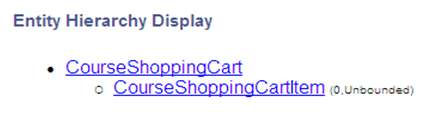
You defined the entity registry setups for the enrollment and Student Financials shopping carts. The following is an example of the Entity Hierarchy Display page for the CourseShoppingCart entity:
This example illustrates the fields and controls on the Entity hierarchy for Enrollment shopping cart . You can find definitions for the fields and controls later on this page.
Note:
We have registered CourseShoppingCart on the Shopping Cart Configuration page with Shopping Cart Type as COURSE.
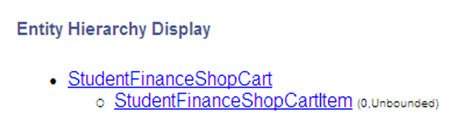
The following is an example of the Entity Hierarchy Display page for the StudentFinanceShopCart entity:
This example illustrates the fields and controls on the Entity hierarchy for Student Finance shopping cart. You can find definitions for the fields and controls later on this page.
Note:
Assume that you have registered StudentFinanceShopCart on the Shopping Cart Configuration page with Shopping Cart Type as StudentFinance.
Click the Generate XSD button for one of the parent entities, for example, CourseShoppingCart. Doing so generates an XSD that contains the elements from CourseShoppingCart entity hierarchy as well as from StudentFinanceShopCart entity hierarchy.
Replace the content of SCC_ENTITY_SHOP_CART.xsd with the generated XSD. To do so, select to access the SCC_ENTITY_SHOP_CART message. On the Schema page, paste the newly-generated XSD.
The following is a graphical representation of the SCC_ENTITY_SHOP_CART.xsd:
This example illustrates the fields and controls on the Example of a common schema for Enrollment and Student Financials shopping carts. You can find definitions for the fields and controls later on this page.
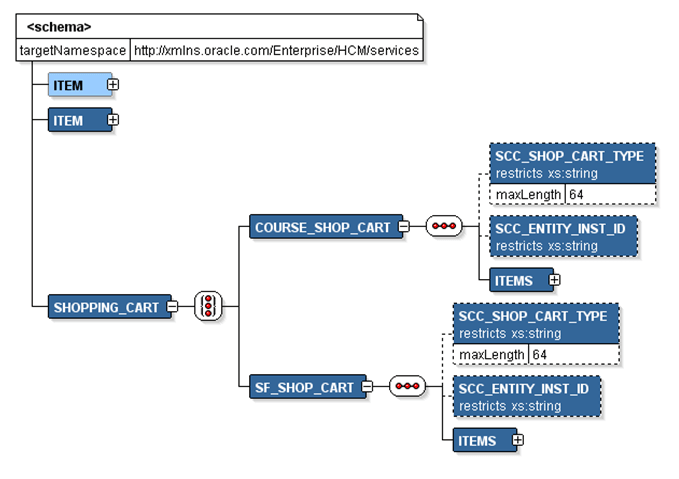
Note that the XSD contains the Course Shopping Cart (COURSE_SHOP_CART) entity as well as the Student Financials Shopping Cart (SF_SHOP_CART) entity, each entity pointing to its appropriate items.
Note:
When creating a new shopping cart, generating the XSD for the newly-created parent entity and then updating the SCC_ENTITY_SHOP_CART.xsd with this newly-created XSD has no impact on the existing shopping carts.
The following is the request XSD of generic SCC_SC_ADDITEM_REQ.xsd.
This example illustrates the fields and controls on the Example of a Schema page for SCC_SC_ADDITEM_REQ.xsd. You can find definitions for the fields and controls later on this page.
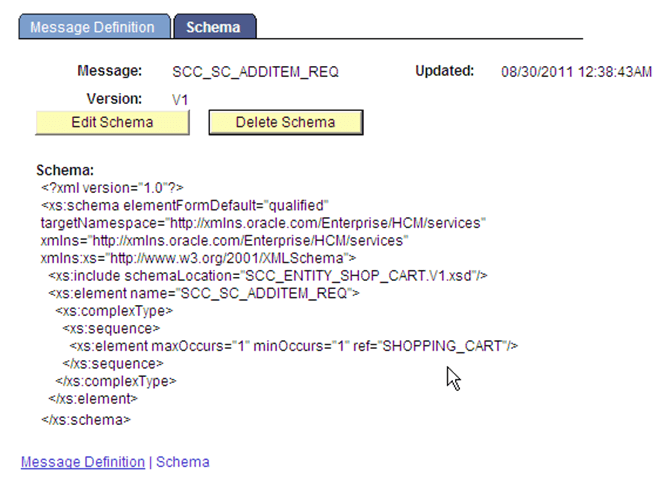
Note that this SCC_SC_ADDITEM_REQ.xsd schema includes the SCC_ENTITY_SHOP_CART.xsd schema that you generated for the CourseShoppingCart entity.