Create Text Message Category Functions
| Rule ID | Name | Long Description |
|---|---|---|
|
SCC_RULE_ID_20130530144525 |
CreateTextMessage |
Create a text message data set and populate it with a message from the message catalog. Up to 9 parameters for the message can be used. |
|
SCC_RULE_ID_20140217002205 |
CreateTextCatalogMessage |
Create a text catalog message data set and populate it with a message from Text Catalog. Up to 4 context keys and 5 parameters for the message can be used. |
Using Delivered Text Message Rules
Functions in the Text Message Category allow you to retrieve a formatted Text Message from the System. Text messages can be retrieved from the following functionality:
-
Message Text Catalog
-
Text Catalog
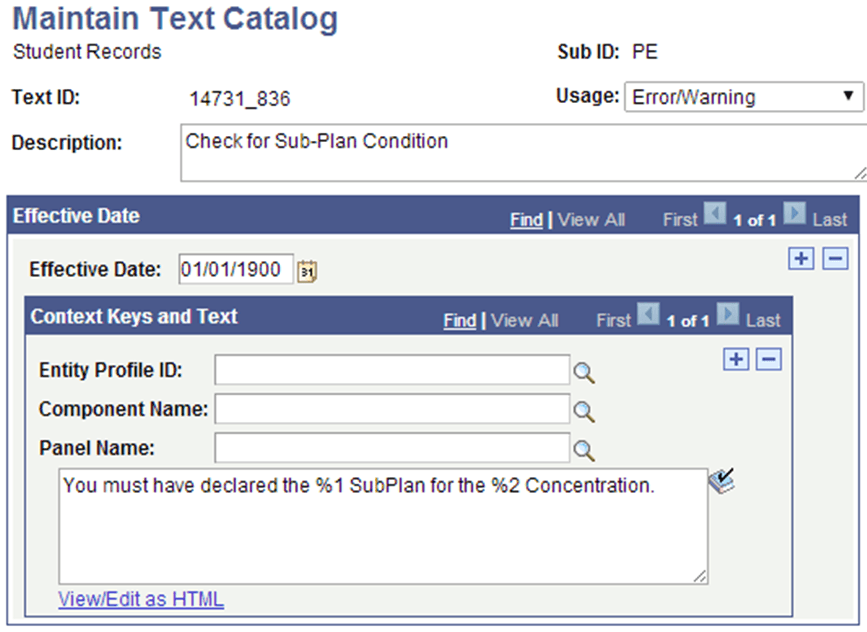
To use Message Text Catalog Text in your Rule, a message catalog text entry needs to exist.
Access Message Text catalog via to view or create Message Catalog entries.
This example illustrates the fields and controls for the Maintain Text Catalog Page for Rules Engine Create Text Message Example.
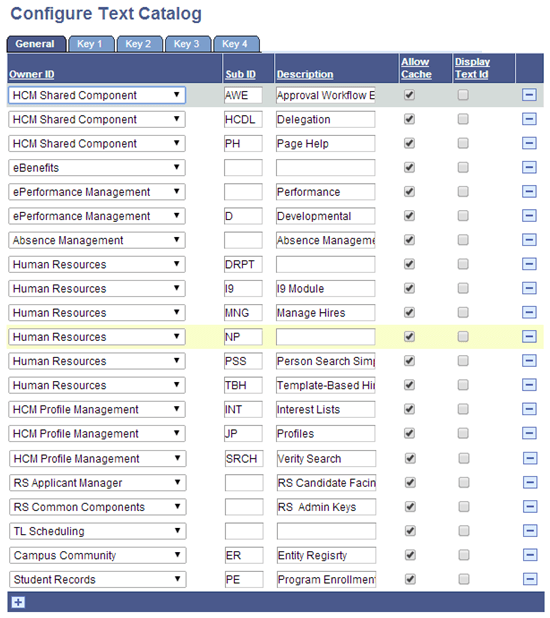
Sub IDs must be created prior to creating a Text Catalog Text entry.
Access to set up Configure Text Catalog to add a relevant Sub ID for the relevant application area.
This example illustrates the fields and controls for the Configure Text Catalog Page for Rules Engine Create Text Message Example.
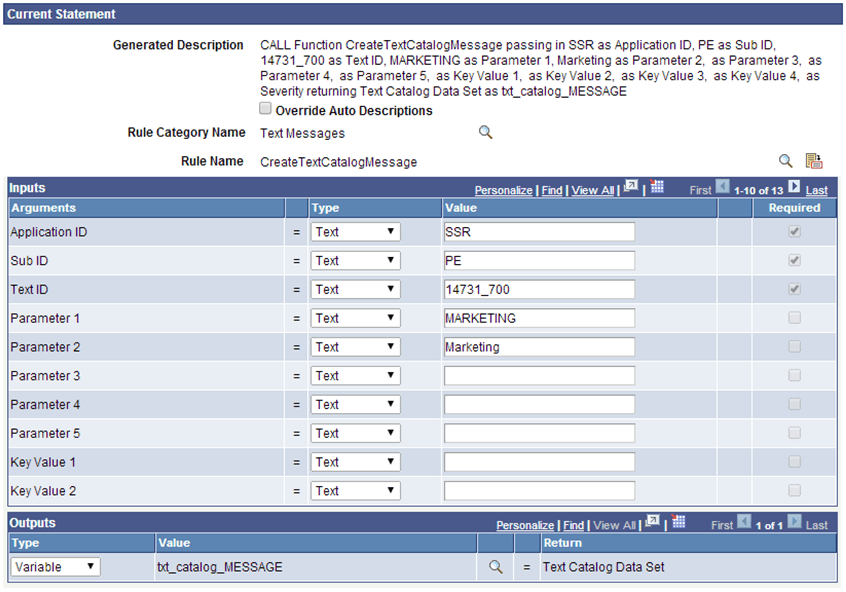
This is an example of a call to a Function that retrieves the Text Catalog:
This example illustrates the fields and controls for an example of a Function Call to the CreateTextCatalogMessage rule that uses the Text Catalog.
To retrieve a formatted text message supply the appropriate input defined as arguments:
| Argument Name | Details | How does this relate to setup |
|---|---|---|
|
Application ID |
A Text value. This argument is required. |
This corresponds to Application ID in the Maintain Text Catalog set up from which a Text Message is retrieved. |
|
Sub ID |
A Text Value. This argument is required. |
This corresponds to Sub ID in the Maintain Text Catalog set up from which a Text Message is retrieved. |
|
Text ID |
A Text Value. This argument is required. |
This corresponds to the unique Text ID in the Maintain Text Catalog set up from which a Text Message is retrieved. |
|
Parameter 1 through 5 |
Text. Optional |
This value replaces Message Text variables %1 through %5 with a value. Provide a Variable, Text Value or (data set) property. |
|
Key Value 1 through 4 |
Text, Optional |
Context Keys can be used for granular selection of Context Catalog Text’s added to a Text Catalog ID. |
|
Text Catalog Data Set |
Required |
Provide a Data Set Variable which references system Data Set “Text Catalog Data Set”. |