Creating Application Classes
Create feature-specific shopping cart application classes to customize the business logic specific to the Campus Solutions application. At this stage, create only the application classes inside the proper application package. Add the PeopleCode at a later step.
Typically, any shopping cart feature would include XXXShoppingCart & XXXShoppingCartItem classes where XXX points to the specific feature for which the shopping cart is created (for example, Course and Student Financials). These are the application class names that you associate with the corresponding entities on the Entity Registry page in the next step.
The XXXShoppingCart class extends the core ShoppingCart class and contains the implementation code for the purchase() method. The SCC_SC_CHECKOUT service operation uses the purchase() method and the SCC_SC_VALIDATE service operation uses the validateCart() method. The system has defined the purchase() method and validateCart() method as abstract in the ShoppingCart base class. The XXXShoppingCart class can also override any other class provided by the base class for providing customized implementation specific to the Campus Solutions application.
The XXXShoppingCartItem class must point to the record where the system stores the shopping cart items.
For example, for the enrollment shopping cart we created the following two classes (APIs):
-
CourseShoppingCart.
-
CourseShoppingCartItem.
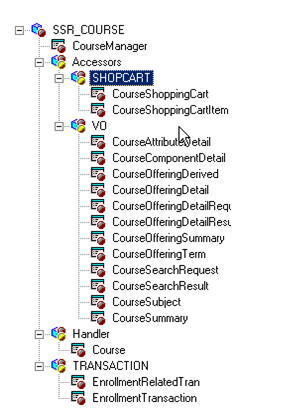
The following diagram shows that we have included both the classes inside the SSR_COURSE application package. This package is specific to the Campus Solutions Student Records application. The CourseShoppingCartItem class points to the SSR_REGFORM record. The system stores the cart items (academic classes in the case of enrollment shopping cart) in the SSR_REGFORM record.
This example illustrates the fields and controls on the Example of how you can create the classes for a shopping cart. You can find definitions for the fields and controls later on this page.