Creating an Entity Application Class
When creating a new entity, you must select an entity type. The entity type selected is set up with a base application class. The new entity uses this base application class by default. However, you can create a new application class that is specific to the entity name. This entity application class extends the base application class.
To create a new entity application class, follow the below steps:
-
In the Application Designer, create a new application class under a new application package or reuse an existing one. For example, the application classes setup with delivered entities were created under the following application packages:
Delivered Transactions Application Package AAWS Admission Transactions
SAD_ADM_APPL
Academic Item Registry (AIR)
SSR_AIR
Academic Progress Tracker (APT)
SSR_APT
Activity Management
SSR_ACTIVITY
Constituent Transaction Management (CTM)
SCC_SL_TRANSACTION
Class Search
SSR_CLASS
Course Shopping Cart
SSR_COURSE
Delegated Access
SCC_DA
Entity API
SCC_COMMON:ENTITY:API
Evaluation Management
SCC_GENERIC_EVALUATIONS
Notification Framework
SCC_COMMON:NOTIFICATION
Research
SSR_RS_RESEARCH
Rules Engine
SCC_RULES_ENGINE
StudyList
SSR_STUDYLIST
The above table shows the application packages used by the delivered transactions that use entity registry.
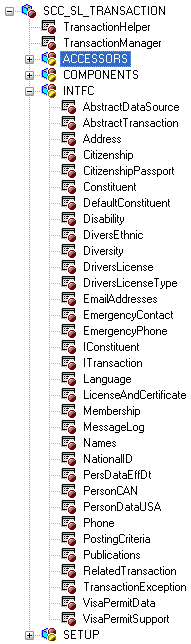
Below is an example of the SCC_SL_TRANSACTION:INTFC application package that comprises application classes used by Constituent Transaction Management:
This example illustrates the fields and controls on the Example of application classes used by CTM. You can find definitions for the fields and controls later on this page.
WARNING:
It is recommended that you do not update delivered application packages to insert the entity application class. Instead, create a separate application package. This is because any modifications made to the delivered application package is considered a customization, and might be overridden when a software updates are delivered.
-
Save the new application class without inserting any Peoplecode logic. Use the entity registry to generate the Peoplecode. This task is defined in the next steps.