Creating an Entity
This section discusses how to create an entity for the application class you created in the previous section.
The new entity can be a parent entity or a child of an existing parent. For instance, delivered with your system, the Constituent and the Application entities are parent entities of many children.
Creation considerations:
-
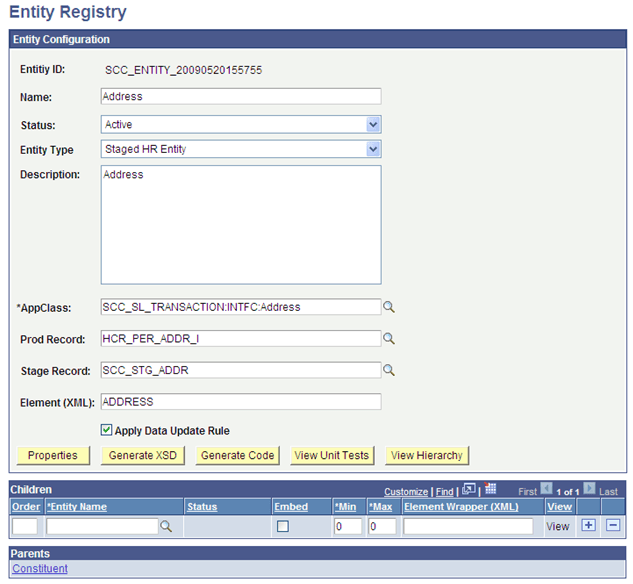
Name the new entity in relation with the underlying record(s) (that is, the stage and/or the production records you are creating the entity for). For example, the entity name for the address underlying records is Address.
-
Select a delivered entity type that corresponds to the need of the transactions that use the entity. For example, if you create an entity for a transaction that requires temporarily staging the information to a stage record, make sure you select an entity type that use stage records. If the delivered entity types do not match your needs, create a new one.
-
Enter the application class name you created in the previous step. The application class you insert here extends the Base Application Class defined in the Entity Type selected. For example, if you create an entity using entity type Staged Entity, the application class you insert extends the base application class SCC_COMMON:ENTITY:StagedEntity. If you used entity type Basic Entity, the application class given inside the entity setup extends the base application class SCC_COMMON:ENTITY:BasicEntity.
-
Enter the other required information and save. After the first save, the Properties button is displayed. Use the Entity Properties page to add any extra needed properties. Save.
-
If the entity you created was to be a child of an existing entity (like Address is a child to Constituent entity), you can now access the parent entity and list the newly created entity in the Children grid of the Entity Registry page. If the entity you created was to be a parent, you can then attach children to it.
WARNING:
At this stage, if you added a child entity, the message schema does not reflect this new entity. However, if the entity is added to an incoming message and no schema validation is occurring, the incoming message containing this data is processed and this entity is handled. As an example, the Address entity is registered as a child entity to the Constituent entity.
This example illustrates the fields and controls on the Example of the entity created for Address. You can find definitions for the fields and controls later on this page.
Generate the Application Class Peoplecode
When creating the entity application class, you do not enter peoplecode logic inside the application class. After creating the new entity and entering the newly created application class, use the Entity Registry to write the application class peoplecode for you.
From the Entity Registry component for the entity you created above, select Generate Code in the Action field. In the Entity Code Generation page, select the desired options to include in the peoplecode. The inclusions later facilitate the work of customizing the peoplecode (Custom Presave Code, Custom Validation Code, Custom SetDefault Code and Extend Fill). Click the Generate Code button. The AppClass Code box is shown. Select all the code and paste it in the peoplecode of the application class you created above in Application Designer.
In Application Designer, modify the peoplecode as needed:
-
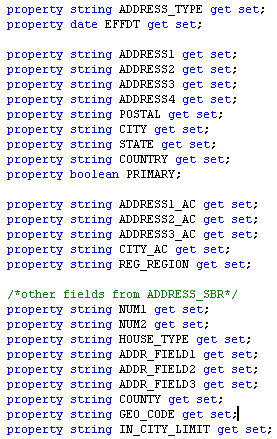
Any new class that you create must declare all its own immutable keys and mutable properties:
This example illustrates the fields and controls on the Examples of properties listed inside the SCC_SL_TRANSACTION:INTFC.Address application class. You can find definitions for the fields and controls later on this page.
-
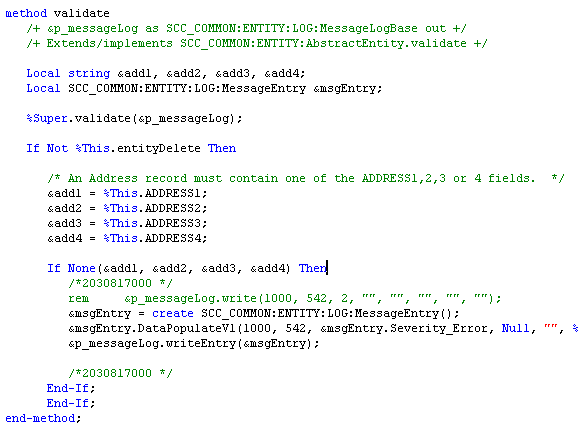
Any new class that you create may choose to override the validate() method in order to validate data prior to saving.
This example illustrates the fields and controls on the Examples of validation done inside the SCC_SL_TRANSACTION:INTFC.Address application class. You can find definitions for the fields and controls later on this page.
-
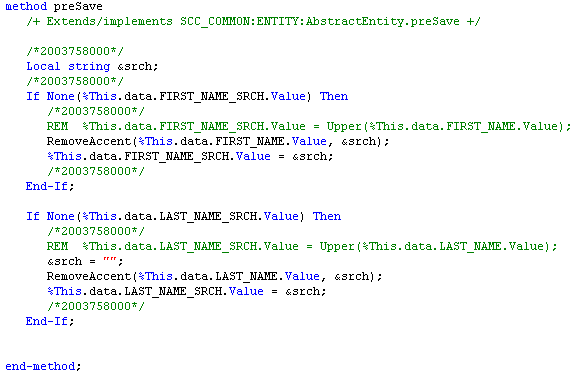
Any new class that you create may choose to override the preSave() method in order to default fields before the user saves the application.
This example illustrates the fields and controls on the Examples of presave logic done inside the SCC_SL_TRANSACTION:INTFC.Names application class. You can find definitions for the fields and controls later on this page.
-
Any new class that you create may choose to override the setDefault() in order default values.
-
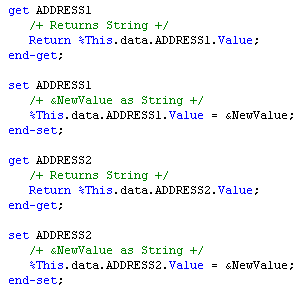
Any new class may declare get/set methods for its properties.
This example illustrates the fields and controls on the Examples of get and set inside the SCC_SL_TRANSACTION:INTFC.Address application class. You can find definitions for the fields and controls later on this page.