Define the Encryption Profile
To define the encryption profile:
-
Go to .
-
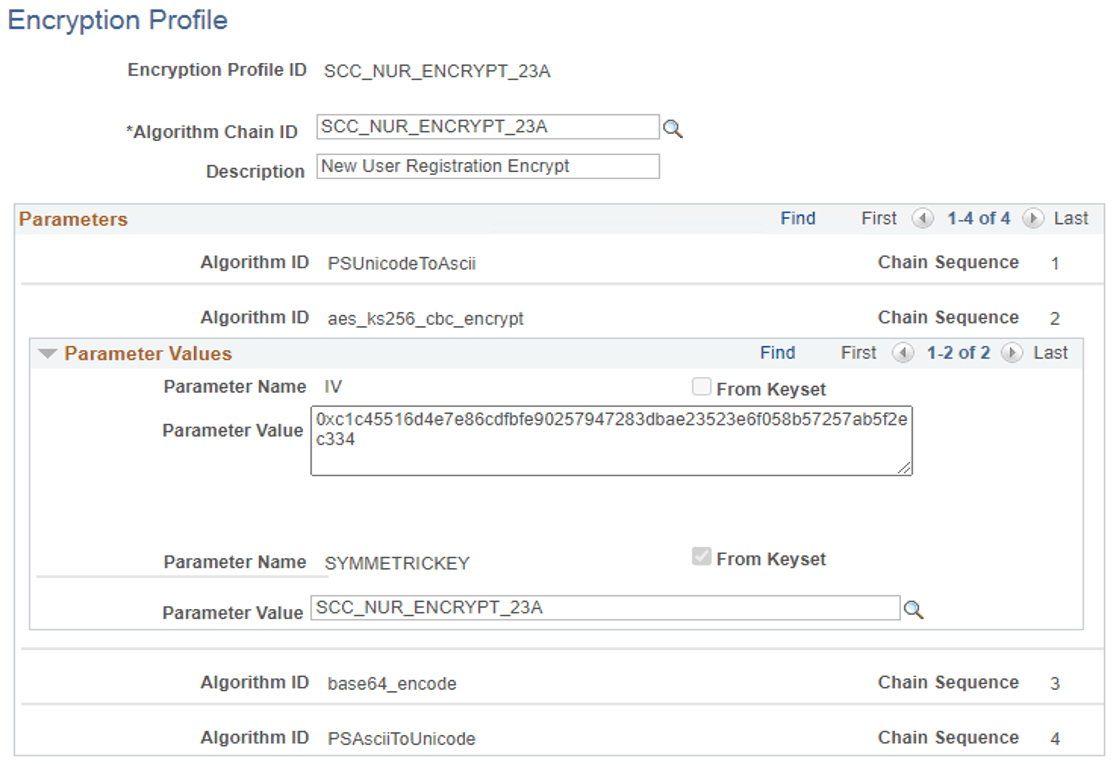
For SCC_NUR_ENCRYPT_23A:
-
Encryption Profile ID: SCC_NUR_ENCRYPT_23A
-
In Algorithm Chain ID, enter SCC_NUR_ENCRYPT_23A.
-
In Description, enter New User Registration Encrypt.
-
In Parameter Value for IV, enter 0x<random 64 character hex string>.
To generate the key, see Generate a Key.
-
In Parameter Value for SYMMETRICKEY, use SCC_NUR_ENCRYPT_23A.
-
-
For SCC_NUR_DECRYPT_23A:
-
Encryption Profile ID: SCC_NUR_DECRYPT_23A
-
In Algorithm Chain ID, enter SCC_NUR_DECRYPT_23A.
-
In Description, enter New User Registration Decrypt.
-
In Parameter Value for IV, use the same value as the one for encrypt IV parameter (see step 2).
-
In Parameter Value for SYMMETRICKEY, use SCC_NUR_DECRYPT_23A.
-
This example illustrates the fields and controls on the Encryption Profile page for SCC_NUR_ENCRYPT_23A.