Defining Address Types
Note:
If you implement Campus Solutions and a separate instance of PeopleSoft Human Capital Management, read the relevant documentation about CS-HCM integration to understand the setup, functional, and technical implementation considerations. See:
Campus Solutions Application Fundamentals: Integrating Person Data
Campus Solutions Application Fundamentals: Integrating Setup Data
Campus Solutions Application Fundamentals: Monitoring Integrations Using the Integrity Utility
Information Center: CS-HCM Integration for PeopleSoft Enterprise Campus Solutions in My Oracle Support (ID 2091799.2)
This topic discusses how to define address types.
Page Used to Define Address Types
| Page Name | Definition Name | Navigation | Usage |
|---|---|---|---|
|
Address Type Table |
ADDR_TYPE_TBL |
|
Define address types and the order in which to use them. |
Entering and Editing Address Types
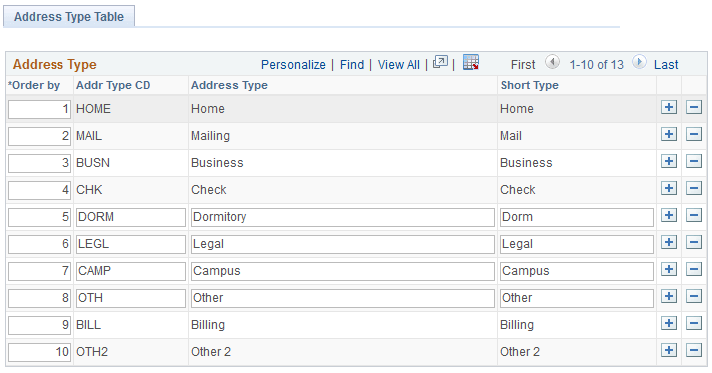
Access the Address Type Table page ().
This example illustrates the fields and controls on the Address Type Table page. You can find definitions for the fields and controls later on this page.
| Field or Control | Description |
|---|---|
|
Order By |
Enter the order in which the system should make this address available. |
Note:
You cannot edit the Home, Mailing, Business, Check, Billing, and Other 2 address types because they are system data.