Defining Rule Triggers
After a Trigger Rule is defined, a Trigger Definition can be created. Trigger Definitions allow you to associate the Trigger Rule to a Component Event or an Entity Method and generate PeopleCode that can be added to the associated component, record, or field event specified on the Define Rule Triggers page using the Generate Code button.
Note:
The component helps to generate Template PeopleCode but does not automatically add this code to the specified event. You may want or need to adjust generated code to add institution specific business logic.
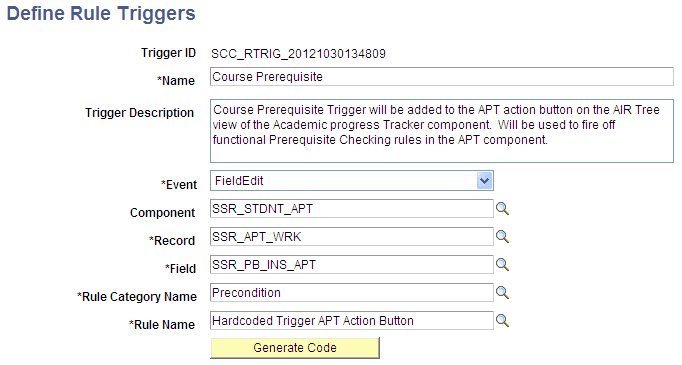
Access the Define Rule Triggers page ().
This example illustrates the fields and controls on the Define Rule Triggers page. You can find definitions for the fields and controls later on this page.
| Field or Control | Description |
|---|---|
|
Trigger ID |
Displays a unique ID generated by the system. When adding a new value the default value is NOID. The unique ID is generated when the Rule Trigger is saved. The Trigger ID is created by combining prefix SCC_RTRIG_ with the system date and time stamp in format YYYYMMDDHHMMSS. |
|
Name |
Enter a Trigger Name. The Trigger Name is used when searching for a Trigger and for display. |
|
Trigger Description |
Enter descriptive text explaining the function of the Trigger. |
|
Event |
Note: This field is only available if the Trigger Type is Online Application. Choose the PeopleCode Component Event to add to the Trigger:
|
|
Component |
Note: This field is only available if the Trigger Type is Online Application. Select from a list of available Components in the environment by Component Name or Description. |
|
Record |
Note: This field is only available if the Trigger Type is Online Application. Select from a list of available records for the selected Component or any record in the system if no Component is selected by Record Name or Description. |
|
Field |
Note: This field is only available if the Trigger Type is Online Application. Select from a list of available fields for the selected Record selected by Field Name or Description. |
|
Rule Category Name |
Select from a list of Rule Categories for which the “Allow Trigger” option has been selected on the Define Rule Categories definition page by Rule Category Name or Long Description. |
|
Rule Name |
Select a Rule to associate with the Trigger. |
For information about integrating the Rules Engine with a user interface, see Integrating User Interfaces with the Rules Engine