Developer Reference for Creating a New CTM Consumer
Take advantage of the CTM framework to create your own consumers of CTM. The CTM transactions created for a consumer can be performed online or offline by your users. Use the steps discussed in this section as guidelines to do so.
WARNING:
Creating a CTM consumer is a technical effort and requires knowledge of Application Designer, web services, Integration Broker, and Entity Registry,
The below diagram shows all the steps in the appropriate order that need to be performed to create your own CTM consumers using the CTM framework:
Creating a new consumer of CTM
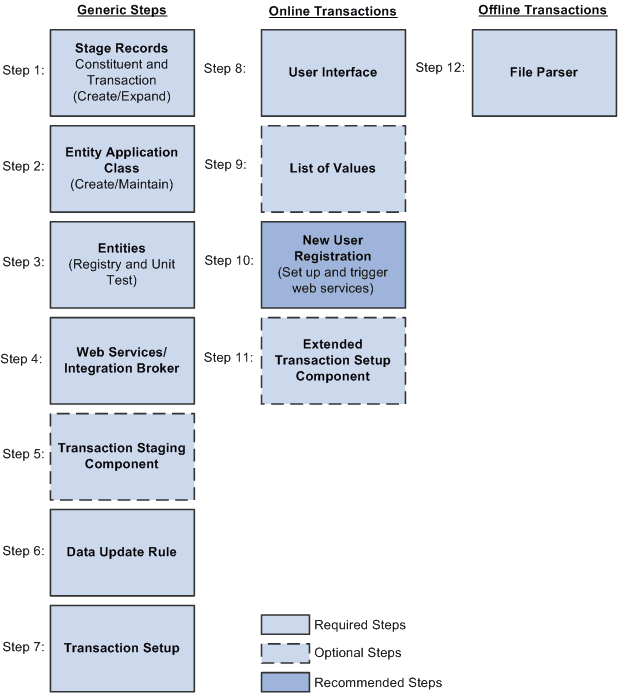
This section discusses:
-
Step 1: Creating or extending staging tables.
-
Step 2: Creating or maintaining an entity application class.
-
Step 3: Creating or maintaining entities.
-
Step 4: Creating or maintaining web services.
-
(Optional) Step 5: Creating a transaction staging component.
-
Step 6: Setting up data update rules.
-
Step 7: Setting up a transaction.
-
(Only for online transactions) Step 8: Creating a user interface.
-
(Optional — only for online transactions) Step 9: Setting up list of values.
-
(Optional — only for online transactions) Step 10: Setting up New User Registration.
-
(Optional — only for online transactions) Step 11: Creating a setup component for a transaction.
-
(Only for offline or batch transactions) Step 12: Setting up File Parser.
-
(Optional) Step 13. Setting up an entity profile for an online transaction.