Step 1: Creating or Extending Staging Tables
A staging record used with CTM must be keyed by Temporary ID (SCC_TEMP_ID field) (high level key). This field is a unique identifier that helps keeping track of staged transactions. The rest of the keys for a staging record are similar to the equivalent production record. It is never effective-dated (even if the matching production record is effective-dated). This is because the data entered in staging records can be updated, modified many times prior to be posted to production. Only at that time, the data is current and therefore the production record gets set with the date the data is posted.
Example: Suppose your CTM transaction captures admissions data and you also want to ask specific questions for which the user can select from answers that are displayed on the user interface. Assume the production record to store the answers to the questions is named SCC_EXTN and its definition is as follows:
This example illustrates the fields and controls on the Production record definition (SCC_EXTN). You can find definitions for the fields and controls later on this page.

Its equivalent staging record definition (for example, call it SCC_EXTN_STG record) should be defined as follows:
This example illustrates the fields and controls on the Matching Staging record definition (SCC_EXTN_STG). You can find definitions for the fields and controls later on this page.

The Staging table holds the staged data before it gets promoted to its matching production table.
Later, you will link the newly created staging record with its matching production record through an entity defined in the Entity Registry component. See Developer Reference for Creating a New CTM Consumer, “Step 3: Creating Entities.”
For CTM, the staging record that you select in the Entity Registry component for the parent entity is referred as the parent staging record. Other than including the SCC_TEMP_ID field as a key like the other staging records, ensure that the parent staging record also includes the following additional fields:
-
SCC_TRANSAC_CD (Transaction Code)
-
SCC_TRANS_STS (Transaction Status)
-
SCC_TRANS_STS_DT (Transaction Status Date)
-
SCC_AUDIT_SBR record for audit tracking
-
Any other fields related to your transaction.
Later, you will also enter the parent staging record for the Transaction Code in the Transaction Setup component. See Developer Reference for Creating a New CTM Consumer, “Step 7: Setting Up Transaction.”
The following is an example of how the parent staging record SAD_APL_DAT_STG, contained in the Application parent entity (delivered with the AAWS admission transaction), is defined in the Entity Registry component:
This example illustrates the fields and controls on the Example of Entity Registry component with the parent staging record for the parent entity Application. You can find definitions for the fields and controls later on this page.

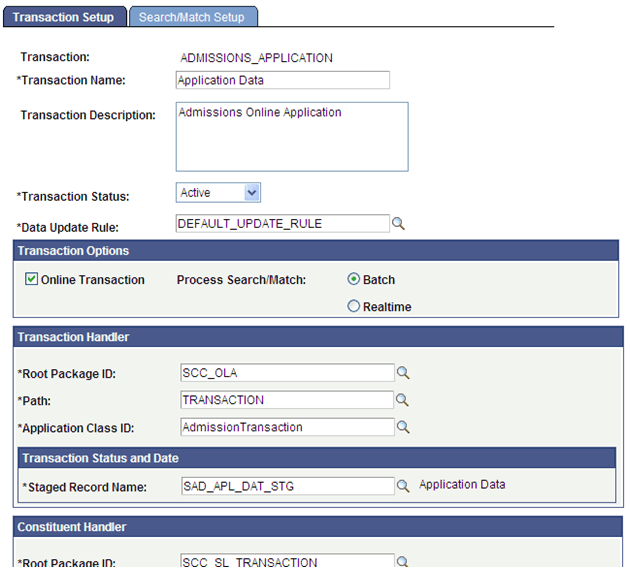
The following is an example of how the SAD_APL_DAT_STG parent staging record (delivered with the AAWS admission transaction) is defined in the Transaction Setup component for the transaction code ADMISSIONS_APPLICATION:
This example illustrates the fields and controls on the Example of Transaction Setup component with the SAD_APL_DAT_STG parent staging record for AAWS transaction. You can find definitions for the fields and controls later on this page.