Entering Selection Parameters
Access the Selection Parameters page ().
This example illustrates the fields and controls on the Selection Parameters page. You can find definitions for the fields and controls later on this page.
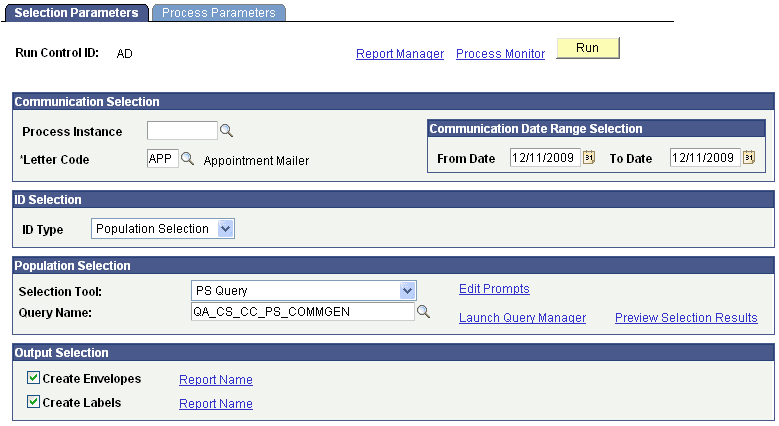
Communication Selection
| Field or Control | Description |
|---|---|
|
Process Instance |
If the communication was previously generated, select the process instance for which you want to generate envelopes or labels. Only the process instances created by either the Communication Generation or the Envelope and Label Generation process are available to ensure that the data extracted by those processes is the same data that will be used to generate the envelopes and labels. Note: The process instance number appears in the Process Instance field on the processed ID's Person Communication Management or Organization Communication Management page. |
|
Letter Code |
Enter the letter code of the item for which you want to generate envelopes and labels. If you entered a process instance number, the letter code of the generated communication appears in the Letter Code field, and the field is unavailable. If the communication has not been completed, enter the letter code for which you want to generate the envelopes and labels. For example, it could be a letter code for a hardcopy item (brochure, flyer, post card, or other) for which you want to generate envelopes and labels. Note: All letter codes are available, whether or not they are set up for the Communication Generation process. |
Communication Date Range Selection
This group box appears only when the letter code is entered manually.
| Field or Control | Description |
|---|---|
|
From Date and To Date |
Enter the date range of the communication records from which to extract data. For example, you might want to extract data only from IDs to which you assigned a specific letter code and set the communication date to between January 1 and March 1 of the current year. |
ID Selection
| Field or Control | Description |
|---|---|
|
ID Type, Person ID, and Org ID |
Specify the types of IDs for which you want to generate envelopes and labels. The choices are: All IDs, All Org IDs, All Person IDs, One Org ID, One Person ID, or Population Selection. When a process instance number is entered, only the IDs processed within the process instance are available. When a letter code is manually entered, the only IDs available for processing are the person IDs and organization IDs with that letter code assigned within the specified date range and where the communication is not completed. If you enter One Person ID or One Org ID, the Person ID or the Org ID field appears. Enter the specific ID for which to generate the envelope or label. |
Population Selection
This group box appears only when the ID type is Population Selection.
| Field or Control | Description |
|---|---|
|
Selection Tool |
Select the tool to use to identify the population for the process. Only tools set to Active on the Selection Tool setup page and the applicable selection tools defined in the context definition for the process are available. The PeopleSoft system delivers the following tools with a default status of Active: Equation Engine, External File, and PS Query. |
|
Query Name, Equation Name, or Attached File |
The field appears based on the selection tool specified. Enter the name of the query or equation to use or upload the external file to use to select the desired population. |
Output Selection
| Field or Control | Description |
|---|---|
|
Create Envelopes, Create Labels, and Report Name |
Select the appropriate check box to generate envelopes or labels or both. When selected, the Report Name link appears. You must select the report definition to use. The report definition must contain the envelope or label template to use and enables the process to retrieve name address information from the associated data source to merge into the template. Only the report names to which you have security access are available. Note: When generating envelopes and labels from within the Communication Generation process, only the report definitions that are created with a data source configured with the same administrative function used in the main letter code are available. However, when generating envelopes and labels with the Envelope and Label Generation process, the data source associated with the report definitions does not need to match the administrative function of the letter code. For example, with the Envelope and Label Generation process you can generate envelopes and labels for a letter code with the ADMA administrative function, and use a report definition with the GEN administrative function. This enables you to use a generic report definition to create envelopes and labels. Warning! When a Process Instance number is entered the Envelope and Label Generation process does not re-extract data for envelopes and labels. It reuses the data extracted for the main letter code report definition to merge inside the envelope or label template. This ensures consistency between the address, the salutation information printed on the letter, and the name and address on the envelopes and labels. If you need to extract additional data to include on the envelopes or labels (for example, you might want to print the name of the admissions recruiting center for the ID on the envelope or label), then you must include the data inside the data source of the report definition for the main letter code. If the data is not in the data source for that report definition, it will not be extracted. |
This table lists the predefined report definitions provided for generating envelopes and labels. You can use these as is or use them as samples from which to create your own templates:
| Admin Function | Report Name | Report Description |
|---|---|---|
|
GEN |
QA_CSENVGEN |
CommGen Envelope - GEN |
|
GEN |
QA_CSLBLGEN |
CommGen Label - GEN |
|
AVIN |
QA_CSENVAVIN |
CommGen Envelope - AVIN |
|
AVIN |
QA_CSLBLAVIN |
CommGen Label - AVIN |
|
ADMA |
QA_CSENVADMA |
CommGen Envelope - ADMA |
|
ADMA |
QA_CSLBLADMA |
CommGen Label - ADMA |