Evaluation Management System/Rules Engine Integration: Rating Component Calculation and Rating Scheme Calculation Rule Groups
In the Rating Scheme setup (), when a rating scheme is indicated as used for auto-calculations, you can associate the rating scheme with a rule which can calculate the Overall Rating for the scheme. You can also associate a rule to each rating component in the scheme to calculate a rating result for the component.
When a user creates an evaluation in the Manage Evaluation component, at the save, the rules designated in the rating scheme setup are invoked. If data needed for each rule exists in the system, a rating value can be returned and populated for each rating component. Additionally, if each required rating component has a rating result populated, the rating scheme rule can be invoked, populating the Overall Rating value. Each time the Manage Evaluation component is saved the rules are invoked, re-evaluating the Calculated Scheme. If, initially, data was not present in the system for a rule to act on, when that data is populated and the Manage Evaluation component is saved, the rule will be invoked, now populating that rating component rating value. If data has changed, the rules will rerun updating the rating results. The SCC_GE_CALC process can also be run to populate and recalculate rating values rather than relying on manually performing saves in the Manage Evaluation component. This process is separate from the Rules Engine batch process and is specific to Evaluation Management. You can find the SCC_GE_CALC process by navigating to . You can also schedule this process to run on frequency to meet your needs.
For more information on how to run the process:
See the product documentation for PeopleTools: Process Scheduler, "Submitting and Scheduling a Process Request."
Functional Scenario
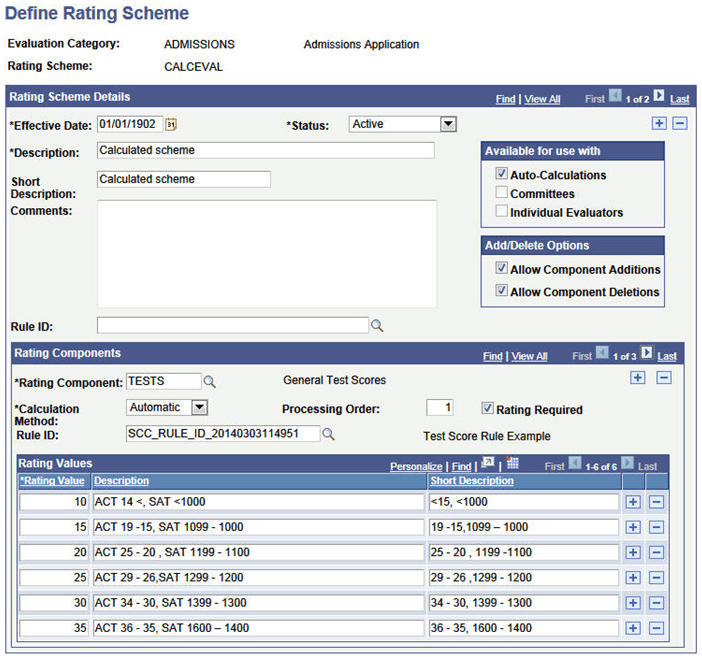
A Rating Scheme is defined for use with Auto-Calculations. It includes three Rating Components, each of which is associated to a Rule. In this setup configuration, there is no rule identified for the Rating Scheme itself, so for the evaluations using this scheme, the Overall Rating value on the transaction pages will be calculated by the record PeopleCode.
This image shows the Define Rating Scheme page (1 of 2): Rules Engine integration example.
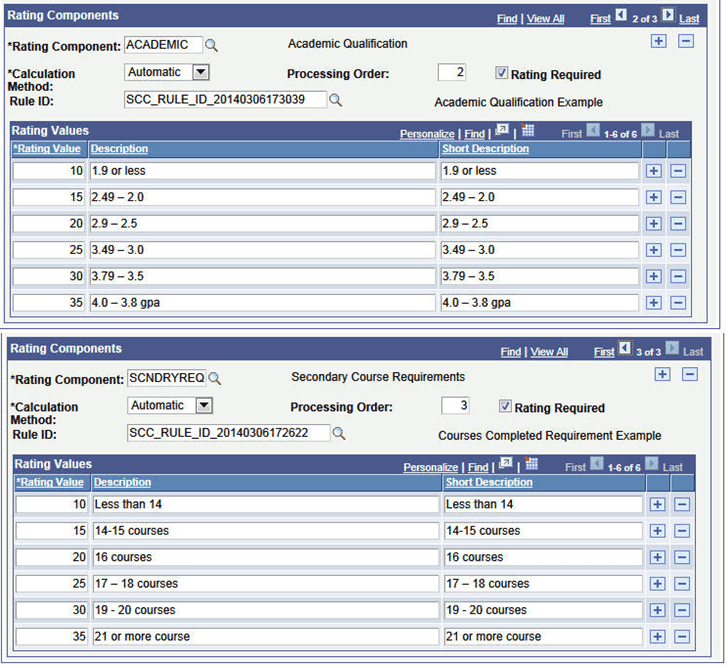
This image shows the Define Rating Scheme page (2 of 2): Rules Engine integration example.
Note:
The rating values specified are used for validation purposes and to derive the description values. Rating values must also be present in the rule itself for calculation purpose.
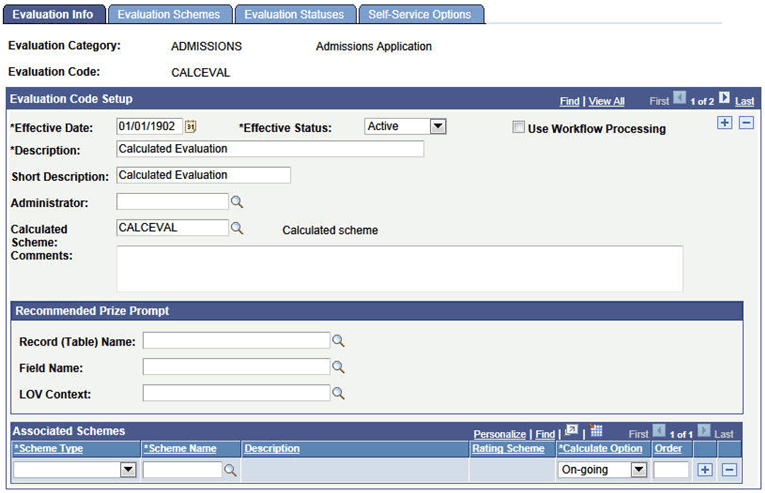
That Rating Scheme is associated with an Evaluation Code. This code is set up to only use a Calculated Scheme; there are no other schemes included in this setup.
This image shows the Evaluation Info page: Rules Engine integration example.
An Evaluation is manually created for EMPLID CCEM0019. At the time of the Evaluation creation, only the Test Score data exists in the system for this ID. At the save of the Manage Evaluation component, the rule linked to the TESTS component is invoked and a value is returned to that rating component:
This images shows the Calculated Scheme page: Rules Engine integration example.
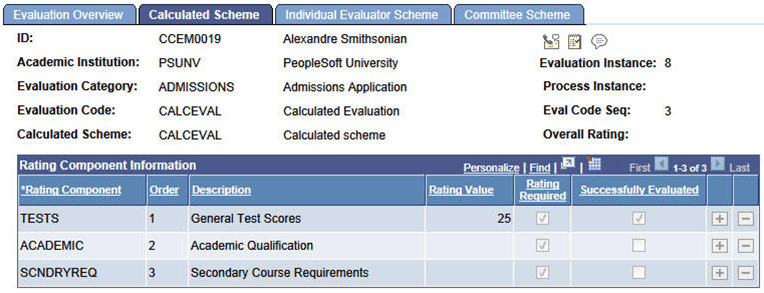
In this example, ID CCEM0019 has the following Test Score data: ACT COMP score of 15, SAT 1 VERB of 600, MATH of 600. The Test Score example rule evaluates the scores, derives a rating of value of 15 for the ACT COMP score and a rating value of 25 for the total of the SAT 1 VERB and MATH scores. Since the SAT 1 total results in a higher rating value, that value is returned to the rating component.
Note:
This same action/activity occurs when using the Create/Maintain Evaluations batch process to create evaluations.
Sometime later the data needed to calculate the other rating components is entered in the system. In this example that is Education data which includes GPA, Percentile Rank and External Subject details.
The SCC_GE_CALC process runs (you can schedule this to run as frequently as needed according to your business needs). The rules for the ACADEMIC and SCNDRYREQ components are invoked and rating values are returned by the batch process for those components. Because all required rating component values are present, the Overall Rating is also calculated:
This image shows the Calculated Scheme page: Rules Engine integration example 2.
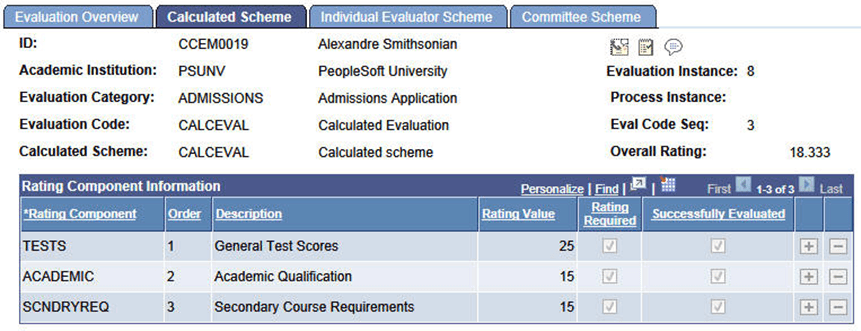
The Academic rating value results from a calculation of the Education Data converted GPA and/or Percentile Rank. In our scenario, ID CCEM0019 has the following data:
-
Converted GPA = 2.0
-
Percentile Rank = 30%
The Academic Qualification rule determines that the Percentile Rank has a higher rating value and returns that value to the rating component.
The SCNDRYREQ rating value results from a count of External Subject completed courses. In our scenario, ID CCEM0019 has a total of 18 external subject completed courses. The SCNDRYREQ rule counts the number of courses completed and applies the rating scale to that number and returns a rating value to the rating component.
In this example above, because no rule was associated for the rating scheme, the Overall Rating is derived by PeopleCode and produces an average of the rating values.
Because this evaluation has not been determined to be final, if there are changes to the underlying data, the rules can be executed again to pick up those changes and do a recalculation. Let us say in this scenario higher ACT scores are received. The COMP score value is 36. The SCC_GE_CALC process is run and the newer score picked up and the TESTS rating component value is recalculated based on that score. The Overall Rating value is also recalculated:
This images shows the Calculated Scheme page: Rules Engine integration example 3
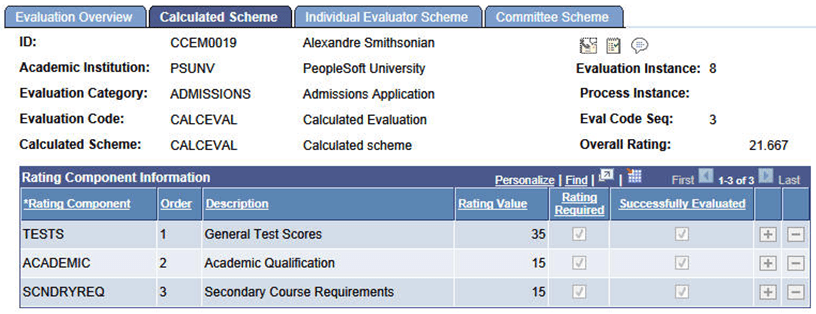
After the Evaluation Status is set to Final, no additional re-calculations will occur.
Functional Scenario Variation
The Rating Scheme setup is modified to use a rule to calculate the Overall rating. Additionally, we have included a Math rating component that is not associated with a rule and is determined then to be populated manually.
This images shows the Define Rating Scheme page: Rules Engine integration example (scenario variation).
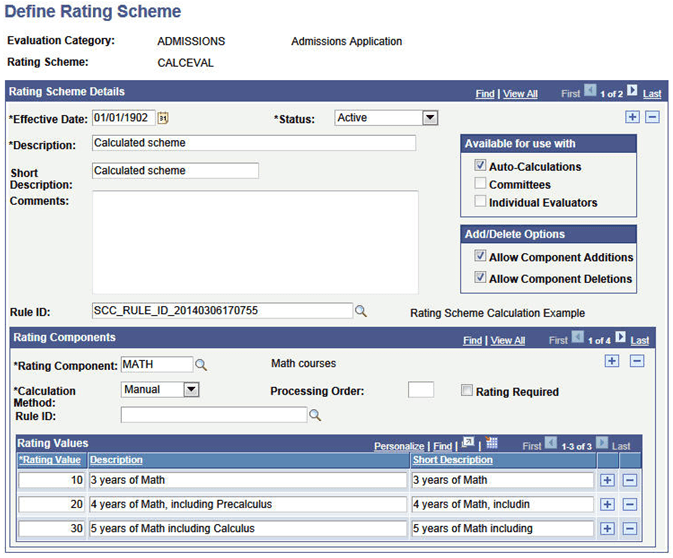
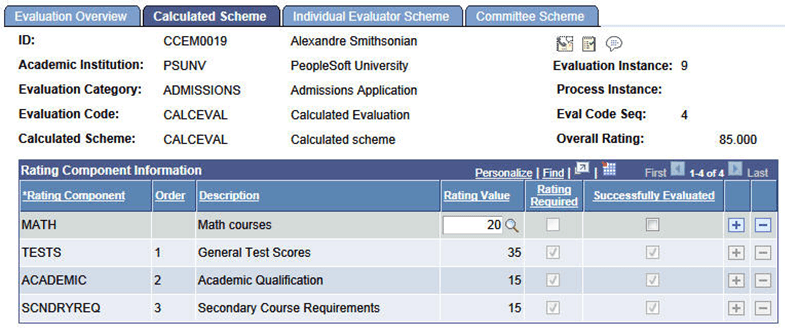
When an evaluation is assigned to an ID, there is now a component which needs to be manually entered.
Note:
The Overall Rating is now calculated by the associated rule – in this example the rule does a simple sum of the rating component values:
This image shows the Calculated Scheme page: Rules Engine integration example (scenario variation).