Evaluation Management System/Rules Engine Integration: Early Result Rule Group
If workflow is used in a particular evaluation, a rule can be associated in the Evaluation Code setup that determines whether the evaluation result or final outcome can be made at various points in a multischeme evaluation. The rules defined under the Early Result Rule Group are invoked when an evaluator submits their evaluation. A submit is defined as all required rating components are populated, an overall rating or recommendation (or both) are present and the Evaluation Status = Final. This can occur from the Self Service pages in the WorkCenter or in the Manage Evaluation component. Each time an evaluation is submitted the Early Result rule fires and evaluates the data returned in the Evaluator List data set. If the rule directs that Early Result = True, then at that point in the evaluation flow, the evaluation concludes and the evaluation can be finalized.
Functional Scenario
An evaluation is setup with an Early Result Rule defined in the Define Evaluation Code component:
This image shows the Evaluation Info page, Early Result Rule Group example.
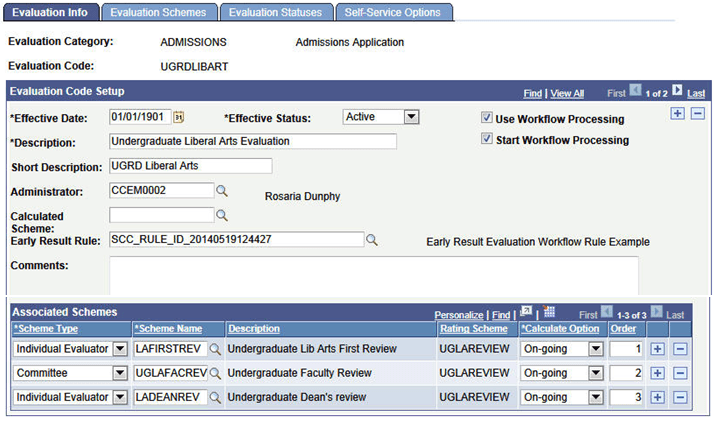
Workflow is used in this evaluation, no calculated scheme is associated with the evaluation code. There are 3 schemes defined as part of the evaluation, as shown above.
Based on the Evaluator results at Order 1, an Early Result rule can determine whether those results require whether the evaluation needs to progress or whether the evaluation can be completed based on the results at Order 1. If those results indicate the workflow should be stopped and the evaluation completed, then the rule’s logic is used to grey down all other levels in the evaluation and populate the Evaluation Status and Recommendation fields on the Evaluation Overview tab for the evaluation. Workflow ceases and no worklist items or notifications (if enabled) will be created for any of the next levels. If the evaluation is to proceed, workflow continues and worklist items and notifications are created for the next level evaluator(s) at Order 2. Again, logic in the rule determines what should happen at this level of the evaluation just as it did for Order 1.
Here are the Evaluations and Calculations in the Rule:
This image shows the Evaluations and Calculations in the Early Result Rule.
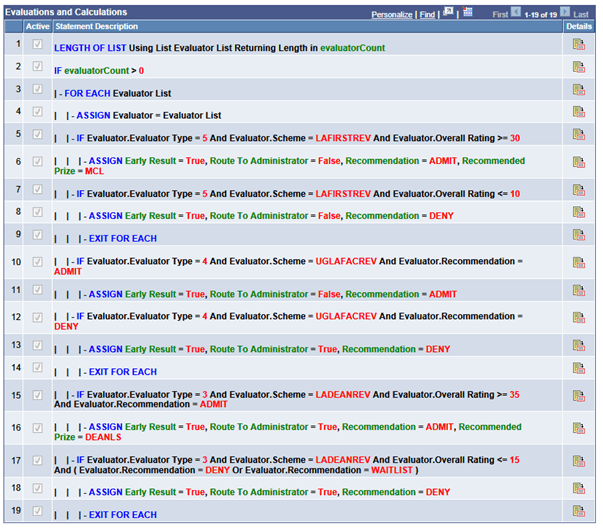
Here is how the rule works with this scenario:
Our evaluator in the Individual Evaluator Scheme LAFIRSTREV is the first to go in the workflow processing order. In our sample rule, we’ve set the logic so we only want the evaluation to progress if that evaluator’s results are within certain parameters:
| - IF Evaluator.Evaluator Type = 5 And Evaluator.Scheme = LAFIRSTREV And Evaluator.Overall Rating >= 30
| | | - ASSIGN Early Result = True, Route To Administrator = False, Recommendation = ADMIT, Recommended Prize = MCL
| | - IF Evaluator.Evaluator Type = 5 And Evaluator.Scheme = LAFIRSTREV And Evaluator.Overall Rating <= 10
| | | - ASSIGN Early Result = True, Route To Administrator = False, Recommendation = DENY
| | | - EXIT FOR EACH
In this example the evaluator type of 5 equates to an individual evaluator ; see more at the end of this section about evaluator types. If the evaluator’s overall rating value is equal to or greater than 30 or equal to or less than 10, the evaluation flow will stop and the evaluation completed using the values specified in the rule for Recommendation to populate the Recommendation value on the Evaluation Overview page. For both conditions, Route to Administrator is false so no intervention by the Evaluation Administrator is expected. The Evaluation Status for the evaluation is set to final, all levels of the evaluation are grayed, no further workflow processing takes place. To continue with our scenario, let’s say the evaluator’s overall rating results were 25, so the workflow processing has continued and the evaluation advances to the Order 2 which is a committee scheme.
Let’s look at the next part of the rule:
| - IF Evaluator.Evaluator Type = 4 And Evaluator.Scheme = UGLAFACREV And Evaluator.Recommendation = ADMIT
| | | - ASSIGN Early Result = True, Route To Administrator = False, Recommendation = ADMIT
| | - IF Evaluator.Evaluator Type = 4 And Evaluator.Scheme = UGLAFACREV And Evaluator.Recommendation = DENY
| | | - ASSIGN Early Result = True, Route To Administrator = True, Recommendation = DENY
| | | - EXIT FOR EACH
In this section of the rule we are referencing the scheme at Order 2. Evaluator type equates to the Committee Administrator. The committee members have all submitted results and the committee administrator will finalize the results for the committee. As with the first example, we have set conditions that are going to direct the workflow, but this time using the Recommendation value that is given for the committee rather than the Overall Rating as in the first example. The logic is much the same, but note that if the Evaluator Recommendation = Deny and we return the Early Result of True, here we are setting the Route to Administrator to True. In that event that all levels of the evaluation are grayed, no further workflow processing takes place except for the Evaluation Administrator: a worklist item would be created and notifications sent. On the Evaluation Overview page, the Recommendation field would be populated with Deny but the field would not be grayed. The Evaluation Status field would not be updated with a final value. Again for purposes of our scenario, let’s say that the committee recommendation is HOLDNXREV (Hold for next review) so the workflow processing has continued and the evaluation advances to the Order 3 which is an individual evaluator scheme.
Here is the final part of the rule:
| | - IF Evaluator.Evaluator Type = 3 And Evaluator.Scheme = LADEANREV And Evaluator.Overall Rating >= 35 And Evaluator.Recommendation = ADMIT
| | | - ASSIGN Early Result = True, Route To Administrator = True, Recommendation = ADMIT, Recommended Prize = DEANLS
| | - IF Evaluator.Evaluator Type = 3 And Evaluator.Scheme = LADEANREV And Evaluator.Overall Rating <= 15 And ( Evaluator.Recommendation = DENY Or Evaluator.Recommendation = WAITLIST )
| | | - ASSIGN Early Result = True, Route To Administrator = True, Recommendation = DENY
| | | - EXIT FOR EACH
In this section of the rule we are referencing the scheme at Order 3, LADEANREV. Evaluator type equates to the Individual Evaluator Scheme Administrator. In this scheme there are multiple evaluators and it is the scheme result (think of this as a consensus of the various evaluators) as set by the administrator which will be considered by the rule. As with the previous examples, we have set conditions that are going to direct the workflow, but this time using the both the Overall Rating and Recommendation values that are given for the scheme. The logic is much the same, but with more complexity. In both conditions, we set the Route to Administrator to True.
Functional Scenario Variation
In the previous scenario, the evaluation code was set up for use with only Individual Evaluator and Committee Schemes. You can incorporate a calculated scheme into the evaluation code setup and have an Early Result Rule recognize the results of the calculated scheme to direct the workflow. Here is the evaluation code setup:
This image shows the Evaluation Info page, Early Result Rule Group example that uses Calculated Scheme.
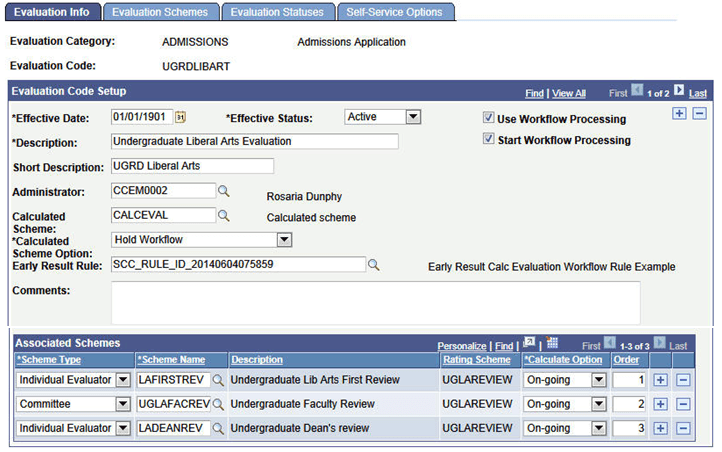
Workflow is used in the evaluation. Note that the Calculated Scheme Option is set to ‘Hold Workflow’. There are also Individual Evaluator and Committee Schemes in the evaluation code setup, as shown above.
Here are the Evaluations and Calculations in the Rule:
This image shows the Evaluations and Calculations in the Early Result Rule, using Calculated Scheme.
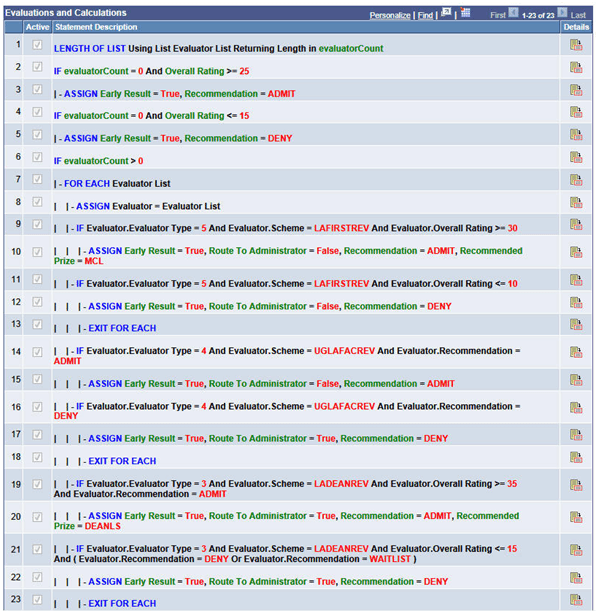
This is the same rule seen previously but cloned to account for the use of the calculated scheme in the scenario. The calculated scheme evaluates data in the system and returns an overall rating value. For more information, see Evaluation Management System/Rules Engine Integration: Rating Component Calculation and Rating Scheme Calculation Rule Groups.
In this scenario, we want the calculated scheme overall rating to determine what happens next in the evaluation flow, so we have set the Calculated Scheme Option to Hold Workflow. This means that the workflow will not trigger until all required rating components have rating values and an Overall Rating is calculated. When used with this Early Result Rule, the logic in the rule will direct whether the workflow should start or not. Here is the relevant part of the rule that evaluates for the calculated scheme:
IF evaluatorCount = 0 And Overall Rating >= 25
| - ASSIGN Early Result = True, Recommendation = ADMIT
IF evaluatorCount = 0 And Overall Rating <= 15
| - ASSIGN Early Result = True, Recommendation = DENY
In terms of activity in the evaluation, since we are holding workflow, the calculated scheme essentially is the first portion of the evaluation to take action. Once the Overall Rating is calculated this signifies a submit action. The early result rule is invoked. Since no evaluators are returned in the count, we know this is a calculated scheme and the logic as shown above is applied. In this scenario, the evaluation could be completed based on the calculated scheme results (if Overall Rating is > = 25 or <= 15). If the Overall Rating falls between those values, the evaluation will proceed and workflow will then start and advance the evaluation to the scheme at Order 1. From there the same scenario ensues as discussed in the previous section.
Note:
Regarding the Calculated Scheme Option — if you were to use Do Not Hold Workflow and the Start Workflow flag is set to Y then the workflow would start immediately without consideration of the calculated scheme. In our scenario here, the difference would be that, even though not all required rating components have ratings and no Overall Rating has been calculated, the workflow would process and worklist items and notifications would be sent to evaluators in the first processing order.
A Note on Evaluator Types
Evaluator Types is a construct used behind the scenes in Evaluation Management in the management of Self Service pages display to the user and in workflow processing . We have leveraged the EMS Evaluator Decision Info Data set as well. When building rules there is a prompt available to aid in selecting the correct value. For reference here is the list of Evaluator Types:
-
Evaluation Administrator.
-
Committee Scheme Administrator.
-
Individual Scheme Administrator.
-
Committee Administrator.
-
Individual Evaluator.
-
Committee Evaluator.