(Only for online transactions) Step 8: Creating a User Interface
The user interface for your CTM online transaction can be created using PeopleTools language, or others. While we recommend using Oracle Application Development Framework (Oracle ADF) to develop an online transaction user interface, you can use any technology or tool that complies with PeopleTools Integration Broker.
Creation considerations:
-
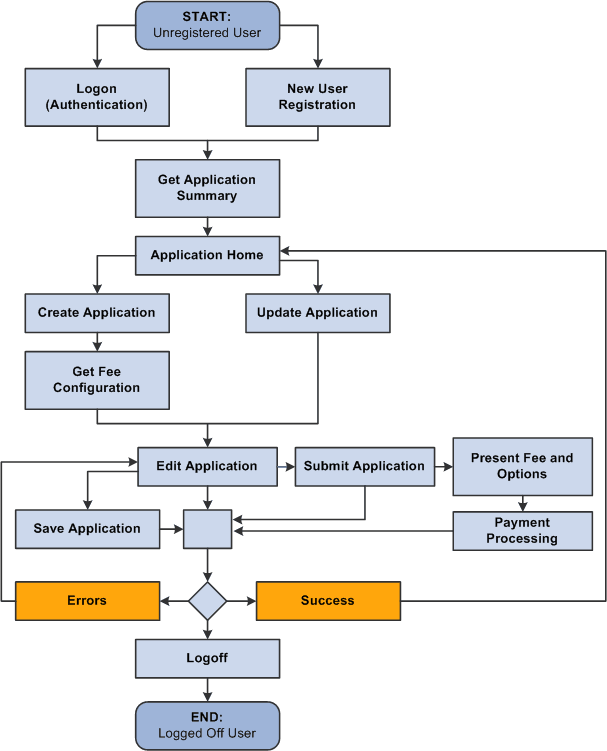
Start by defining the data collection flow for your online user interface. This exercise will help you identify where the web services you created in one of the previous subsections gets invoked. For example, an online application user interface, may have the following data collection flow:
Example of a data collection flow for an Online Application
-
Because an online transaction requires authenticating the user, consider using the New User Registration framework to take advantage of all the Campus Solutions security objects delivered with the framework. Some self-service users may already have a username and a password to access your system (returning users) some don’t (guest users). The New User Registration framework allows both users to authenticate to your system and once successfully authenticated, be transferred to the online self-service page used by your CTM transaction.
-
Once the system has authenticated the user, it is also an appropriate time for the user interface to perform any initialization or setup to prepare the user for entry into the online transaction. Such setup may include requesting for a bulk list of values data that the user interface can subsequently display to the user. Performing this activity up front may result in a general performance improvement and improved user experience.
A typical self service online transaction user interface might perform the following actions:
To allow a new user to register and a returning user to login, see Setting Up CTM for New User Registration.
To initialize retrieval of list of values for specific fields:
-
After authenticating the user, optionally formulate a bulk List-Of-Values request message.
-
Submit the request message to the SCC_GET_LOV service operation.
-
Store the List-Of-Value results in a temporary storage area for use throughout the online transaction functioning.
Refer to the third step related to list of values discussed in the Creation considerations topic of this subsection.
To retrieve saved transactions:
If the online transaction allows the self-service user to save an incomplete transaction in order to come back later, create a page where you can display the incomplete transaction names so a user can select the proper transaction to complete. A get service will retrieve the saved data.