Step 7: Setting Up a Transaction
See Setting Up CTM, “Setting Up a Transaction.”
Setup considerations:
-
The Transaction Handler application class handles the activities specific to the posting of the data for your new CTM transaction, for instance, data validation, posting, save, purge, to get related transactions and so on. The application class you specify here must extend the SCC_SL_TRANSACTION:INTFC:AbstractTransaction. Any method of this class can be overridden by the Transaction Handler class as per business requirements. The following is an example of a Transaction Handler application class code:
import SCC_SL_TRANSACTION:INTFC:AbstractTransaction;
class TransactionClass extends SCC_SL_TRANSACTION:INTFC:AbstractTransaction
	method TransactionClass ();

/* May override these methods as per business requirement */
	method validate(&p_tempConstituentID As number, &p_log As
SCC_SL_TRANSACTION:INTFC:MessageLog out) Returns boolean;
	method post(&p_tempConstituentID As number, &p_EMPLID As string);
	method save(&p_tempConstituentID As number, &p_EMPLID As string);
  	 method getRelatedTransactions(&p_tempID As number, &p_transacCode As string)
Returns array of SCC_SL_TRANSACTION:INTFC:RelatedTransaction;
	method purge(&p_arrTempConstituentID As array of number);

end-class;
method TransactionClass
	%Super = create SCC_SL_TRANSACTION:INTFC:AbstractTransaction();
end-method;
Note:
For an example of a delivered Transaction Handler application class that extends the SCC_SL_TRANSACTION:INTFC:AbstractTransaction, look at the AAWS admission transaction delivered application class SCC_OLA.TRANSACTION.AdmissionTransaction.
-
The Staging Record Name is the staging record you created in Step 1: Creating or Extending Staging Tables. It is the parent staging record for your transaction.
-
While you can use different values, we recommend to set the Constituent Handler information as follows:
-
Root Package ID: SCC_SL_TRANSACTION
-
Path: INTFC
-
Application Class ID: DefaultConstituent
-
-
The Transaction Data Launch View should contain the location of where you applied the transaction staging component you created in step 5. Leave the values as blank if you decided not to provide a component to review the staged transaction-specific data.
-
When creating a CTM transaction that only involves constituent data (no transaction-specific data), consider setting up your transaction with the following Transaction Handler information:
This example illustrates the fields and controls on the Example of Transaction Handler section on Transaction Setup page. You can find definitions for the fields and controls later on this page.
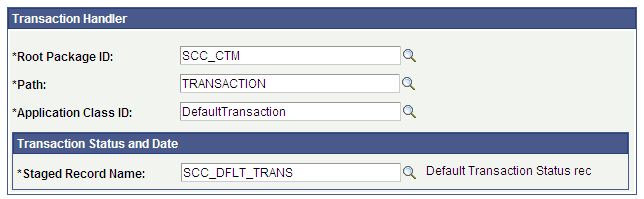
A delivered example of a CTM transaction that does not involve any transaction data is DELEGATED_ACCESS. This CTM transaction can be used to gather constituent information about the third party (the proxy) who has been delegated access to a student data. In this case the transaction will only process constituent data, leaving all the transaction-specific data logic unused.
Note:
For examples on how the Transaction Setup component is configured for the delivered AAWS admission transaction, see Setting Up CTM.