(Optional) Step 4: Setting Up the CTM Transaction for Delegated Access
Access the Transaction Setup page ().
This example illustrates the fields and controls on the Sample Transaction Setup Page for Delegated Access. You can find definitions for the fields and controls later on this page.
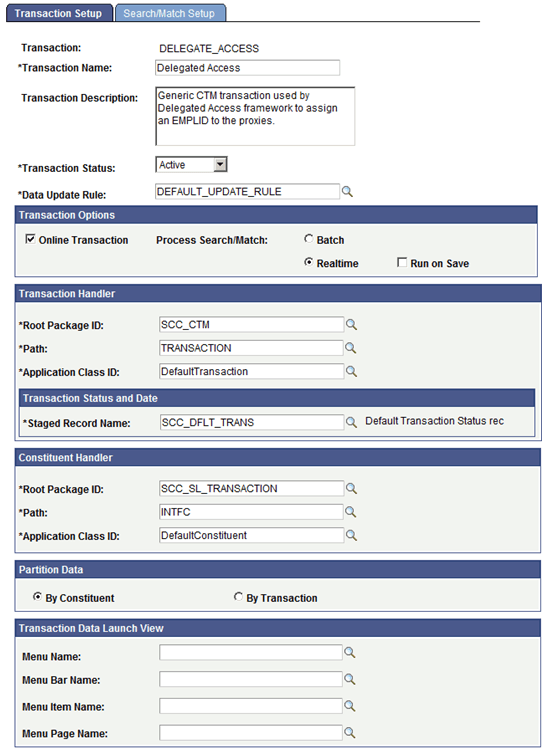
Each delegation transaction you create can be associated with a CTM Transaction Code. Consider reusing the same CTM Transaction Code. Generally, you will want to use different values only if a delegation transaction code requires a different Search/Match configuration, or if you want to use a different Data Update Rule configuration. It is recommended that you associate a delegation transaction with a CTM Transaction Code only if you want to assign an EMPLID to the proxy.
The following setup is recommended for configuring a CTM transaction for delegated access:
Transaction Options
| Field or Control | Description |
|---|---|
|
Online Transaction |
Select this check box because the Delegated Access business process is performed through self-service pages. |
|
Process Search/Match |
Select:
|
Transaction Handler
| Field or Control | Description |
|---|---|
|
Root Package ID |
Select SCC_CTM. |
|
Path |
Select TRANSACTION. |
|
Application Class ID |
Select DefaultTransaction. |
|
Staged Record Name |
Select SCC_DFLT_TRANS. |
The SCC_CTM.TRANSACTION.DefaultTransaction class allows for the processing of CTM transactions that use only constituent data and do not use any transaction-specific data. Delegated Access does not involve any transaction-specific data.
Constituent Handler
| Field or Control | Description |
|---|---|
|
Root Package ID |
Select SCC_SL_TRANSACTION. |
|
Path |
Select INTFC. |
|
Application Class ID |
Select DefaultConstituent. |
Partition Data
| Field or Control | Description |
|---|---|
|
By Constituent |
Select this option. The Delegated Access framework does not use transaction data. |
Transaction Data Launch Parameters
The fields in this region should be left blank because there is no transaction-specific data with delegated access and therefore there is no transaction staging component for the administrative user.
Note:
Set the Search/Match Setup page using the configuration of your choice.