Setting Up Organization Types
To define an organization type, use the External Organization Type Table component (SCC_ORG_TYP_TB).
The External Organization Type Table page defines the business structure of an organization used by an institution such as Business, Non-Profit, School, Foundation, Knowledge or Other. It also sets up the dynamic links to the various pages that a user would complete for data entry for the organization type.
This section discusses how to define the organization type.
Page Used to Define the Organization Type
| Page Name | Definition Name | Navigation | Usage |
|---|---|---|---|
|
External Organization Type Table |
SCC_ORG_TYP_TBL |
|
Define the organization type. |
Defining the Organization Type
Access the External Organization Type Table page ().
This example illustrates the fields and controls on the External Organization Type Table page. You can find definitions for the fields and controls later on this page.
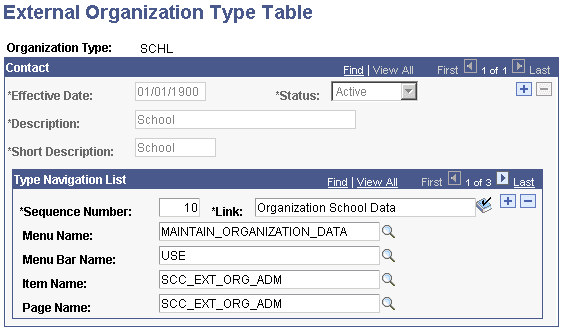
Contact
| Field or Control | Description |
|---|---|
|
Status |
Displays Active to indicate that a particular organization type is available. If your institution determined not to use the organization type Inactive displays. |
|
Description |
Enter a description of the organization type. |
|
Short Description |
Enter an abbreviated description of the organization type. |
Type Navigation List
| Field or Control | Description |
|---|---|
|
Sequence |
Displays 10. This number can increase in increments of 10. This specifies the position of the specified link as it appears on the EXT_ORG_TABLE page (the main page used for creating/maintaining external organizations). If an external organization type needs for you to complete multiple pages to specify all the information about a specific organization type, multiple dynamic links can be displayed to specify the pages necessary to complete the information. Therefore multiple sequence numbers are used to determine how the links appear. |
|
Link |
Enter the name of the link. This link appears in theOrganization Type Related group box on the Organization Table page. |
|
Menu Name |
Enter the name of the menu name. |
|
Menu Bar Name |
Enter the name of the menu bar. |
|
Item Name |
Enter the item name. |
|
Page Name |
Enter the page name. |