Step 6: Setting Up Permission Lists and Roles for the Delegated Access Components
Use PeopleTools security components to create a permission list that contains the DA menu . To keep the security granular in order to delegate access to a specific subject at a time, consider creating one permission list per DA menu. For example, if you look at the permission list CS - DA Contact Info Update, it contains only one DA menu (SCC_DA_SS_ADDRESS). This menu grants access to several components: Addresses, Email Addresses and Phone.
After creating the permission list, you should add the permission list to a role. Again, use PeopleTools security components to create a role that includes the permission list. The role becomes the Proxy Role Name, which you use when you create the delegation transactions. It is the role that is assigned to the proxy so the proxy can perform the transaction.
The following information illustrates the permission lists and role names that contain the sample components delivered in your system.
| Role Name | Permission List | Menu Name | Component Name |
|---|---|---|---|
|
CS - DA Contact Info Update |
HCCPCSSA1141 |
SCC_DA_SS_ADDRESS SCC_DA_SS_ADDRESS SCC_DA_SS_ADDRESS |
SS_CC_ADDRESSES SS_CC_EMAIL_ADDR SS_CC_PERS_PHONE |
|
CS - DA Contact Info View |
HCCPCSSA1140 |
SCC_DA_ADDR_VW SCC_DA_ADDR_VW SCC_DA_ADDR_VW |
SS_CC_ADDRESSES SS_CC_EMAIL_ADDR SS_CC_PERS_PHONE |
|
CS - DA Emergency Contacts |
HCCPCSSA1150 |
SCC_DA_SS_EMRCNCT |
SS_CC_EMERG_CNTCT |
|
CS - DA Holds |
HCCPCSSA1170 |
SCC_DA_SS_HOLDS |
SS_CC_HOLDS |
|
CS - DA To Do List |
HCCPCSSA1160 |
SCC_DA_SS_TO_DO |
SS_CC_TODOS |
For information on creating roles and permission lists, see PeopleTools: Security Administration.
Granting access to the SCC_DA_AUTH_CHECK service operation
For each permission list that grants access to a DA menu, make sure it also grants access to the SCC_DA_AUTH_CHECK service operation. This web service is used by the Proxy Access Validation process when the proxy accesses a delegated component (PAV is triggered in realtime from the search record).
Note:
If you do not grant access to the SCC_DA_AUTH_CHECK service operation, self-service users and administrators are not able to access the Share My Information component and Review Shared Information component, respectively.
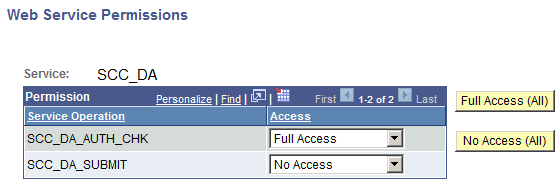
This example illustrates how to Set Up SCC_DA_AUTH_CHK Service Operation in Permission Lists.
-
Edit the permission list by going to . For example: HCCPCSSA1141.
-
Add the web service SCC_DA:
-
Click Edit.
-
For the SCC_DA_AUTH_CHK service operation, select Full Access.
-
-
Make sure the required security for SCC_DA_AUTH_CHK is granted from the permission list you use to grant delegators access to the Share My Information component, and also from the permission list you use to grant administrators access to the Review Shared Information component. This is necessary because the PAV process is also triggered in real-time when users access these components.
Granting access to the SCC_DA_SUBMIT service operation
Granting access to the SCC_DA_SUBMIT service operation is only needed in the permission list used to grant a proxy access to the Proxy Terms and Conditions page ( HCCPCSSA1182 - CS - DA Proxy Terms&Conditions and HCCPCSSA1180 - CS - DA Proxy Terms&Cond_TEST). Access to this service is needed so the proxy can submit the information.
For information on:
-
Using the SCC_DA_SUBMIT service operation, see Delegated Access Validation.
-
Using the permission lists with the corresponding roles in New User Registration, see New User Registration Framework and Delegated Access.