Step 8: Provisioning the Gatekeeper Permission List to all of Your Users
The permission list HCCPCSSA1200 - CS NUR GateKeeper is used to access the Gatekeeper. Add this permission list to a role that you want to assign to all of your users that could potentially register with your system through a New User Registration login page. For example, students, alumni, applicants, and so on.
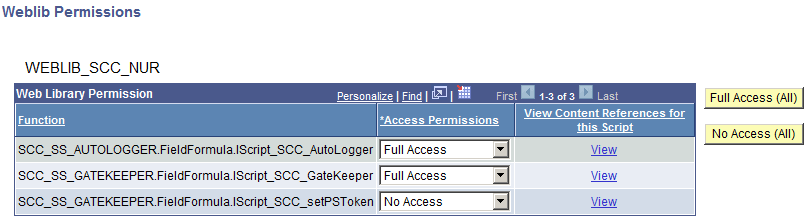
The HCCPCSSA1200 permission list grants access to the web library WEBLIB_SCC_NUR.
This example illustrates the fields and controls on the HCCPCSSA1200 Web Service Permissions Page.
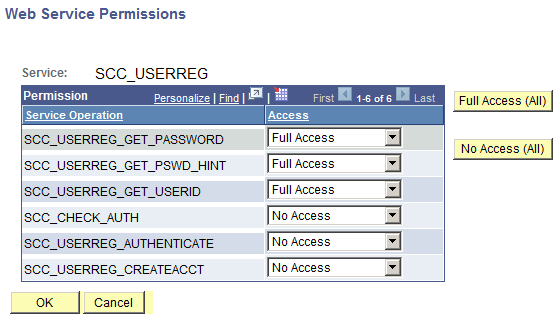
The web library grants access to the following permissions:
This example illustrates the fields and controls on the WEBLIB_SCC_NUR Weblib Permissions Page.
Having security access to the Gatekeeper allows your existing users to sign in through New User Registration login page with an existing user ID and password, and take advantage of the Gatekeeper functions. For example, automatic application level provisioning and page transfer after successfully signing into your system. If users do not have access to the Gatekeeper, they see the following error after they are authenticated: Not Authorized.
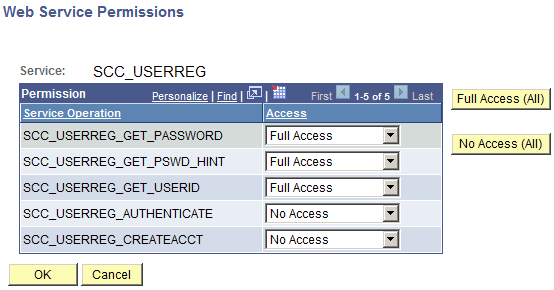
If you implement the New User Registration Forgot Password and Forgot User ID utilities, your existing users also need to have access to the HCCPCSSA1210 permission list. This permission list grants access to the web services that are needed for the Forgot Password and Forgot User ID utilities.
This example illustrates the fields and controls on the HCCPCSSA1210 Web Service Permissions Page.
For guest users, create a new role that exclusively contains the HCCPCSSA1200 permission list. Also, when you implement the New User Registration Forgot Password and Forgot User ID utilities, include the HCCPCSSA1210 permission list. Add this role to the SCC_SS_TEMPLATE user ID. By default, the guest is provisioned with all the security setup inside that user ID.
Related Topics