Setting Security for Milestones
To set up Milestone security, use the Milestone Security (SSR_SCRTY_GRADSTAT) component.
This section discusses how to set Milestone security.
Page Used to Set Security for Milestones
| Page Name | Definition Name | Navigation | Usage |
|---|---|---|---|
|
Milestone Security |
SCRTY_TBL_MLSTN |
|
Identify, by user and institution, access to Milestones. |
Setting Milestone Security
Access the Milestones Security page ().
This example illustrates the fields and controls on the Milestone Security page. You can find definitions for the fields and controls later on this page.
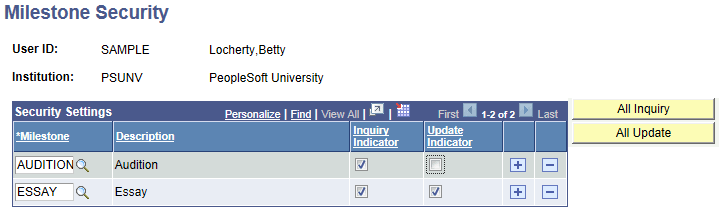
| Field or Control | Description |
|---|---|
|
Inquiry Indicator |
Select this check box to allow the user to see the Milestone. |
|
Update Indicator |
Select this check box to allow the user to see and update the Milestone. |
|
All Inquiry |
Click this button to allow the user to see all Milestones. |
|
All Update |
Click this button to allow the user to see and update all Milestones. |