Reconciling Tuition Fee Payments
This section provides an overview of reconciling Tuition Fee payments to HEI's from the SLC and discusses how to:
-
View the Remittance Report File Summary.
-
View Remittance Data to Student Award Data Comparison.
-
View Student Award Details.
-
View FA Disbursement Data to SF Item Data Comparison.
-
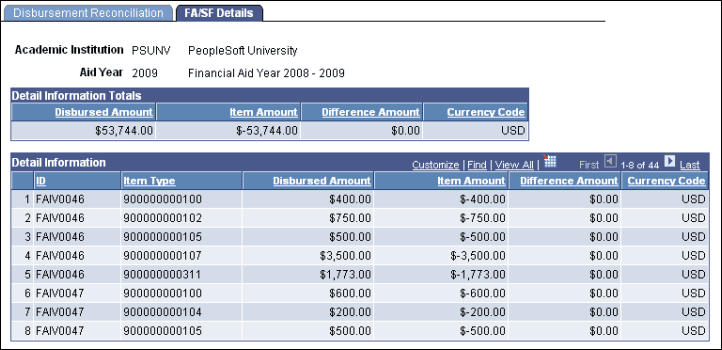
View FA/SF Details.
Understanding Tuition Fee Payments Reconciliation
You can configure the system to use SLC Tuition Fee Loan and Tuition Fee Grant payment data to pay students' tuition fees. HEI's can use the system to reconcile actual payments received from the SLC, represented by Remittance Report file data, with payments that have been made to students.
Pages Used to Reconcile Tuition Fee Payments
| Page Name | Definition Name | Navigation | Usage |
|---|---|---|---|
|
Remittance Report File Summary |
SFA_SLC_TFRA_SUMRY |
|
View the Remittance Report files that have been loaded for a HEI/SLC academic year. |
|
Remittance Reconciliation |
SFA_SLC_TFRA_RECON |
|
View a comparison of Remittance data and Student Award Data for an Institution/Aid Year/HEI, which maps to the HEI/SLC academic year. |
|
Remittance /Student Awards |
SFA_SLC_TFRA_AWARD |
|
View the details for student remittance and award data. |
|
Disbursement Reconciliation |
SFA_DISB_SF_RECON |
|
View a comparison of FA Disbursement data and SF Item data. |
|
FA/SF Details |
SFA_DISB_SF_RECON1 |
|
View the details for student Financial Aid Disbursement data and Student Financials Item data. |
Viewing the Remittance Report File Summary
Access the Remittance Report File Summary page ().
This example illustrates the fields on the Remittance Report File Summary page.
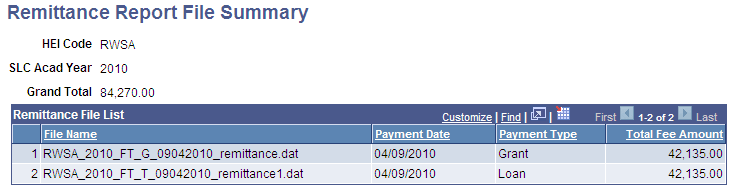
Use this page to learn which files have been loaded for the current HEI and SLC academic year.
Viewing the Remittance Data to Student Award Data Comparison
Access the Remittance Reconciliation page ().
This example illustrates the fields and controls on the Remittance Reconciliation page. You can find definitions for the fields and controls later on this page.
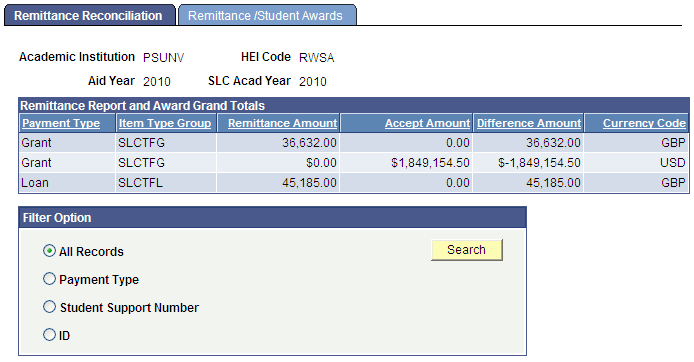
Use this page to compare Remittance data to Student Award Data for a particular institution, aid year, and HEI combination.
Remittance Report and Award Grand Totals
This group box lists the totals by payment type, such as grant or tuition. The page uses the values in the Remittance Report Parameters group box on the Student Loans Company Setup - Options page to associate item type groups with payment types.
Filter Option
Use the Filter Option group box to filter results by Payment Type, Student Support Number, or ID. Click the Search button to access the Remittance /Student Awards page.
Viewing Student Award Details
Access the Remittance/Student Awards page ().
This example illustrates the fields and controls on the Remittance/Student Awards page. You can find definitions for the fields and controls later on this page.
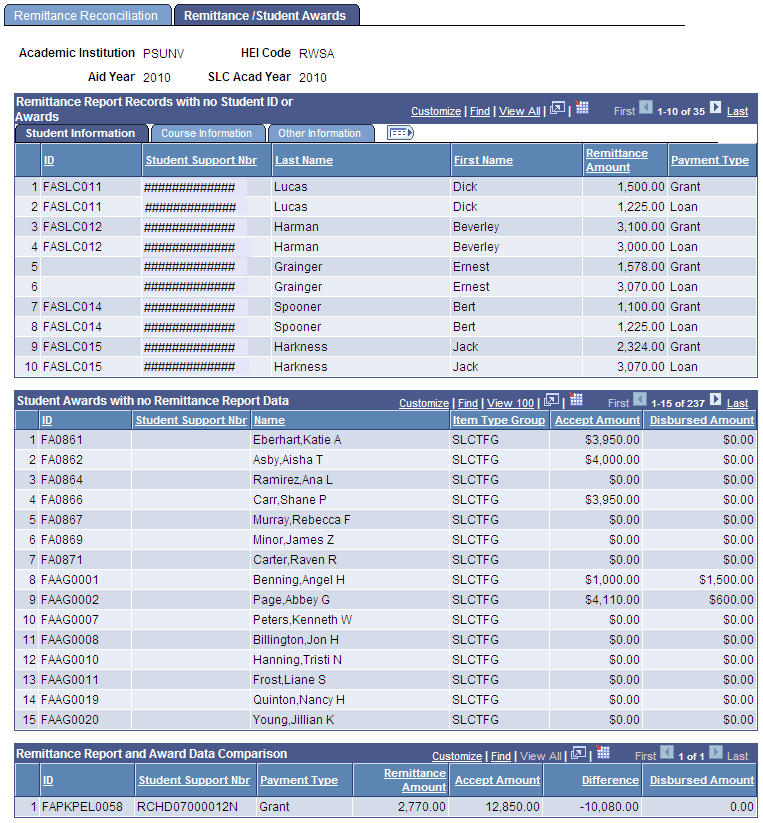
Remittance Report Records with no Student ID or Awards
This group box lists Remittance Report data that is not associated with a student ID or does not have a matching SLC Financial Aid Award. For example, a Remittance Report record was received but could not be matched with a student in the system. Or a Remittance Report record with a Student Support Number is matched to a student ID, but that student does not have any SLC Financial Aid Awards. You can view details about the Remittance Report records in this group box by clicking on the Student Information, Course Information, and Other Information tabs.
Student Awards with no Remittance Report Data
This group box lists students who have SLC Financial Aid awards that do not have matching Remittance Report data.
Remittance Report and Award Data Comparison
This group box lists students who have Remittance Report data and SLC Financial Aid award data and displays differences, if any, between the two.
Viewing the FA Disbursement Data to SF Item Data Comparison
Access the Disbursement Reconciliation page ().
This example illustrates the fields and controls on the Disbursement Reconciliation page. You can find definitions for the fields and controls later on this page.
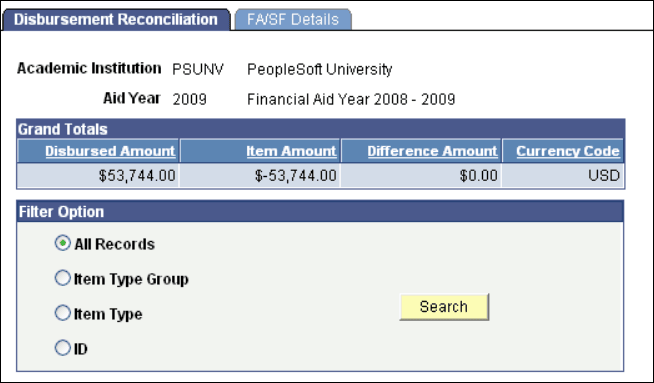
Use this page to compare Financial Aid disbursement data to Student Financials item data.
Filter Option
Use the Filter Option group box to filter results by Item Type Group, Financial Aid Item Type, or ID. Press the Search button to access the FA/SF Details page.
Note:
You can use this page to access information about any Financial Aid Item Types. It is not limited to SLC Item Types.