Setting Up Group Options
Access the Group Options page ().
This example illustrates the fields and controls on the Group Options page. You can find definitions for the fields and controls later on this page.
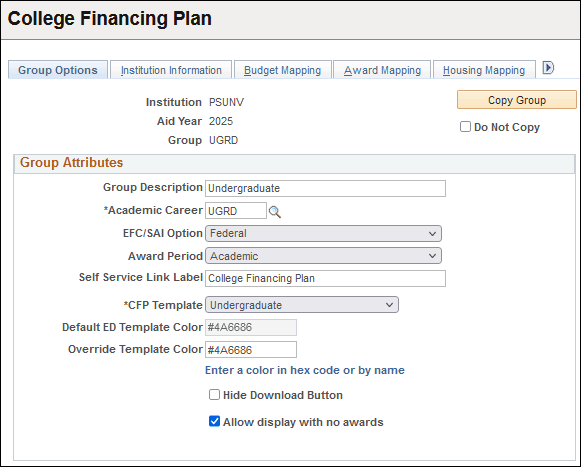
| Field or Control | Description |
|---|---|
|
Copy Group |
Click this button to open the Group Copy window. You can use this window to copy existing groups for modification and then saving as a new College Financing Plan Group. Note: You can’t copy groups from AY 2020 and earlier because of the changes to the setup between AY 2020 and 2021. |
|
Do Not Copy |
Select this option to prevent the group from being copied during the Aid Year Rollover process. |
|
Group Description |
Enter a description for this group. |
|
Academic Career |
Select a career to associate to the group. This value is used when retrieving budget and award information. |
|
EFC/SAI Option (Expected Family Contribution Option) |
Select:
|
|
Award Period |
Select an award period to associate to the group. This value is used when retrieving budget and award information. If you select “Both”, data from both the ‘Academic’ and ‘Non Standard’ Award Periods are included in one College Financing Plan. |
|
Self Service Link Label |
Enter the text you want to display as the Financial Aid Self Service link to the College Financing Plan. “College Financing Plan” is the default text. |
|
CFP Template (college financing plan template) |
Select the template you want to use for this group:
|
|
Default ED Template Color (default united states department of education template color) |
Displays the default hexadecimal format color code used by the United States Department of Education. |
|
Override Template Color |
Enter a hexadecimal format color code if you want to override the default. |
|
Hide Download Button |
Select to disable the user's ability to download an XML version of their CFP data. |
|
Allow display with no awards |
Select this check box if you want the College Financing Plan link to be available to students in Self Service even if the student doesn't have any qualifying awards for the Institution and Aid Year. Note: This option helps institutions comply with the expectations within Principles of Excellence in Executive Order 13607 which states that educational institutions provide meaningful information to service members, veterans, spouses, and other family members about the financial cost (budget) and quality (institutional metrics) of educational institutions. Although the student may not have any awards, it is assumed that they would have a cost of attendance budget assigned which is used to create the College Financing Plan based on the Budget Mapping options. |