Specifying Loan Counseling Attributes
Access the Loan Counseling page ().
This example illustrates the fields and controls on the Loan Counseling page. You can find definitions for the fields and controls later on this page.
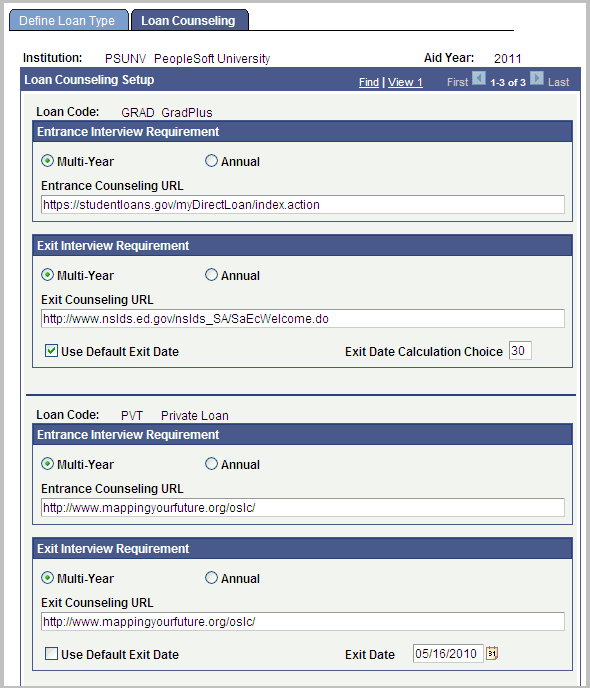
Entrance Interview Requirement
Note:
You can only select Multi Year or Annual; not both.
| Field or Control | Description |
|---|---|
|
Multi Year |
Select if a loan-counseling entrance interview is required only once. |
|
Annual |
Select if a loan-counseling entrance interview is required each aid year that the student borrows this type of loan. |
|
Entrance Counseling URL |
Enter URL to display in Self Service. |
Exit Interview Requirement
Note:
It does not matter if you select Multi Year or Annual for the Exit Interview Requirement. The selection has no direct impact to the Exit Interview functionality.
| Field or Control | Description |
|---|---|
|
Exit Counseling URL |
Enter URL to display in Self Service. |
|
Use Default Exit Date |
Select this check box to specify the default exit date for activating your exit interview URL. If this check box is selected, the Exit Date Calculation Choice is displayed. If it is not selected, the Exit Date is displayed. |
|
Exit Date Calculation Choice |
Select the number of days from the exit or program completion date to start displaying the exit interview link to students. If you select Multi-Year, the system uses the student's graduation date to calculate the number of days based on the Exit Date Calculation Choice value. For example, if the value is 15 and the graduation date is June 30, the link will appear on June 15. If you select Annual, the system uses the last day of the term and subtracts the value in the Exit Date Calculation Choice check box. For example, if the value is 15 and the last day of the term is June 15, the link will appear on May 30. |
|
Exit Date |
Enter or select the calendar date on which to start displaying the exit interview link. This field displays when Use Default Exit Date is not selected. |