Correcting and Editing Data in the Suspense Record
Important:
Test score load and other processes and components discussed in this Processing External Test Scores documentation are deprecated. It is strongly recommended that you use Prospect/Admissions Data Load (PDL) instead. For more information on PDL, see the Prospect/Admissions Data Load documentation.
This section provides an overview of the correcting and editing of suspense data and discusses how to review:
-
Test score suspense data.
-
Personal information.
-
Test score data.
Understanding, Correcting, and Editing Suspense Data
Before entering the TAC Suspense component, you must enter the TAC test ID. The pages in the component dynamically appear based on the TAC test ID you enter. The pages in the component are very similar in the way they look and work. For example, every suspense component has a Personal Information page. In addition, they all share the first page – Process Options. Many of the values and codes that appear in the suspense component are based on values and codes that the TAC defines. Contact the TAC that manages the application for full descriptions of the data that appears in these pages or refer to the data layouts you receive from the TAC.
Note:
Data in suspense tables does not affect tables in your database until you post the data. In addition, if you find an error in the suspense component after you post the data, you have to go to the appropriate page in your database to make any changes. For example, if you find an error on the Personal Information page in the Suspense component, you have to go to the Add/Update a Person component to correct the error.
Pages Used to Correct and Edit Data in the Suspense Record
| Page Name | Definition Name | Navigation | Usage |
|---|---|---|---|
|
Test Score Suspense Data |
SAD_SUSP_PROC_OPTN |
|
View and correct load process results and test score messages. This page appears for every test ID. |
|
Personal Information |
SAD_ACT_SUS_BIO SAD_ADA_SUS_BIO SAD_AMC_SUS_BIO SAD_AP_SUS_BIO SAD_CRS_SUS_BIO SAD_DAT_SUS_BIO SAD_EOS_SUS_BIO SAD_GMS_SUS_BIO SAD_GMT_SUS_BIO SAD_GRE_SUS_BIO SAD_LAW_SUS_BIO SAD_SAT_SUS_BIO SAD_SSS_SUS_BIO SAD_TFL_SUS_BIO |
|
Review and edit the student's personal information in the suspense record. Refer to the data layouts from the testing agency to determine the fields that will appear. Each test has a Personal Information page. The data varies depending on the test ID. |
|
Tests |
SAD_ACT_SUS_TST SAD_ADA_SUS_TST SAD_AMC_SUS_TST SAD_AP_SUS_TST SAD_CRS_SUS_TST SAD_DAT_SUS_TST SAD_EOS_SUS_TST SAD_GMS_SUS_TST SAD_GMT_SUS_TST SAD_GRE_SUS_TST SAD_LAW_SUS_TST SAD_SSS_SUS_TST SAD_TFL_SUS_TST |
|
Review or edit test data in the suspense record. Some of the information on this page is required (such as test date and test components). If this information is missing in the external test data load, you must enter valid values here before posting the record. Refer to the data layouts from the testing agency to determine the fields that will appear. Each test has a Tests page, with the exception of SAT. The data varies depending on the test ID. |
|
Academics |
SAD_ACT_SUS_SPS |
|
For ACT only: Review or edit academic data in the suspense record. Refer to the data layouts from ACT to determine the fields that will appear. Note that the same changes have been made to the corresponding candidate data page (SAD_ACT_CD_ACAD). ] |
|
Activities |
SAD_ACT_SUS_COL |
|
For ACT only: Review and edit activity information in the suspense record. Refer to the data layouts from ACT to determine the fields that will appear. |
|
Interests |
SAD_ACT_SUS_INT |
|
For ACT only: Review and edit interest data in the suspense record. Refer to the data layouts from ACT to determine the fields that will appear. |
|
Education |
SAD_ADA_SUS_OTH |
|
For ADA only: Review and edit education data in the suspense record. Refer to the data layouts from Associated American Dental Schools Application Service (AADSAS) to determine the fields that will appear. |
|
Courses |
SAD_ADA_SUS_CRS |
|
For ADA only: Review and edit course detail information in the suspense file. Refer to the data layouts from AADSAS to determine the fields that will appear. |
|
Applicant Data |
SAD_ADA_SUS_ADDL SAD_AMC_SUS_OTH |
|
For ADA only: Review and edit applicant data in the suspense record. Refer to the data layouts from AADSAS to determine the fields that will appear. |
|
Family Information |
SAD_ADA_SUS_FAMILY |
|
For ADA only. Review and edit the family information data in the suspense record. Refer to the data layouts from AADSAS (Associated American Dental Schools Application Service) to determine the fields that will display. |
|
Essays |
SAD_ADA_SUS_ESSAY |
|
For ADA only. Review and edit the personal statement data in the suspense record. Refer to the data layouts from AADSAS to determine the fields that will display. |
|
Colleges |
SAD_AMC_SUS_COL |
|
For AMCAS only: Review and edit college data in the suspense record. Refer to the data layouts from American Association of Medical Colleges (AAMC) to determine the fields that will appear. |
|
GPA/Hours |
SAD_AMC_SUS_GPA |
|
For AMCAS only: Review and edit undergraduate education data in the suspense record. Refer to the data layouts from AAMC to determine the fields that will appear. |
|
Schools |
SAD_AP_SUS_SCH |
|
For AP only: Use the Schools page to review and edit school data in the suspense record. Refer to the data layouts from Educational Testing Service (ETS) to determine the fields that will appear. |
|
Awards |
SAD_AP_SUS_PREV SAD_SSS_SUSP_SDQ |
|
For AP and SSS only: Review and edit additional question information in the suspense record. Refer to the data layouts from ETS to determine the fields that will appear. |
|
Additional Information |
SAD_CRS_SUS_ACI |
|
For CRS only: Review and edit additional information in the suspense record. Refer to the data layouts from Law School Admission Council (LSAC) to determine the fields that will appear. |
|
Profile Data |
SAD_GRE_SUS_PRFL |
|
For GRE only: Review and edit profile data in the suspense record. Refer to the data layouts from ETS to determine the fields that will appear. |
|
Prior Schools |
SAD_LAW_SUS_MTR |
|
For LSAT/LSDAS only: Review and edit prior schools attended in the suspense record. Refer to the data layouts from LSAC to determine the fields that will appear. |
|
Candidate Data |
SAD_LAW_SUS_ACI |
|
For LSAT/LSDAS only: Review and edit candidate data in the suspense record. Refer to the data layouts from LSAC to determine the fields that will appear. |
|
Recommendations |
SAD_LAW_SUS_REC |
|
For LSAT/LSDAS only: Review and edit recommendation data in the suspense record. Refer to the data layouts from LSAC to determine the fields that will appear. |
|
Academics |
SAD_LAW_SUS_SCH |
|
For LSAT/LSDAS only: Review and edit academic data in the suspense record. Refer to the data layouts from LSAC to determine the fields that will appear. |
|
SAT I |
SAD_SAT_SUS_SATI |
|
For SAT only: Review and edit SAT I data in the suspense record. Refer to the data layouts from ETS to determine the fields that will appear. |
|
SAT II |
SAD_SAT_SUS_SATII |
|
For SAT only: Review and edit SAT II data in the suspense record. Refer to the data layouts from ETS to determine the fields that will appear. |
|
Student Data |
SAD_SAT_SUS_SDQ SAD_SSS_SUS_SDQ |
|
For SAT and SSS only: Review and edit student data in the suspense record. Refer to the data layouts from ETS to determine the fields that will appear. |
|
School Data |
SAD_SAT_SUS_SDQ2 |
|
For SAT only: Review and edit school data in the suspense record. Refer to the data layouts from ETS to determine the fields that will appear. |
Reviewing Test Score Suspense Data
Access the Test Score Suspense Data page ( or ).
This example illustrates the fields and controls on the Test Score Suspense Data page. You can find definitions for the fields and controls later on this page.
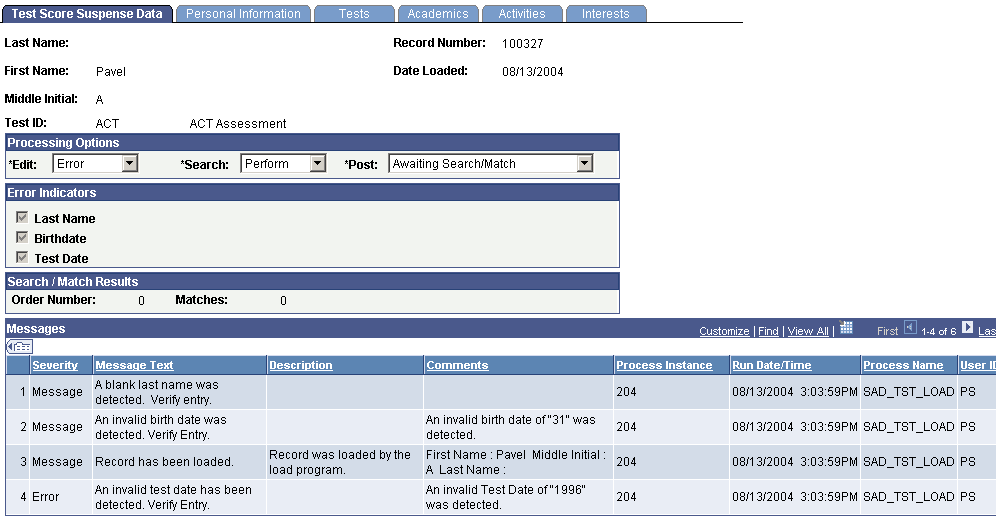
This page provides the status of a suspense record regarding the loading, search/match and posting processes.
Any informational and error messages that external test data load and search/match/post processes generate appear on this page. You can use this page to keep current on the status of an individual's test score processing. These messages can serve historical and analytical purposes, giving you a picture of the kinds of errors encountered in your test score processing. To do so, you would need to wait to purge your test score messages until you have completed your analysis.
Processing Options
| Field or Control | Description |
|---|---|
|
Edit |
Displays the status of the load process for this suspense record. The load process populates this value. Complete: The load process loaded the test score data without a problem. This record is ready to be posted. Error: The load process encountered problems when loading the test score data. The system indicates the values that you must correct in the Error Indicators group box. Correct all errors and save the data before running the search/match/post process on this record. After you correct the errors and save the component, the system changes the field value to Complete. Perform: You set this value manually. This is for informational purposes only. |
|
Search |
Displays the status of the search/match process for this suspense record. The search/match process populates this value. Complete: The search/match process completed successfully. Error: The search/match process encountered problems. Refer to the log file for information regarding the error. Perform: The search/match process will process this record the next time that you run the process. |
|
Post |
Displays the status of the record regarding the search/match/post process. You can enter these values manually; however, some are entered by the system after processes are run, as described in the following table. If the process created a new person in your database, the process generates an ID for the person and displays it in the ID field on the page. If the process updated an existing person's record, the process displays the ID that was updated in the ID field on the Bio/Demo page. |
| Post Value | Meaning | How Set |
|---|---|---|
|
Error |
The posting process encountered a problem. |
Set by the system during the search/match/post process. |
|
New ID Add |
The system was unable to find a match in the database and will add a record with a new ID to your database when you run the search/match/post process. When set manually, this value means that the process identified a match and the user determined manually that no duplication exists. When the user runs the search/match/post process again, the process creates a new record and generates an ID, which it displays in the ID field on the Personal Information page. |
Set by the system during the search/match process if no match was found in your database (only when you run search/match and post and different times). Set manually. |
|
No Action |
Search/match/post and purge suspense file processes will ignore the record if this value is entered. |
Set manually. |
|
Purge |
Indicates that this suspense record will be removed from the system during the purge suspense file process. |
Set by the system during the search/match/post process if the record was successfully processed. |
|
Update ID |
The search/match/post process found a matching ID in the database. The process will update the matching records with the data from this suspense record. When set manually, means that the process identified a match, and the user determined manually that duplication exists. The system makes available the ID field on the Personal Information page. Select the ID that you want the search/match/post process to update. You must save the page and run the search/match/post process to update the record. |
Set by the system during the search/match process if a match was found in the database and if your search parameters define that an update should occur in this situation (only when you run search/match and post and different times). Set manually. |
|
Awaiting Search/Match |
This record is in the suspense file and is waiting to be processed by the search/match/post process. |
Set by the system during the load external data process. |
Note:
While you can manually edit the values in the Edit, Search, and Post fields, keep in mind that if a field contains Error and you manually change it without correcting an error, you may experience problems when posting the data.
Error Indicators
| Field or Control | Description |
|---|---|
|
Last Name, Test Date,Birth Day, First Name, Graduation Date, High School Graduation Date, and Test Component |
When a load error occurs, the load external data process displays the required values that were missing or incorrect in the load. Go to the Personal Information page, the Tests page, or another page in the Suspense component where the missing or incorrect data resides to enter a valid value. When you correct the error, the system clears the check box and the fields will no longer appear. After all of the check boxes are cleared and the component is saved, the system displays Complete in the Edit field. |
Search/Match Results
| Field or Control | Description |
|---|---|
|
Order Number |
You know that the search/match/post process found a match and did not post the suspense record when the Search field contains Perform and displays the search order number that led to the match in the Order Number field. Use this information to decide whether a possible duplicate exists. |
|
Matches |
Displays the number of matches that the process found at the order number given. |
Messages
| Field or Control | Description |
|---|---|
|
Message Severity |
The message severity, such as Message or Error. |
|
Message Text |
The message on this row of data. |
|
Description |
The detailed message. |
|
Comments |
Results or other additional information about the message. |
|
Process Instance |
The process number of the process that you ran for this record. Process Scheduler generates this number. |
|
Run Date/Time |
The day and time that the process ran for this record. |
|
Process Name |
The name of the application engine that you ran for this record (for example, in the previous page example, the messages displayed from running SAD_TST_LOAD application engine, which is the External Test Score Load process). |
|
User ID |
The user ID of the person who ran the process. |
Reviewing Personal Information
Access the Personal Information page ( or ).
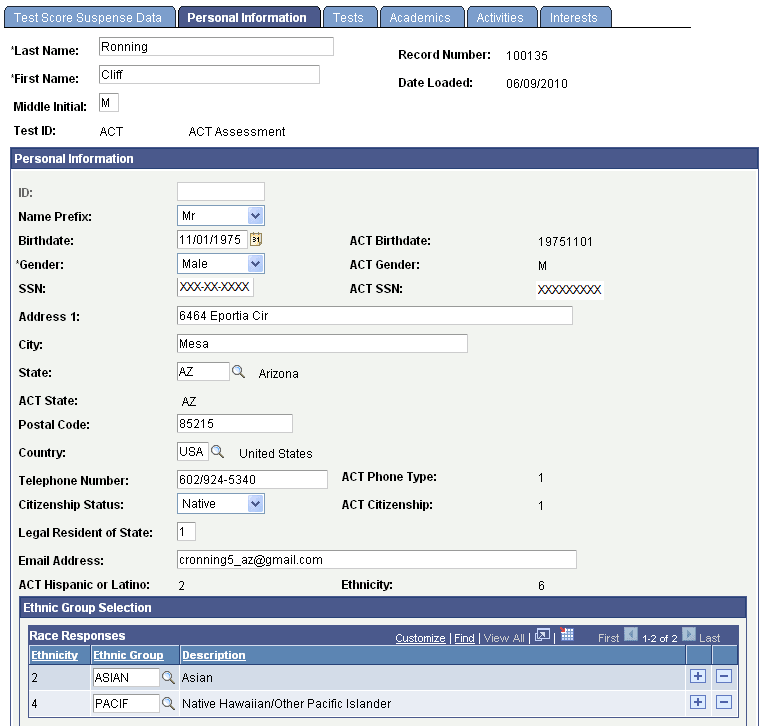
This example illustrates the fields and controls on the Personal Information page (1 of 2). You can find definitions for the fields and controls later on this page.
This example illustrates the fields and controls on the Personal Information page (2 of 2). You can find definitions for the fields and controls later on this page.
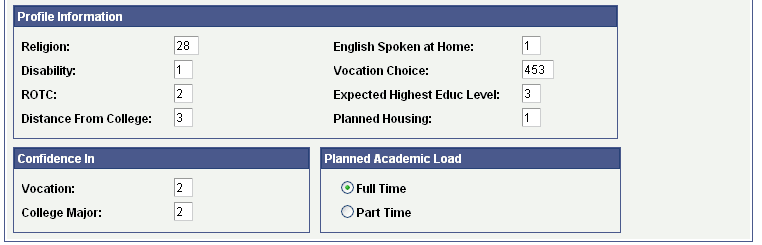
Use Personal Information page in the suspense component to review and edit biographical and demographic data loaded through the external test data load. Use this page to edit the person's last name, first name, and birth date, if the external data load omitted these values. The data varies depending on the test ID. Common fields are described in this section.
When the search/match/post process posts the data in the suspense record, the process posts much of this data to the newly created personal information record.
Note:
If the search/match/post process finds a match and updates the existing record with the data in the suspense file, the process does not update the personal information. This prevents you from overriding verified information.
| Field or Control | Description |
|---|---|
|
Record Number |
Displays the test record number. This number is automatically populated based on the Installation parameters. |
|
Date Loaded |
Displays the date that you loaded this record. |
|
Last Name, First Name, and Middle Initial |
Displays the person's last name, first name, and middle initial or middle name, as they appear in the test record. If the Last Name or First Name fields are empty, enter values. |
|
ID |
This field is unavailable until you run the search/match/post process. The search/match/post process generates an ID and displays it here when the process creates a new record. If the process finds a match and updates an existing record, the process enters the ID of the record that it updated. If the process finds a match and retains the record in the suspense table, and you decide to update an existing ID (by selecting Update ID in the Post field on the Process Options page), a prompt becomes available. Click the prompt to select the ID that you want to update. |
|
Birthdate |
Displays the person's birth date after the load process converts it to the PeopleSoft date standard from the birth date reported on the test. |
|
Name Prefix |
Displays a name prefix, according to the gender from the test record and the prefix criteria that you set up on the External Test Score Load page. |
|
Gender |
The person's gender. The load process converts the person's gender as reported in the test record to the corresponding PeopleSoft gender code. |
|
Ethnic Group |
Displays the person's ethnic group. The load process converts the person's ethnicity code as reported on the test record to the corresponding PeopleSoft ethnic group. This value is populated based on the Ethnic Group Mapping page. This setup must be done for the Test ID indicated or a value will not appear. |
|
SSN (social security number) |
Displays the person's social security number after the load process converts it to the PeopleSoft standard from the social security number reported on the test. |
|
Address 1, Address 2, City, State, Country, and Postal Code |
Displays the person's address. The load program validates the country for every test where a country code is received. The country code is validated against the PS Country table, with the exception of ADA, AMCAS, AP and SAT which have their own country mapping tables. |
|
Telephone |
Displays the person's telephone number. |
|
Citizenship Status |
Displays the person's citizenship status. This value is populated based on the conversion of the data from the test record to a PeopleSoft value. Values for this field are delivered with your system as translate values. |
Reviewing Test Score Data
Access the Tests page ( or ).
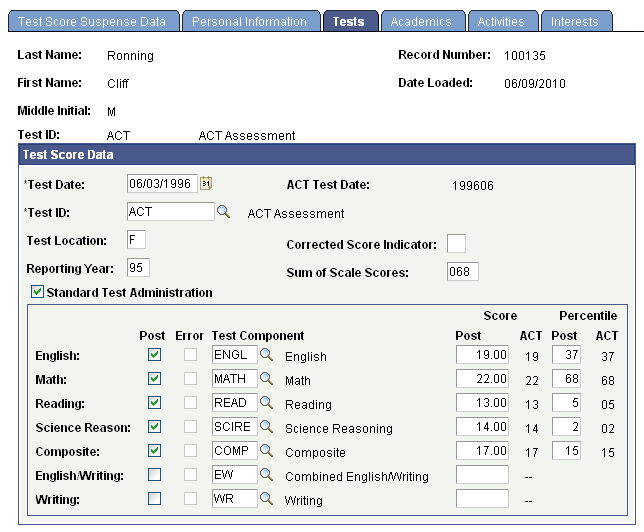
This example illustrates the fields and controls on the Tests page. You can find definitions for the fields and controls later on this page.
| Field or Control | Description |
|---|---|
|
Test Date |
Displays the day that this person took the test. The load process converts the test date delivered with the test to the PeopleSoft format, which appears here. The search/match/post process posts the test date to your database when you run the process for this suspense record. |
|
Test ID |
Displays the ID of the test taken by this person. Define test IDs on the on the Test Tables page. The test ID is entered as a parameter during the load process. |
|
Post |
The load process selects this check box if the score and component are valid. You can post the score for this component. |
|
Error |
The load process selects this check box if it encounters an error with either the component or the score during the load process. You can view additional information about this error on the Test Score Suspense Data page. The error must be cleared in order for the component and score to post to Test Results. Once the specific error is corrected, the Error check box is cleared and the Post check box is selected. |
|
Test Component |
Displays the test components that you selected on the External Test Score Load page for the test ID. |
|
Score and Percentile |
Displays the reported score and percentile for each component (if applicable). |