Defining BPV Organization Locations
This section discusses how to:
-
Define BPV organization locations.
-
Review or update BPV organization locations.
-
Define accreditation information for BPV organizations.
Pages Used to Define BPV Organization Locations
| Page Name | Definition Name | Navigation | Usage |
|---|---|---|---|
|
Location Detail |
ORG_LOCATIONS |
|
Add a BPV organization location. |
|
BPV Organization Locations |
SAD_BPV_OLC_NLD |
|
Review or update the locations for BPV organizations that you added on the Location Details page. |
|
BPV Accreditation |
SAD_BPV_ACC_NLD |
|
Define accreditation information for BPV organization locations. |
|
BPV Location Notes |
SAD_BPV_LNT_NLD |
|
Enter notes for BPV organization locations. |
Defining BPV Organization Locations
Access the Location Detail page ().
This example illustrates the fields and controls on the Location Detail page. You can find definitions for the fields and controls later on this page.
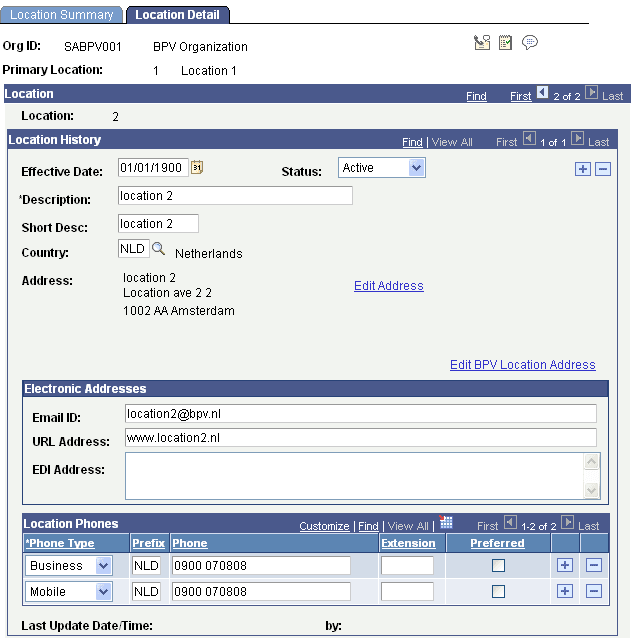
Click the Edit BPV Location Address link to access the BPV Organization Locations page and review or update the locations for BPV organizations that you add on this page. The Edit BPV Location Address link appears only if you select the Use Dutch Functionality option on the SA Features page.
Reviewing or Updating BPV Organization Locations
Access the BPV Organization Locations page ().
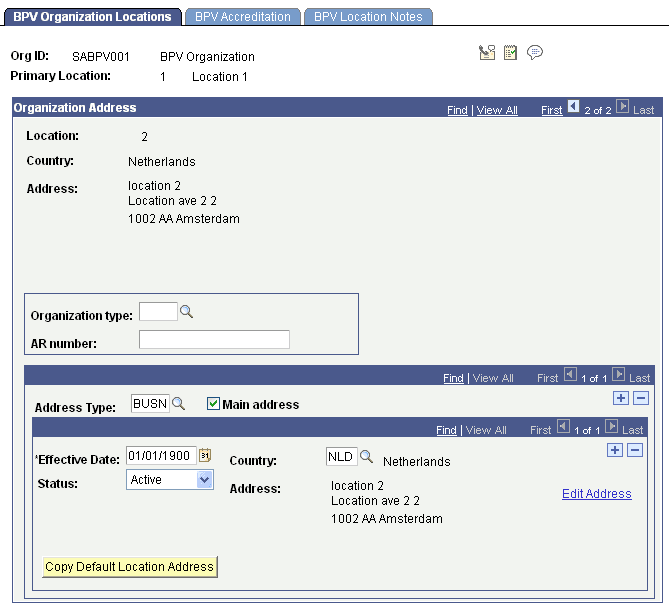
This example illustrates the fields and controls on the BPV Organization Locations page . You can find definitions for the fields and controls later on this page.
Note:
You cannot use this page to add a BPV organization location. To add a BPV organization location, use the Location Detail page (discussed in the previous section).
| Field or Control | Description |
|---|---|
|
Organization type |
Select an organization type for this location. Organization types are defined on the BPV Organization Type page. |
|
AR number (account receivable number) |
Enter the account receivable number of the location. |
|
Address Type |
Enter the address type for this location. Define address types on the Address Types page. |
|
Main address |
Select the primary address for this location. |
|
Copy Default Location Address |
Click to copy the address from the Location Detail page. When you click the button, the address appears on the address type row. The button appears only if you select an address type. |
To administer phone numbers, access the Location Detail page (). To add or update BPV contacts, access the Contact Detail page ().
Defining Accreditation Information for BPV Organizations
Access the BPV Accreditation page ().
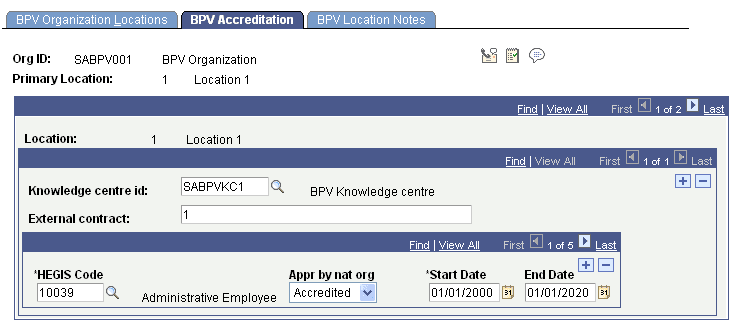
This example illustrates the fields and controls on the BPV Accreditation page . You can find definitions for the fields and controls later on this page.
| Field or Control | Description |
|---|---|
|
Knowledge centre id |
Enter the knowledge center or external organization at this location for which to select accreditation. |
|
External contract |
Enter the number of the external contract that has been generated and distributed by the knowledge center to the BPV organization. This is for information only. |
|
HEGIS Code |
Enter the CREBO code for which the accreditation applies. Only the HEGIS codes that belong to the knowledge center and are secured through the link between HEGIS code and academic program appear in the prompt. |
|
Appr by nat org |
Enter the accreditation status of this organization for this CREBO code. Your options are Accredited, In Cons (in consideration), and Not Accr (not accredited). When you select the Accredited check box when creating a contract on the BPV Contract page, only CREBO codes that are identified as accredited here are available. |
|
Start Date and End Date |
Enter the start and end dates of the accreditation. |