Reviewing Test Score Candidate Data
Important:
Test score load and other processes and components discussed in this Processing External Test Scores documentation are deprecated. It is strongly recommended that you use Prospect/Admissions Data Load (PDL) instead. For more information on PDL, see the Prospect/Admissions Data Load documentation.
This section provides an overview of test score candidate data and discusses how to review:
-
Candidate data personal information.
-
Academic information.
-
Student profile high school and college activity information.
-
Interest information.
Understanding Test Score Candidate Data
The search/match/post process creates test score candidate data only if you are posting to Campus Solutions. If you are posting to CRM, the process does not create test score candidate data.
The search/match/post process posts candidate data (according to the test) to the Test Score Candidate Data component. This component is informational only. The data in this component does not affect other data in your database. For example, if you change a person's name in this component, it does not change the name anywhere else in the system. If you choose however to create prospects from test scores, some of this data is used for the process, such as graduation date, intended major, and extracurricular activities.
Many of the values and codes that appear in the Test Score Candidate Data components are based on values and codes that the testing agency defines. Contact the testing agency that manages the test for full descriptions of the data that appears in these pages or refer to the test score layout that you received from the testing agency.
Before entering the Test Score Candidate Data component, you must enter the test ID. The pages in the component dynamically appear based on the test ID that you entered. The number of pages that appear in the component depend on the test ID. You must have Test ID Security defined for your user ID in order to access the component. The pages shown here are examples of the Test Score Candidate Data component.
Pages Used to Review Test Score Candidate Data
| Page Name | Definition Name | Navigation | Usage |
|---|---|---|---|
|
Personal Information |
SAD_ACT_CD SAD_ADA_CD SAD_AMC_CD SAD_LAW_CD SAD_SAT_CD SAD_SSS_CD |
|
This page appears for the ACT, ADA, AMCAS, LSAT/LSDAS, SAT, and SSS. Review the student's personal information as it was received from the testing agency. The fields vary depending on the test ID. This page also indicates if the post process created an employee ID for this person. |
|
Test Score Candidate Data |
SAD_AP_CD SAD_CRS_CD SAD_DAT_CD SAD_EOS_CD SAD_GMT_CD SAD_GRE_CD SAD_GMS_CD SAD_TFL_CD |
|
This page appears for the AP, CRS, DAT, EOS, GMAT, GRE, GMASS, and TOEFL. Review the student's personal and academic information as it was received from the testing agency. The fields vary depending on the test ID. This page also indicates if the post process created an employee ID for this person. |
|
Academics |
SAD_ACT_CD_ACAD SAD_LAW_CD_SCH |
|
This page displays for the ACT and LSAT/LSDAS. Access a student's test and academic data as reported by the testing agency. The fields vary depending on the test ID. |
|
Activities |
SAD_ACT_CD_ACT |
|
This page displays for ACT only. Access student profile high school and projected college activity information. |
|
Interests |
SAD_ACT_CD_INT |
|
This page appears for ACT only. Access student profile interest and college preference information. |
|
Education |
SAD_ADA_CD_ED |
|
This page appears for ADA. Review a student's academic history as reported from AADSAS. |
|
Applicant Data |
SAD_ADA_CD_DATA SAD_AMC_CD_OTH |
|
This page appears for ADA and AMCAS. Review the student's data to support their application for admission as it was received from the testing agency. The fields vary depending on the test ID. |
|
Application |
SAD_ADA_CD_APP SAD_AMC_CD_APP |
|
This page appears for ADA and AMCAS. View the results of the Create Applicants from Test process for this student. You can also select not to create an application for this student by selecting Do Not Use for Create Appl in the Post Option field. |
|
Courses |
SAD_ADA_CD_CRS |
|
This page appears for ADA. Review a student's academic course work and grades as reported by AADSAS. |
|
Family Information |
SAD_ADA_CD_FAMILY |
|
This page appears for ADA. Review the family information. |
|
Essays |
SAD_ADA_CD_ESSAY |
|
This page appears for ADA. Review the personal statement data |
|
Colleges |
SAD_AMC_CD_COL |
|
This page appears for AMCAS. Review a student's prior colleges attended as well as previous majors and degrees earned, as provided by AAMC. |
|
GPA/Hours |
SAD_AMC_CD_GPA |
|
This page appears for AMCAS. Review a student's grade point averages and credit hours, as provided by AAMC. |
|
Awards |
SAD_AP_CD_AWRD |
|
This page appears for AP. Review the student's awards information including award type and year, as reported from the Advanced Placement exam. |
|
Schools |
SAD_AP_CD_SCHL |
|
This page appears for AP. Review a student's high school and college information as reported from the Advanced Placement exam. |
|
Test Data |
SAD_AP_CD_TEST SAD_LAW_CD_SB SAD_SAT_CD_TEST |
|
This page appears for the AP, LSAT/LSDAS, and SAT. Review additional test data as reported by the testing agency that is not posted to the Test Results page. The fields vary depending on the test ID. |
|
Additional Data |
SAD_CRS_CD |
|
This page appears for CRS. Review the student's academic, employment, and search-related data, as provided by LSAC. |
|
Prior Schools |
SAD_LAW_CD_MATR |
|
This page appears for LSAT/LSDAS. Review undergraduate academic data and prior law schools attended, as provided by LSAC. |
|
Candidate Data |
SAD_LAW_CD_CD |
|
This page appears for LSAT/LSDAS. Review the student's additional test and application information, as provided by LSAC. |
|
Recommendations |
SAD_LAW_CD_REC |
|
This page appears for LSAT/LSDAS. Review letter of recommendation data as provided by LSAC. |
|
Student Data |
SAD_SAT_CD_STD SAD_SSS_CD_SDQ |
|
This page appears for SAT and SSS. Review additional information about the student, as provided by ETS. The fields vary depending on the test ID. |
|
School Data |
SAD_SAT_CD_SCH |
|
This page appears for SAT. Review college preference information for a student. If the test type is college, you can review the high school information for the student, as provided by ETS. If the test type is secondary, you can review the colleges that the student submitted test scores to, as provided by ETS. The data that appears on the page depends on the test type that you selected during the external test score load process. |
Reviewing Candidate Data Personal Information
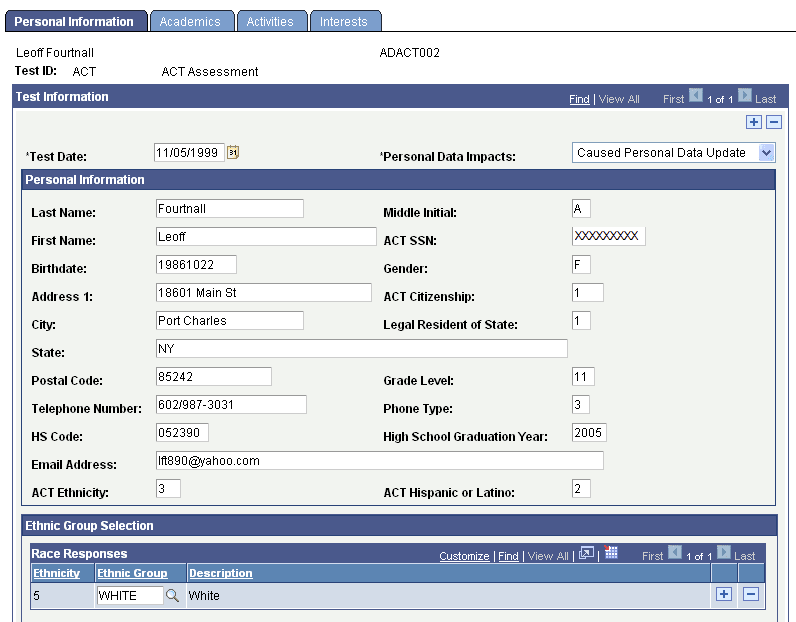
Access the Personal Information page ( or ).
This example illustrates the fields and controls on the Personal Information page (1 of 2). You can find definitions for the fields and controls later on this page.
This example illustrates the fields and controls on the Personal Information page (2 of 2). You can find definitions for the fields and controls later on this page.
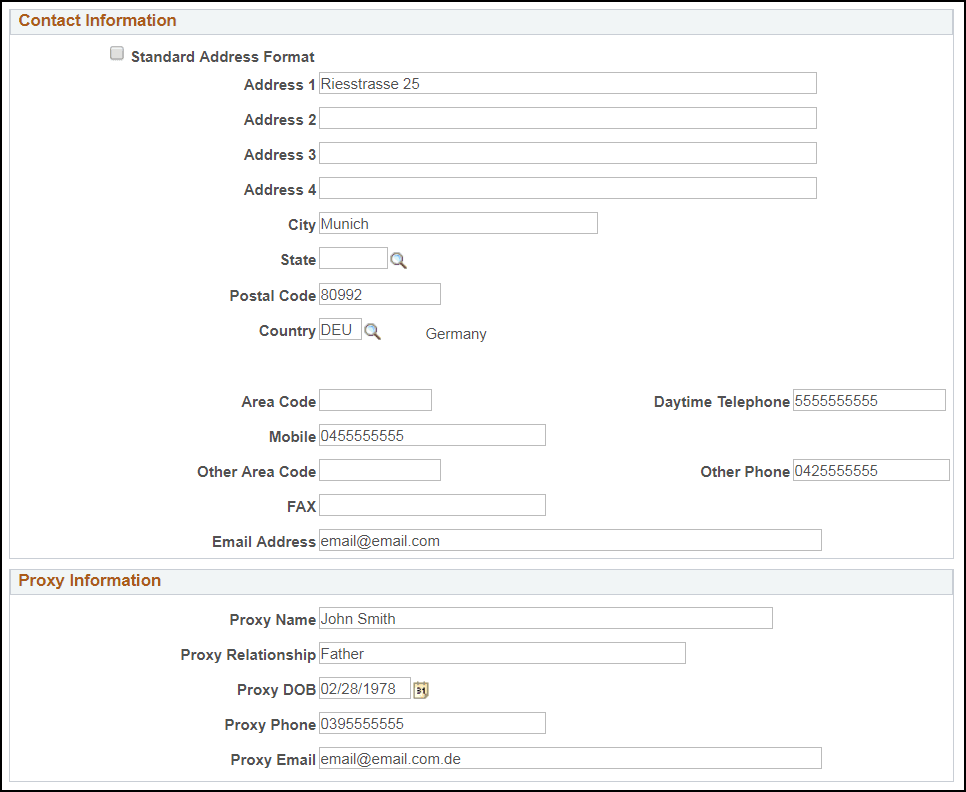
Personal and academic data posted from the suspense record appears in these fields.
| Field or Control | Description |
|---|---|
|
Test ID |
Displays the test you entered on the search page. The pages to the component vary based on the test ID. |
|
Test Date |
Displays the day the person took the test. |
|
Personal Data Impacts |
Indicates whether the process added a new EMPLID to your database or updated the personal data for an existing EMPLID. The system displays one of the following values for this field:
|
Reviewing Academic Information
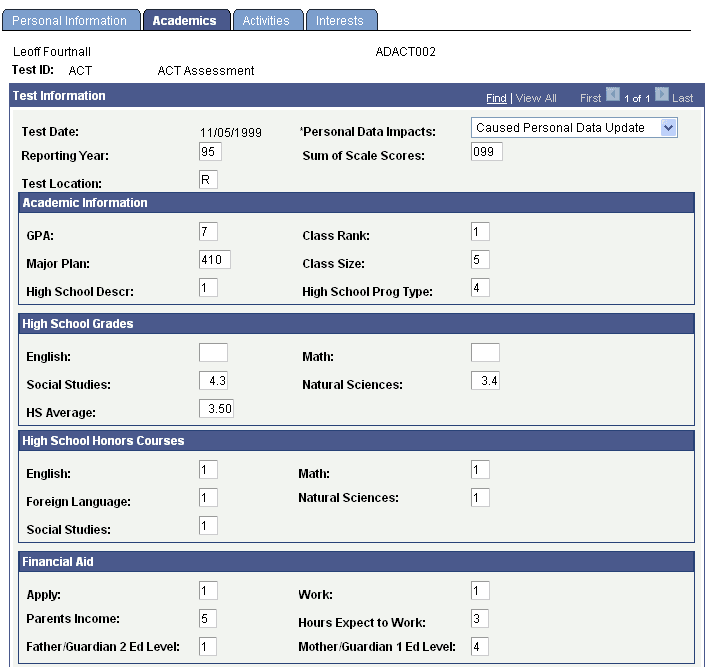
Access the Academics page ( or ).
This example illustrates the fields and controls on the Academics page (1 of 2).
This example illustrates the fields and controls on the Academics page (2 of 2).
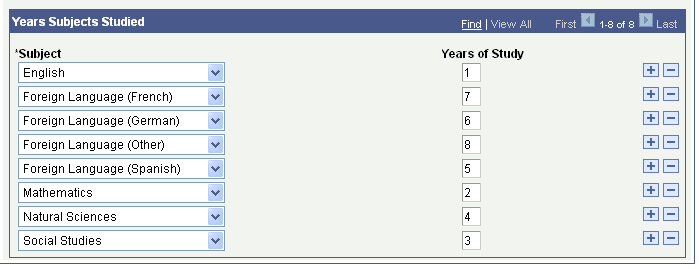
Academic information data posted from the suspense record appears in these fields.
Reviewing Student Profile High School and College Activity Information
Access the Activities page ( or ).
This example illustrates the fields and controls on the Activities page.
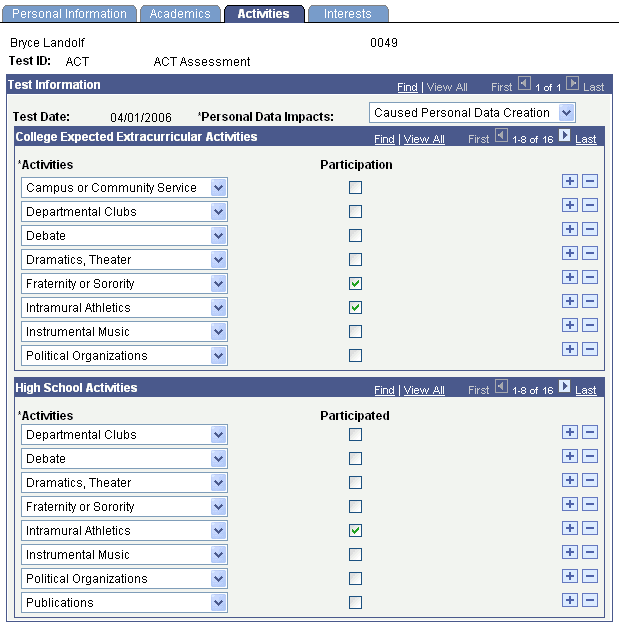
High school and college activities data posted from the suspense record appears on this page.
Reviewing Interest Information
Access the Interests page ( or ).
This example illustrates the fields and controls on the Interests page (1 of 2).
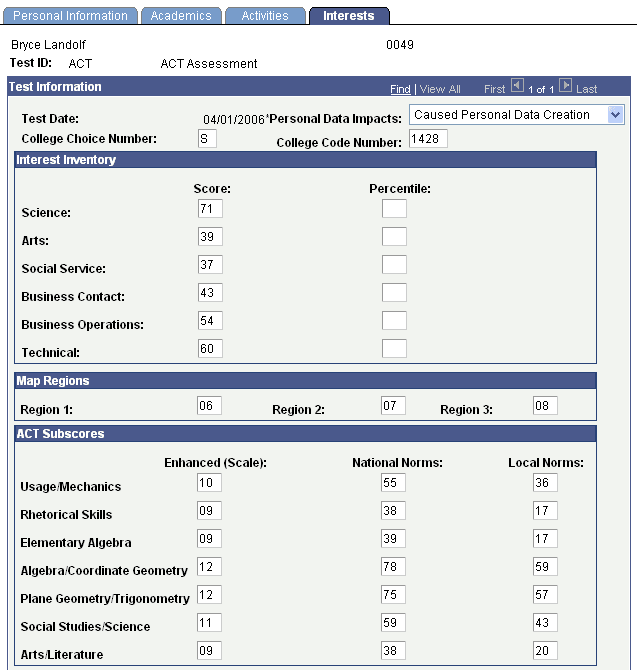
This example illustrates the fields and controls on the Interests page (2 of 2).
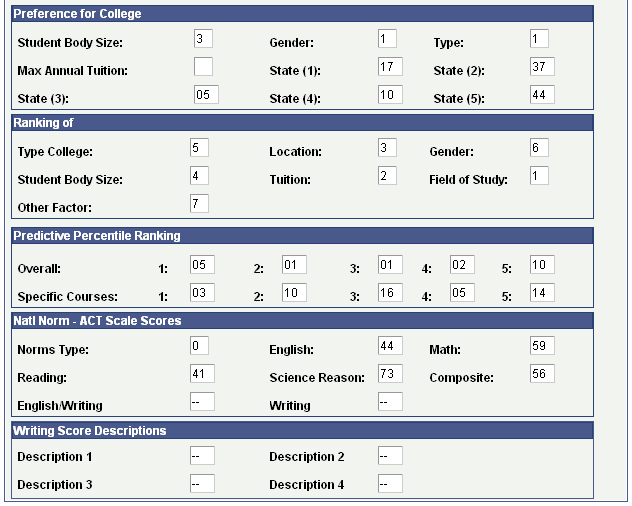
Interest and college preference data posted from the suspense record appears on this page.