SAD_CREATEAPPL
This service operation enables the online application user to create an admission application in the Campus Solutions system. Using this service may result in one or more applications being created. It can also result in multiple applicant preferences being created within the same application, for example, entry of another program or plan for an existing application is a preference.
| Create Application Service Operation Description and Features | Details |
|---|---|
|
Description |
The Create Application service operation call results in one or more admission applications being initialized. The application center settings on the Application Configuration component control whether multiple applications (or preferences) can be created. For example, if you do not have an application center set up for an applicant who selects an Undergraduate career, Liberal Arts program, and History plan, the service operation throws an error. The service operation populates the admission application fields based on the settings on the User Defaults and Installation - AD components. At application creation time the operation does not physically save the data to the admissions staging tables. The save process does not occur until a later point in time when the user selects a save or submit option on the online application. Therefore, this operation is more concerned with the initialization of an application, driven by configuration, rather than creating a physical application in the database. |
|
Users |
|
|
Processing |
The service operation performs the following steps:
|
|
Output |
After processing, the operation creates an admission application with default data and preferences. The user can subsequently update and submit this application through the Save and Submit service operations. |
|
Error Conditions |
The following conditions result in a service error:
|
Input Message: SAD_CREATEAPPL_REQ
This image shows the input parameters that the SAD_CREATEAPPL service operation receives:
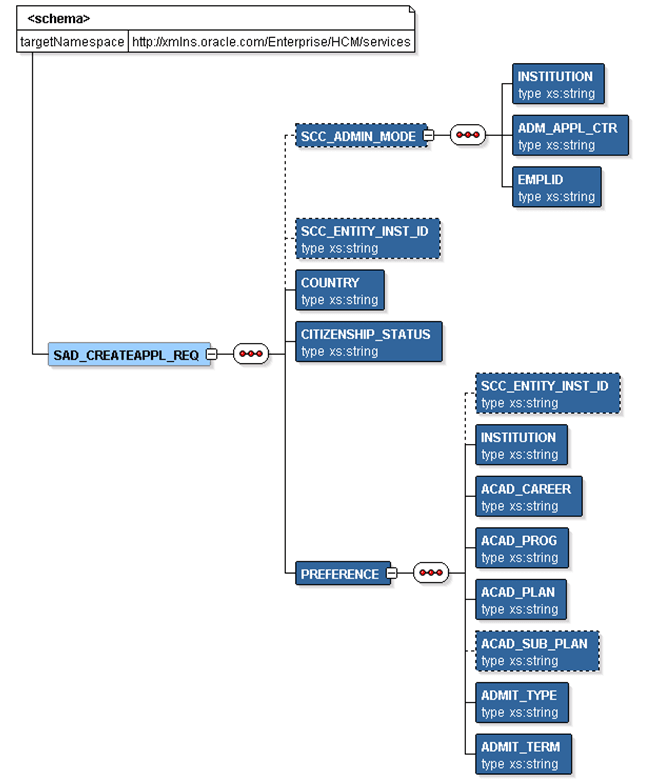
Required data that the online application must supply to the service operation in Non-administrator (Applicant) mode:
-
Institution
-
Academic Career
-
Admit Term
-
Academic Program
-
Academic Plan
Required data that the online application must supply to the service operation in Administrator mode:
-
Institution
-
Admission Application Center
-
Academic Career
-
Admit Term
-
Academic Program
-
Academic Plan
-
Country and Citizenship Status (if your application mapping requires them).
The following is an example of the SAD_CREATEAPPL_REQ message that the SAD_CREATEAPPL service operation receives from an online application:
<?xml version="1.0"?>
<SAD_CREATEAPPL_REQ>
  <COUNTRY>AUS</COUNTRY>
  <PREFERENCE>
    <INSTITUTION>PSUNV</INSTITUTION>
    <ACAD_CAREER>UGRD</ACAD_CAREER>
    <ACAD_PROG>AA</ACAD_PROG>
    <ACAD_PLAN>ARTHIST</ACAD_PLAN>
    <ADMIT_TYPE>FYR</ADMIT_TYPE>
    <ADMIT_TERM>0747</ADMIT_TERM>
  </PREFERENCE>
</SAD_CREATEAPPL_REQ>
Output Message: SAD_CREATEAPPL_RESP
When the Integration Broker receives the SAD_CREATEAPPL_REQ message, it responds with the SAD_CREATEAPPL_RESP message.
This image shows the output parameters that the SAD_CREATEAPPL service operation passes to the online application.

Note that the SAD_CREATEAPPL_RESP schema includes the Application entity (ADM_APPL_DATA) and Constituent entity XSD schemas.
The following is an example of the SAD_CREATEAPPL_RESP message that the SAD_CREATEAPPL service operation transmits to the online application:
<?xml version="1.0"?>
<SAD_CREATEAPPL_RESP>
  <PREFERENCE>
    <ADM_APPL_DATA>
     <!-- Application data shape -->
    </ADM_APPL_DATA>
    <CONSTITUENT>
     <!-- Constituent data shape -->
    </CONSTITUENT>
  </PREFERENCE>
</SAD_CREATEAPPL_RESP>
Fault Message: SAD_FAULT_RESP
If the service operation encounters an error condition, it responds with the SAD_FAULT_RESP message.
This image shows the SAD_FAULT_RESP message parameters.
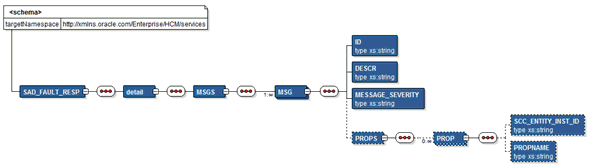
The following is an example of the SAD_FAULT_RESP message that the SAD_CREATEAPPL service operation transmits to the online application:
<?xml version="1.0" encoding="UTF-8"?>
<SOAP-ENV:Envelope xmlns:SOAP-ENC="http://schemas.xmlsoap.org/soap/encoding/" xmlns:SOAP-ENV="http://schemas.xmlsoap.org/soap/envelope/">
  <SOAP-ENV:Body>
    <SOAP-ENV:Fault>
      <faultcode>300</faultcode>
      <faultstring>A Error occurred processing this request</faultstring>
      <detail>
        <MSGS>
          <MSG>
            <ID>14200-556</ID>
            <DESCR> Validation error in preference PSUNV/UGRD/AA/MUSIC/VOIC/FYR/0690</DESCR><PROPS/>
          </MSG>
          <MSG>
            <ID>14200-556</ID>
            <DESCR> Tag ACAD_SUB_PLAN has an invalid value VOIC. Check and try again.</DESCR><PROPS><PROP><SCC_ENTITY_INST_ID>PREFERENCE ROW 1</SCC_ENTITY_INST_ID><PROPNAME>ACAD_SUB_PLAN</PROPNAME></PROP></PROPS>
          </MSG>
        </MSGS>
      </detail>
    </SOAP-ENV:Fault>
  </SOAP-ENV:Body>
</SOAP-ENV:Envelope>